probablyProbably AdGuad application will perform better...
it would be nice if someone else checked ad- guard apk or another ad blocker for comparasion.
probablyProbably AdGuad application will perform better...


you can use it on a TR installer, you gotta PM @harlan4096 or me for the download urlCan i use my KIS18 license on this product? I tried back when it was a fresh beta and it "only accepted beta licenses".


So it turns out that it is called "Microsoft Windows Operating System". What a name.I can't get icacls.exe to appear in the Application Control list.
Usually, if a process is missing from the list, it will appear after Iaunch it, but this trick is not working with icacls.exe.
Any ideas?
 Kaspersky licenses was -2/+3 for newer versions? Because I remember license worked on KSOS ver. 5
2 + 3 is 5, you're trying to activate it on 6Sad.
View attachment 188138View attachment 188139
@davisd
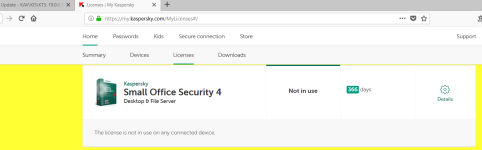
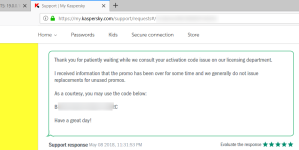
I tried to send a request to kaspersky support for replace my KSOS 2 key, they sent me a key for KSOS 4 (1 year) as a gift.
Generous customer service
They may do this again with you.
MELISSA Thank you very much.
Perform the following steps to upgrade to the latest release of Kaspersky Small Office Security:
a) Exit Kaspersky: right-click on the Kaspersky K icon in the lower right corner of your screen (the system tray). Select 'Exit' from the list that appears.
b) Download and install Kaspersky as described in the following article:
-Workstion/PC: Kaspersky Small Office Security 6
DAVIS Will I be able to upgrade?
MELISSA Yes.
DAVIS Will licences upgrade in license portal?
MELISSA Yes.
DAVIS Moment.
MELISSA Yes Davis.
Would there be anything else for the meantime?
DAVIS Were you able to locate all 16x codes for the KSOS 2?
Or just the ones I provided?
MELISSA A I have checked it using your My Kaspersky Account.
DAVIS Alright.
Thank you a lot
MELISSA You're very much welcome. Would there be anything else for the meantime?
DAVIS Have a good day.
MELISSA Thank you very much. I would appreciate if you could do me a favor and complete a quick survey about the support that I have provided. Please keep this window open as the survey will show once I end the chat session. The chat transcript will re-appear after completing the survey. Thank you for contacting Kaspersky Lab Technical Support and have a wonderful day!
Sadly looks like I am screwed. Good that they were "generous" to you, wish I could say the same..RICARDO V Okay, Your license is for KSOS2 . This license can be used to KSOS 5 at the most.
DAVIS But Melissa told me my licenses for KSOS2will be upgraded so I will be able to use them for KSOS6
RICARDO V I understand you were informed something else. All Kaspersky licenses can be used on 3 levels higher than the original license.
DAVIS Then what do I do now with added 16x codes for KSOS2 in My Kaspersky Porta?l
They are all unused.
RICARDO V Perform the following steps to get the KSOS 5. Exit Kaspersky: right-click on the Kaspersky K icon in the lower right corner of your screen (the system tray). Select 'Exit' from the list that appears. Download and install Kaspersky as described in the following article: Kaspersky Small Office Security 5.0 (Personal Computer)
*connection drops here, the guy just leaves without saying anything*
Chat logs from the official Kaspersky LIVECHAT Support Contact us via LiveChat!
Sadly looks like I am screwed. Good that they were "generous" to you, wish I could say the same..
Sorry davisd
So after firing up a KIS2019 TR I enfaced this.. I couldn't find any information why I am not allowed to use it in the EU. Just ignoring it for a now. Never seen this type of msg before.
View attachment 188689