
Of course, it's very restrictive hehe have You tried it?


Open MalwareTips from your Home Screen or desktop. Follow discussions, find answers and pick up where you left off.
If you cannot find an install option, update your browser or use its bookmark option to keep MalwareTips close.
After installation, open the app and sign in. Enable push notifications in Preferences if you want alerts. On iPhone and iPad, push requires a Home Screen web app and iOS or iPadOS 16.4 or later.
Sign in to manage notificationsInstallation is optional. Your notification settings stay under your control.
 Thread starter
harlan4096
Thread starter
harlan4096

yea I am using it for more than 2 months without any problem, I used it in interactive mode with "Ask User" rather than Deny, I couldn't find any software other than macrium reflect and kerish doctor,iobit asking to access it.Of course, it's very restrictive hehe have You tried it?


yea i just installed them to test, i will uninstall them soon!I see you have a huge bunch of overkill security products installed + in resident protection there


This was the KTS log for that fileDid You check if that app was moved to UnTrusted group in Application Control / Intrusion Prevention? If so, You can move to Trusted group, and it should fix the warning.
Maybe that file is not digitally signed or not very well-known in KSN yet…
Today, 12/25/2022 6:40:05 AM Application Control was triggered IGCC IGCC.exe C:\Program Files\WindowsApps\AppUp.IntelGraphicsExperience_1.100.4232.0_x64__8j3eq9eme6ctt 12560 RM-PC\RM Active user evtModify Allowed Allowed IGCCApp.db C:\Users\RM\AppData\Local\Packages\AppUp.IntelGraphicsExperience_8j3eq9eme6ctt\LocalState Personal data
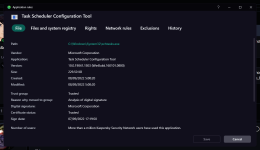
Here:Can You show the KSN info (Details and Rules -> File in Application Control) for that exe?
This way, for example:
View attachment 271557

This was in KTS default settings.
Moved to Trusted, restarted PC and the popup error did not display. Thanks for the help.Move IGCCTray.exe to Trusted group (Error Verifying Signature).
Also, one of the IGCC files appears as not digitally signed (Missing)
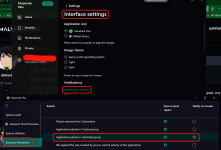
Okay. So configuring KTS with your configs, is KTS enough for protection? Do I need other programs like VS, H_C, etc?It's the developer probably who have to fix the issue, hehe...
Does KTS encrypt everything we type?IMHO not needed...
Members who viewed this thread in the last 5 minutes
