Advanced Plus Security Kongo's PC Security Config

Original forum configuration · expand details
Last updated
Apr 29, 2026
Main use of this computer
For home and private use
Operating system
Windows 11
On-device encryption
Windows BitLocker / Device Encryption
Device sign-in security
    • Hardware security key
Security updates
Allow security updates and latest features
Update channels
Allow stable updates only
User Account Control (UAC)
Always notify
Smart App Control
On
Network firewall
Enabled
Router and network details
AiProtection Pro by TrendMicro (ASUS ROG Rapture GT-AXE11000)
Real-time protection
Deep Instinct Endpoint Protection
CyberLock (AutoPilot)
Device firewall
Microsoft Defender Firewall with Advanced Security
Custom security settings
Hardening tools:
- Cyberlock with Intelligent Firewall set to "Aggressive"
- Cyberlock with Security Posture set to "Aggressive"
- Run by SmartScreen (forces SmartScreen to scan files of choice)

- O&O ShutUp10 (recommended settings)
- O&O AppBuster (removed unecessary Windows 11 apps)
- Windows Sandbox


System settings:
- Reputation Based Protections (all modules enabled)
- Smart App Control enabled

- Data Execution Prevention set to AlwaysOn
- Core Isolation: Memory Integrity enabled
- Kernel-mode Hardware-enforced Stack Protection enabled
- Local Security Authority Protection enabled
- Microsoft Vulnerable Driver Blocklist enabled
- Memory Access Protection enabled
- Secure Boot enabled
- Drives encrypted via TPM (BitLocker)
- Windows Update Delivery Optimization disabled
- AutoPlay disabled
- Network Discovery disabled (Public Firewall profile)
- PowerShell --> Constrained Language Mode
- Hide extensions for known file types --> disabled
- Show hidden files --> enabled
- Virtualization enabled

‎‎‎ㅤ‎ ‎
Periodic malware scanners
ESET Online Scanner, X-Sec
Malware sample testing
I participate in malware testing; details below
Environment for malware testing
‎‎‎ㅤㅤㅤ
VMware Workstation Player + Mozilla VPN on host machine while connected to the guest network.

Online Malware Analysis Platforms that I use:


- FileScan.iO
- Intenzer Analyze
- Hybrid Analysis
- VirusTotal
- Sophos Intelix
- ANY.RUN
-
Triage
- Kaspersky Threat Intelligence Portal
- UnpacMe
- Qianxin Online Sandbox


--> Currently I am barely testing
Browsers and extensions
ㅤ
Mozilla Firefox

Extensions:
- JShelter

- Ghostery
- Bitwarden

Browser privacy and security settings:
- Tracking protection: Strict (enables Total Cookie Protection)
- Enable secure DNS using: Max Protection (ControlD)
- HTTPS-only-mode enabled
- DuckDuckGo set as search engine
- Clearing browsing data on exit
- Search suggestions disabled
- Websites overview disabled
- Blocking incoming location, camera and microphone requests
- AutoPlay for audio and video disabled
- Firefox telemetry disabled
- Blocking pop-ups and third-party redirects
- Warn when websites try to install addons enabled
- Protection against fraudulent content and dangerous software enabled
- AI features are blocked


ㅤㅤ
Secure DNS
ㅤ
- ControlD with balanced native-blocklists + OISD-big (Network-Wide)
- ControlD with strict native-blocklists + Ai Malware Filter (Aggressive) + Hagezi Ultimate + Hagezi TIFs + Automatic IP redirect over Proxy (Only browser)


ㅤ
Desktop VPN
/
Password and passkey manager
ㅤBitwarden Premium
Maintenance tools
PatchMyPC, UniGetUI, GeekUninstaller, Process Lasso and Windows built in tools for cleaning and optimization
File and photo backups
ㅤbackup to external drive when necessary
Subscriptions
    • Google One Standard 200GB
System recovery
Aomei Backupper
Usage and exposure
    • Visiting familiar websites
    • Visiting unknown or untrusted websites
    • Opening email attachments
    • Online shopping and card payments
    • Downloading software and files from reputable sites
    • Gaming
    • Streaming from untrusted sites
    • Downloading malware samples
Computer specs
GPU: Nvidia Geforce RTX 3060 TI
CPU: Intel I5 12600K
RAM: 16 GB DDR4-3200 Crucial
Hard disks: 500 GB Samsung 970 EVO Plus + 1 TB Western Digital Blue
Notable changes
- Updated for year 2026
Feedback preference

Detailed suggestions and alternatives welcome

- removed SafeToOpen and added Port Authority to Firefox (If one uses uBlock Origin, you can simply enable the filter "Block Outsider Intrustion into LAN")

I however decided to keep using Ghostery and add that extra extension that also gives me a better overview of the blocks

​

 
and take a look at SiriusLLM (runs with Cyberlock) if you haven't tried it already...
Oh trust me I did. I really love it but I don't want to add another tool to CyberLock + Deep Instinct. I purchased a lifetime license for CL and will just wait until SiriusGPT will be integrated. For now Deep Instinct + CyberLock is running smoothly.

Integrate it soon @danb . I dare you! 😠
 
How performs SafeToOpen lately in the detection of phishing sites?
It performs well in my tests.

As an example:

phishing site that impersonates a microsoft login:
Screenshot 2025-10-10 192646.png


After a quick analysis of SafeToOpen:
Screenshot 2025-10-10 192700.png


It basically says that the website is trying to impersonate the site live.com and is therefor blocked.
So it really is working well for me here. There is no other extension of this kind that I know of.
 
Last edited:
It performs well in my tests.

As an example:

Fresh phishing site that impersonates a microsoft login:
View attachment 291797

After a quick analysis of SafeToOpen:
View attachment 291798

It basically says that the website is trying to impersonate the site live.com and is therefor blocked.
So it really is working well for me here. There is no other extension of this kind that I know of.
It just does not load, without any extensions

2025-10-10 20.39.19 windocyte.com f050b6d347fa.jpg
 
It performs well in my tests.

As an example:

phishing site that impersonates a microsoft login:
View attachment 291797

After a quick analysis of SafeToOpen:
View attachment 291798

It basically says that the website is trying to impersonate the site live.com and is therefor blocked.
So it really is working well for me here. There is no other extension of this kind that I know of.
Thanks for the info.
 
Please forgive me if this question is intrusive.
Why are you using the Port Authority extension?

I have enabled this:

dev-platform@mozilla.org - Google Groups

about:config

network.lna.blocking set to true

Today I tried running this test without uBlock Origin:

Redirecting to http://samy.pl/webscan/

I'll insert the test for you (for privacy reasons, I've deleted the connections):

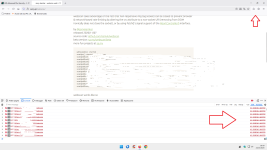
3.png

As you can see in the red arrow to the right of the Firefox browser development tools, connections have been blocked.

I can't know if your Firefox has the same settings as mine, so it would be helpful if you could run the same test and check.
Thank you for your attention and for any response.:)
 
Last edited:
Please forgive me if this question is intrusive.
Why are you using the Port Authority extension?

I have enabled this:

dev-platform@mozilla.org - Google Groups

about:config

network.lna.blocking set to true

Today I tried running this test without uBlock Origin:

Redirecting to http://samy.pl/webscan/

I'll insert the test for you (for privacy reasons, I've deleted the connections):

View attachment 292236

As you can see in the red arrow to the right of the Firefox browser development tools, connections have been blocked.

I can't know if your Firefox has the same settings as mine, so it would be helpful if you could run the same test and check.
Thank you for your attention and for any response.:)
Hey @Sampei.Nihira

I am sorry but I am not quite sure what your question is... Are you wondering why I am using Port Authority as a standalone extension instead of uBlock Origin with the blocklist that does basically the same? :unsure:

Screenshot 2025-10-23 201847.png


Edit:

I get it now. My bad. So basically both uBlock Origins blocklist and Port Authority are redundant if simply enabling this in about:config? Didn't know about that.. Thank you! :)
 
Last edited:
Hey @Sampei.Nihira

I am sorry but I am not quite sure what your question is... Are you wondering why I am using Port Authority as a standalone extension instead of uBlock Origin with the blocklist that does basically the same? :unsure:

View attachment 292242

Edit:

I get it now. My bad. So basically both uBlock Origins blocklist and Port Authority are redundant if simply enabling this in about:config? Didn't know about that.. Thank you! :)

Yes, it's the same in Chrome/Edge too.
Have a nice day.
 
Hello, as always, sorry to bother you (I have no idea what the medium feedback is).

After scanning the HTTP ports, today I ran the WebSocket port test.
I removed uBo + my DNS filtering.

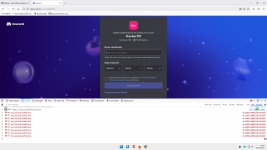
0.png

The conclusion is that PA is useless if the LNA setting is enabled.
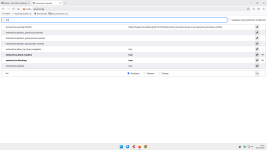
I also enabled LNA trackers blocking, but I have no documentation on this.

0a.png

P.S.

Only for the WebSocket test, I ran it again with LNA disabled, and the port scan was still blocked.
The HTTP ports test is also blocked without LNA enabled.
So FF protects, perhaps with the settings I use, without the need for PA.

Best regards.

 
Last edited:
Hello, as always, sorry to bother you (I have no idea what the medium feedback is).

After scanning the HTTP ports, today I ran the WebSocket port test.
I removed uBo + my DNS filtering.

View attachment 292504

The conclusion is that PA is useless if the LNA setting is enabled.
I also enabled LNA trackers blocking, but I have no documentation on this.

View attachment 292505

P.S.

Only for the WebSocket test, I ran it again with LNA disabled, and the port scan was still blocked.
The HTTP ports test is also blocked without LNA enabled.
So FF protects, perhaps with the settings I use, without the need for PA.

Best regards.
Don't worry, you are not bothering me at all. Always looking forward to learning something new. 🙃
 

Recently browsing

Members who viewed this thread in the last 5 minutes

You may also like...

Continue exploring the conversation.

Back
Top