Open MalwareTips in Safari and tap Share. You may need to open the Page Menu first.
Choose Add to Home Screen. If it is not listed, use Edit Actions to add it.
Keep Open as Web App enabled if shown, then tap Add.
Android
Open MalwareTips in Chrome or another browser that supports app installation.
Open the browser menu and look for Install app, Install and create shortcut, or Add to Home screen.
Choose Install and confirm. Wording varies by browser.
Desktop
Chrome: use the install icon in the address bar, or the menu under Cast, save and share.
Edge: open the menu, then More tools, Apps and Install this site as an app.
Safari on Mac: choose Share or File, then Add to Dock. Firefox on Windows: look for the web apps button in the address bar.
If you cannot find an install option, update your browser or use its bookmark option to keep MalwareTips close.
Keep up with your conversations
After installation, open the app and sign in. Enable push notifications in Preferences if you want alerts. On iPhone and iPad, push requires a Home Screen web app and iOS or iPadOS 16.4 or later.
Deep Instinct Endpoint Protection CyberLock (AutoPilot)
Device firewall
Microsoft Defender Firewall with Advanced Security
Device sign-in security
Hardware security key
Security updates
Allow security updates and latest features
Update channels
Allow stable updates only
User Account Control (UAC)
Always notify
Smart App Control
On
Network firewall
Enabled
Router and network details
AiProtection Pro by TrendMicro (ASUS ROG Rapture GT-AXE11000)
Custom security settings
Hardening tools: - Cyberlock with Intelligent Firewall set to "Aggressive"
- Cyberlock with Security Posture set to "Aggressive"
- Run by SmartScreen (forces SmartScreen to scan files of choice) - O&O ShutUp10 (recommended settings)
- O&O AppBuster (removed unecessary Windows 11 apps)
- Windows Sandbox
System settings:
- Reputation Based Protections (all modules enabled)
- Smart App Control enabled - Data Execution Prevention set to AlwaysOn
- Core Isolation: Memory Integrity enabled
- Kernel-mode Hardware-enforced Stack Protection enabled
- Local Security Authority Protection enabled
- Microsoft Vulnerable Driver Blocklist enabled
- Memory Access Protection enabled
- Secure Boot enabled
- Drives encrypted via TPM (BitLocker)
- Windows Update Delivery Optimization disabled
- AutoPlay disabled
- Network Discovery disabled (Public Firewall profile)
- PowerShell --> Constrained Language Mode
- Hide extensions for known file types --> disabled
- Show hidden files --> enabled
- Virtualization enabled ㅤ
Periodic malware scanners
ESET Online Scanner, X-Sec, System Informer
Environment for malware testing
ㅤㅤㅤ VMware Workstation Player + Mozilla VPN on host machine while connected to the guest network.
Browser privacy and security settings: - Tracking protection: Strict (enablesTotal Cookie Protection)
- Enable secure DNS using: Max Protection (ControlD)
- HTTPS-only-mode enabled
- DuckDuckGo set as search engine
- Clearing browsing data on exit
- Search suggestions disabled
- Websites overview disabled
- Blocking incoming location, camera and microphone requests
- AutoPlay for audio and video disabled
- Firefox telemetry disabled
- Blocking pop-ups and third-party redirects
- Warn when websites try to install addons enabled
- Protection against fraudulent content and dangerous software enabled
- AI features are blocked
ㅤㅤ
Secure DNS
ㅤ - ControlD with balanced native-blocklists + OISD-big (Network-Wide)
- ControlD with strict native-blocklists + Ai Malware Filter (Aggressive) + Hagezi Ultimate + Hagezi TIFs + Automatic IP redirect over Proxy (Only browser)
ㅤ
Desktop VPN
/
Password and passkey manager
ㅤBitwarden Premium
Backup & recovery2
File and photo backups
ㅤbackup to external drive when necessary
System recovery
Aomei Backupper
Device & usage6
Main use of this computer
For home and private use
Maintenance tools
PatchMyPC, UniGetUI, GeekUninstaller, Process Lasso and Windows built in tools for cleaning and optimization
Subscriptions
Google One Standard 200GB
Computer specs
GPU: Nvidia Geforce RTX 3060 TI
CPU: Intel I5 12600K
RAM: 16 GB DDR4-3200 Crucial
Hard disks: 500 GB Samsung 970 EVO Plus + 1 TB Western Digital Blue
Notable changes
- Updated for year 2026
Feedback preference
Detailed suggestions and alternatives welcome
Community rating
Community rating
How members rate the shared configuration. This is community feedback, not a security test.
AiProtection Pro by TrendMicro (ASUS ROG Rapture GT-AXE11000)
Real-time protection
Deep Instinct Endpoint Protection CyberLock (AutoPilot)
Device firewall
Microsoft Defender Firewall with Advanced Security
Custom security settings
Hardening tools: - Cyberlock with Intelligent Firewall set to "Aggressive"
- Cyberlock with Security Posture set to "Aggressive"
- Run by SmartScreen (forces SmartScreen to scan files of choice) - O&O ShutUp10 (recommended settings)
- O&O AppBuster (removed unecessary Windows 11 apps)
- Windows Sandbox
System settings:
- Reputation Based Protections (all modules enabled)
- Smart App Control enabled - Data Execution Prevention set to AlwaysOn
- Core Isolation: Memory Integrity enabled
- Kernel-mode Hardware-enforced Stack Protection enabled
- Local Security Authority Protection enabled
- Microsoft Vulnerable Driver Blocklist enabled
- Memory Access Protection enabled
- Secure Boot enabled
- Drives encrypted via TPM (BitLocker)
- Windows Update Delivery Optimization disabled
- AutoPlay disabled
- Network Discovery disabled (Public Firewall profile)
- PowerShell --> Constrained Language Mode
- Hide extensions for known file types --> disabled
- Show hidden files --> enabled
- Virtualization enabled ㅤ
Periodic malware scanners
ESET Online Scanner, X-Sec
Malware sample testing
I participate in malware testing; details below
Environment for malware testing
ㅤㅤㅤ VMware Workstation Player + Mozilla VPN on host machine while connected to the guest network.
Browser privacy and security settings: - Tracking protection: Strict (enablesTotal Cookie Protection)
- Enable secure DNS using: Max Protection (ControlD)
- HTTPS-only-mode enabled
- DuckDuckGo set as search engine
- Clearing browsing data on exit
- Search suggestions disabled
- Websites overview disabled
- Blocking incoming location, camera and microphone requests
- AutoPlay for audio and video disabled
- Firefox telemetry disabled
- Blocking pop-ups and third-party redirects
- Warn when websites try to install addons enabled
- Protection against fraudulent content and dangerous software enabled
- AI features are blocked
ㅤㅤ
Secure DNS
ㅤ - ControlD with balanced native-blocklists + OISD-big (Network-Wide)
- ControlD with strict native-blocklists + Ai Malware Filter (Aggressive) + Hagezi Ultimate + Hagezi TIFs + Automatic IP redirect over Proxy (Only browser)
ㅤ
Desktop VPN
/
Password and passkey manager
ㅤBitwarden Premium
Maintenance tools
PatchMyPC, UniGetUI, GeekUninstaller, Process Lasso and Windows built in tools for cleaning and optimization
File and photo backups
ㅤbackup to external drive when necessary
Subscriptions
Google One Standard 200GB
System recovery
Aomei Backupper
Usage and exposure
Visiting familiar websites
Visiting unknown or untrusted websites
Opening email attachments
Online shopping and card payments
Downloading software and files from reputable sites
Gaming
Streaming from untrusted sites
Downloading malware samples
Computer specs
GPU: Nvidia Geforce RTX 3060 TI
CPU: Intel I5 12600K
RAM: 16 GB DDR4-3200 Crucial
Hard disks: 500 GB Samsung 970 EVO Plus + 1 TB Western Digital Blue
Hi,
With the November 2025 security update, Microsoft is introducing native support for third-party passkey managers in Windows 11.
I see that you use Bitwarden in FF, which is currently in beta:
Hi,
With the November 2025 security update, Microsoft is introducing native support for third-party passkey managers in Windows 11.
I see that you use Bitwarden in FF, which is currently in beta:
- replaced Proton VPN with Mozilla VPN (based on Mullvad) I mainly use it because of the good integration into Firefox + added Process Lasso - removed SafeToOpen in Firefox + added a few more details for my system settings
doesn't Process Lasso have a new name or am I thinking of something else, and I vaguely recall Process Lasso having some relevance with older windows, but not so much with win10 & win11 or is it time for me to drink another cup of coffee
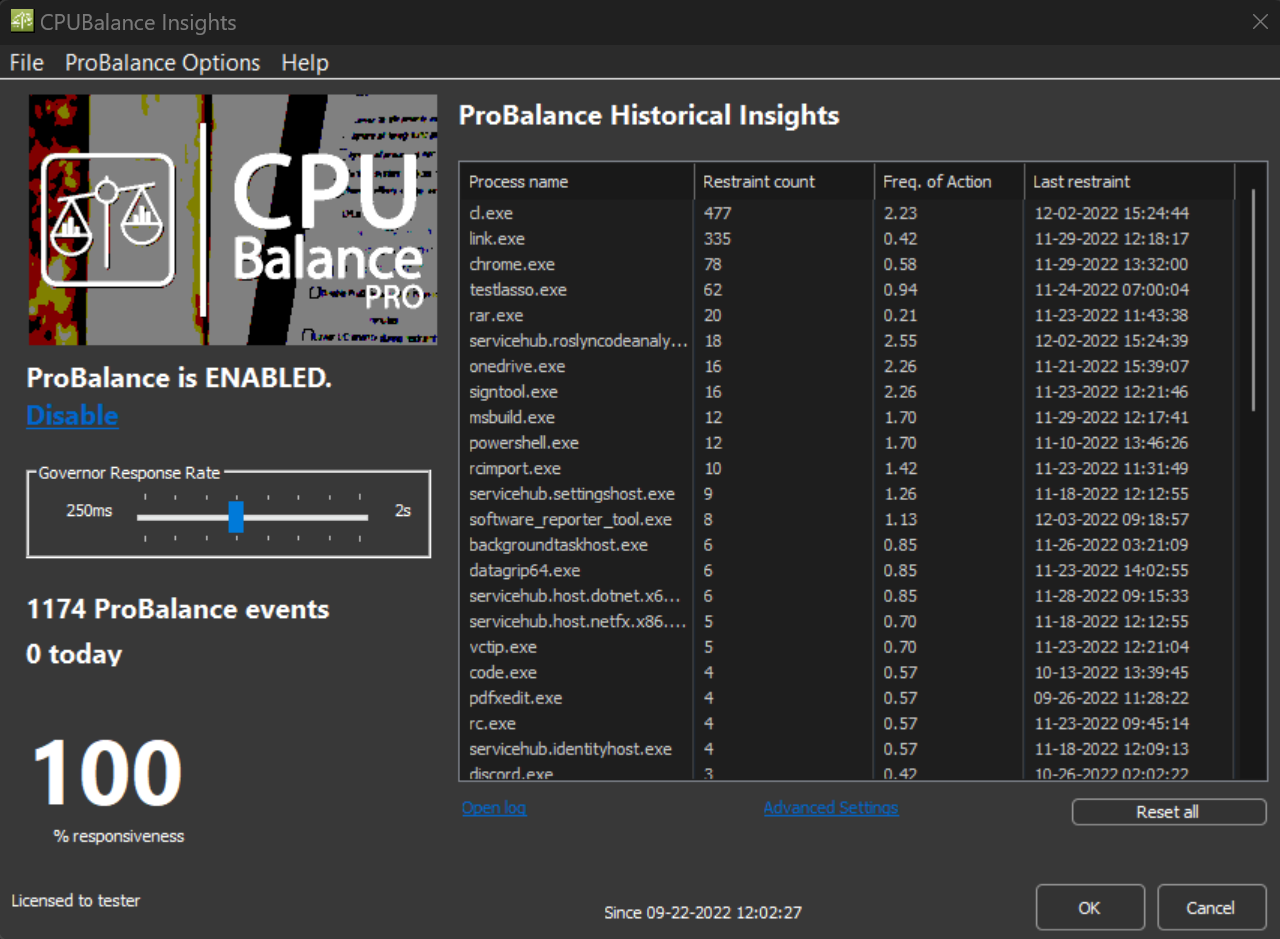
I tried Process Lasso and really liked it. However, I didn’t like the nag screen in the free version and only wanted the BalancePro functionality. I therefore installed CPUBalance free, which does exactly what I need. I have W11, but my computer is not that recent….
CPUBalance is a free Windows app with Process Lasso's ProBalance algorithm, which keeps your PC responsive during high CPU loads. We recommend Process Lasso: It includes everything CPUBalance does, gets more frequent updates and does far more.
doesn't Process Lasso have a new name or am I thinking of something else, and I vaguely recall Process Lasso having some relevance with older windows, but not so much with win10 & win11 or is it time for me to drink another cup of coffee
I also saw @rashmi installing it and it apparently had a performance improvement for Vivaldi in an HDD system.
If you notice any positive impact on something after trying for some days, then let us know.
I just don't think that I really need it. I personally think that I can simply rely on NextDNS with Hagezi Ultimate + Asus Ai Protection + Google Safe Browsing in Firefox. After all a great extension in my opinion. Might get it back when I feel like it. Definitely still my go-to web protection extension.
I also saw @rashmi installing it and it apparently had a performance improvement for Vivaldi in an HDD system.
If you notice any positive impact on something after trying for some days, then let us know.
I've been using it for 2 weeks or so and I am enjoying it. It definitely feels like my PC is running snappier when having many tabs open + a game running in the background but in day to day use I barely can feel it as my hardware is good enough for most tasks without any extra "help". Still, I can see it as a good companion for people with older systems.
Thanks y'all, I installed process lasso on my Host hardware and seems nicely solid, I had run it years ago, but had gotten away from it, tempted to buy the Pro version, not expensive, if only to support the bitsum developers... but I should probably use it few weeks first.
actually now about 6 weeks later, I ran into some issus(s) after installing process lasso on host, where I'm usually running VMware VMs. I cannot say for sure the issue was process lasso, (my notes are not readily available) and might have how cpu was configured for VM vis a vis the host, which I also modified. PL ended up feeling like an app I did not need. (might be great on some systems)...
I must have bought Process Lasso many years ago but they still honour the license & its updates often, I've tried a few times removing it out our interest but the PC does run better with it especially if copying large files etc, for me worth running.
@Kongo How do you use the ASUS AI protection on your router? On this PC I use the 'Security' setting, I've never had anything blocked only a couple of bits on my wife's MacAir? On my router the sigs haven't updated since February 13 (2.494)
What do you mean by "On this PC I use the Security setting"? Ai Protection works network-wide. You can't control how it behaves on different devices within the network. It's normal that Ai Protection only gets updates once or twice a month maybe.
Sorry for the late reply... I really like it as it doesn't slow down browsing and it just works out of the box. No need to add tons of additional filters or change any settings. Very simpistic yet effective.
Recently browsing
Members who viewed this thread in the last 5 minutes