



LibreOffice 26.8’s Tabbed UI (also known as the Notebookbar and modelled after the Ribbon in Microsoft Office) can show a colourful background when application theming is enabled under Tools > Options > Appearance.
A blue shade is used by default but you can pick or set any colour you like. In the ‘Customisations’ section, first selected the Writer, Calc, Impress or Data Notebookbar value, then use the dropdown to chance the colour. Click apply to see it in action.
You’ll also see your preferred coloured background when using the Tabbed Compact mode as well, albeit to less obvious effect given it’s more of a narrow strip.
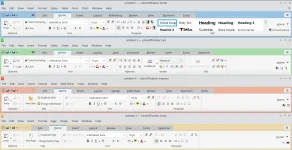

LibreOffice gives its Ribbon-style UI a pop of colour
You'll be able to customise the look of LibreOffice's Tabbed UI in the free office suite's next major release, which his due out in August 2026.
 www.omgubuntu.co.uk


