


Advanced Security Linux Mint Cinnamon Wayland setup
- Thread starter LinuxFan58
- Start date
You are using an out of date browser. It may not display this or other websites correctly.
You should upgrade or use an alternative browser.
You should upgrade or use an alternative browser.
- Last updated
- Jun 1, 2026
- How it's used?
- For work or educational use
- Operating system
- Linux
- Other operating system
- Linux Mint 22.3 Zena Cinnamon Wayland
- On-device encryption
- Other full-disk drive encryption software
- Log-in security
- Biometrics (Windows Hello PIN, TouchID, Face, Iris, Fingerprint)
- Security updates
- Allow security updates and latest features
- Update channels
- Allow stable updates only
- User Access Control
- N/A - Linux / Mac / Other operating system
- Smart App Control
- N/A - Linux / Mac / Other operating system
- Network firewall
- Enabled
- About WiFi router
- TP-Link triband with IPv6 disabled and all security features enabled (TP-link home care, SPI-firewall, IP-MAC binding). E-mail log message level is set to critical.
- Real-time security
- Sticking to trusted package sources and using Linux sandboxing (AppArmor, Firejail, Flatpak) to contain utilities, accessoires and applications.
- Firewall security
- Built-in Firewall for Mac/Linux
- About custom security
- Using only official package sources from verified publishers and de-installed all unused accessoires and applications.
- Mildly hardened Linux by disabling P2P, remote access, old TLS versions and enabling ASLR system wide.
- Created additional Firejail profiles with firecfg and reduced Flatpak permissions with flatseal.
- Added OpenSnitch outbound application firewall to compliment inbound GuFW.
- Installed logcheck with e-mail warning for security alerts & events
- Using Wayland (experimental) on Cinnamon desktop.
- Enhanced browser security with flags.
- Periodic malware scanners
- When I receive files from others I scan them with Virus Total. My half yearly data backups to external USB are scanned with Microsoft Defender

- Malware sample testing
- I do not participate in malware testing
- Environment for malware testing
- None
- Browser(s) and extensions
- Brave with two profiles, one for surfing and one for work. Privacy wise I have Brave shieds disabled in my work and enabled in my surfing profile (only Ads, Kees1958 and custom rules). Security wise my surfing profile has most site permissions on block and Bitdefender Traffic Light while my work profile has website permission on default with NVT Browser lockdown limiting website access to a few trusted domains and file download to usual office documents.
- Secure DNS
- NextDNS in the Router with OISD and telemetry blocklists enabled (for IOT devices), allowing only common TopLevelDomains to connect.
- We use Quad9 as default DNS (at OS-level) for our Laptops and smartphones (to bypas router TLD firewall restrictions)
- Cloudflare Zero Trust Free plan (with malware protection) is used as DNS over HTTPS in the browser.
- Desktop VPN
- Proton VPN free for Linux on-demand (out of home). At home I have little use for VPN because our IP and IP location are changed regularly
 .
.
- Password manager
- Build-in (OS and Browser)
- Maintenance tools
- None
- File and Photo backup
- FreeFileSync quick on-demand backups to a partition on my internal SSD to which sandboxed utilities, desktop accessoires and applications have no access to.
- The half yearly full backup saves to an external USB-SSD which is checked (afterwards) by Microsoft Defender on my wife's laptop (which has triple USB protection).
- Subscriptions
- None
- System recovery
- TimeShift (to another partition on 1 TB SSD)
- Risk factors
- Browsing to popular websites
- Working from home
- Making audio/video calls
- Opening email attachments
- Buying from online stores, entering banks card details
- Logging into my bank account
- Streaming audio/video content from trusted sites or paid subscriptions
- Computer specs
- AMD Ryzen 7 (5700U) laptop with 1 TB SSD and 16GB RAM
- Notable changes
- To many
After jumping back and forth, I finally decided for:
- Changed from ControlD free to Cloudflare free ZT
- Replaced 7-zip (unsandboxed) with PeaZip in Flatpak
- Moved from LibreOffice in Flatpak to LibreOffice in Firejail
- Moved from Thunderbird to Evolution (both in Flatpak sandbox)
- Moved from Xfce desktop with X11 to Cinnamon desktop with Wayland
- What I'm looking for?
Looking for maximum feedback.


Nice and secure configuration you have there. Btw, is the built-in password manager KeepassXC or something else?

I replaced ControlD with Cloudflare Zero Trust free plan (thanks @rashmi for posting).
Reason was that I am running out of 300.000 queries limit, when I am doing a lot of research when developing new courses for the business university I am working for (teaching my old profession for fun as pensionado). I am impressed with the granular control and option ot add a (unique) warning or explanation sentence for each policy
Reason was that I am running out of 300.000 queries limit, when I am doing a lot of research when developing new courses for the business university I am working for (teaching my old profession for fun as pensionado). I am impressed with the granular control and option ot add a (unique) warning or explanation sentence for each policy
Last edited:
I'm curious, did you harden Thunderbird or not?
I've hardened the email clients I've used over time without any problems, including increasing the sandbox level to default:
https://www.wilderssecurity.com/threads/hardening-thunderbird.432718/
I've hardened the email clients I've used over time without any problems, including increasing the sandbox level to default:
https://www.wilderssecurity.com/threads/hardening-thunderbird.432718/
@LinuxFan58
It is interesting to note that your rule in uBoL that blocks Beacon (object) does not intercept JavaScript, does not intercept browser APIs, and does not intercept sendBeacon.
The navigator.sendBeacon() API is blocked by one of my rules that you are familiar with.
It allows data to be sent in the background even when the user leaves the page, without blocking loading and without being easily intercepted.
It is one of the preferred APIs for modern tracking.
Even though the percentage of website breakage, especially for payments, is high.
I chose it for greater Beacon coverage.
Let me show you the results of the rule's prevention as processed by ChatGPT 5.2:
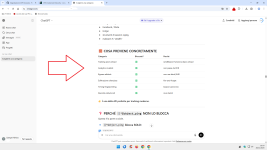
It is interesting to note that your rule in uBoL that blocks Beacon (object) does not intercept JavaScript, does not intercept browser APIs, and does not intercept sendBeacon.
The navigator.sendBeacon() API is blocked by one of my rules that you are familiar with.
It allows data to be sent in the background even when the user leaves the page, without blocking loading and without being easily intercepted.
It is one of the preferred APIs for modern tracking.
Even though the percentage of website breakage, especially for payments, is high.
I chose it for greater Beacon coverage.
Let me show you the results of the rule's prevention as processed by ChatGPT 5.2:
Last edited:
@Sampei.Nihira
Yes you are right, but then I have to switch to AdGuard Mv3 or uBo Mv2. which I don't want at the moment (AG for geo political reasons and uBo because it lowers the speedometer 3.1 benchmark so much)
Yes you are right, but then I have to switch to AdGuard Mv3 or uBo Mv2. which I don't want at the moment (AG for geo political reasons and uBo because it lowers the speedometer 3.1 benchmark so much)
Last edited:
I am really happy with Cloudflare zero trust. Running 5 firewall policies and removed all browser extensions.
View attachment 294418
I would recommend that you at least create general rules in Brave's internal adblock to block these trackers that are not blocked at the DNS level.
In my opinion, 6-9 rules with general validity would be sufficient.
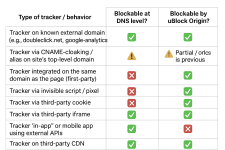
P.S.
What is Rule 2 based on?
Incredible, congratulations.
You have just exceeded your underestimated average user rating.
You have just exceeded your underestimated average user rating.
Okay I admit, could not do anything today because trains were cancelled due to excessive weather conditions (snow and storm Goretti). So I cancelled the meeting and started playing with Cloudflare. Wanted to increase privacy a little so I reduced the logs to block only and enabled removing sensitive information (free plan has fixed retention period). Watched another episode of Gangs of London and filled my time with the absolute summon of useless activity by changing ...

The use of setting your own blockpage is that you can add a custom reason per policy (reden: website website staat op de zwarte lijst van websites die schadelijke software verspreiden). I changed the background colour (because my wife found the default to much in your face)
The use of setting your own blockpage is that you can add a custom reason per policy (reden: website website staat op de zwarte lijst van websites die schadelijke software verspreiden). I changed the background colour (because my wife found the default to much in your face)
Last edited:
Because of @Andy Ful malware filter testing
Security and privacy wise I should be okay with Avira Safe Browsing and Privacy Badger extensions (one is bound to strict German privacy regulations and the other is developed by the Electronic Frontier Foundation).
- Work profile: Avira Safe browsing with anti-tracking enabled. The mild anti-tracking compliments nicely with the mild advertisement blocking of Cloudflare. Also Avira's URL filtering provides best results when testing malware, phishing and fake shopping links in combination with Cloudflare and Google Safe Browsing.
- Surfing profile: Privacy Badger in learning mode (l know it can be misused, but it has never occurred in the wild) to compliment Brave's adblocking. This combo resulted in the lowest third-party exposure after a day of surfing.
Setup finalized
Get this:
Could you get more?
Maybe, I don't have any experience with Brave's built-in adblock.
I would block 1p script on all websites outside your TLDs in your aggressive profile.
You would also get 3p script blocked at the same time.
Almost certainly 3p frames too.
+ Privacy/security without adding extensions.
However, I have some doubts about this aspect (frame) in PB.
It would be better to ask the AI.
I would leave PB in your moderate profile.
If you're interested in trying it, I'll write down the simple rules, which I'm sure you can write yourself.
Last edited:
Brave in Aggressive mode also blocks first party. I use PB in learning because it shows third-party exposure also. When those 3P are useless (from user experience perspective) connections I block them in PB. Until now I only added 1 domain.
I used uBol only allowing some trusted TLD's but the number of blocks were zero. Same with your rules in AG you pm-ed.
With my surfing behavior Brave Shields seem to do very well. This is why I want to know what the actual 3P exposure is.
I used uBol only allowing some trusted TLD's but the number of blocks were zero. Same with your rules in AG you pm-ed.
With my surfing behavior Brave Shields seem to do very well. This is why I want to know what the actual 3P exposure is.
Brave in Aggressive mode also blocks first party. I use PB in learning because it shows third-party exposure also. When those 3P are useless (from user experience perspective) connections I block them in PB. Until now I only added 1 domain.
I used uBol only allowing some trusted TLD's but the number of blocks were zero. Same with your rules in AG you pm-ed.
With my surfing behavior Brave Shields seem to do very well. This is why I want to know what the actual 3P exposure is.
What I wrote in my previous post is that even if you block 1p scripts and therefore also indirectly 3p scripts + PB, you may not achieve a total block of 3p frames.
Dynamic filtering: Benefits of blocking 3rd party iframe tags
However, with uBo, I know this for sure because 3p frames have a separate setting.
With your configuration, I don't know.
And I believe there is a reason for this separation.
Ask the AI.
It's just a suggestion.
Last edited:
Well thanks to @TairikuOkami and @Sampei.Nihira I changed extensions again. using uBol to limit exposure to a few common Top Level Domains in Surfing Profile.
Okay finally decided (at least I think and hope so
Code:! ********************************************************** ! Block rules to increase security and privacy * ! ********************************************************** ! Block tracking pings and beacons ||*$ping #%#//scriptlet('abort-on-property-read', 'sendBeacon') ! Block risky and depreciated EVAL javascript command #%#//scriptlet('noeval') ! Block everything except from common Top Level Domains ||*$all,denyallow=nl|be|de|uk|eu|com|edu|io|net|org|abuse.ch ! Block file share services also used to host malware ||anonfiles.com$all ||discord.com/attachments$all ||file.io$all ||gofile.io$all ||hastebin.com$all ||ix.io$all ||pastebin.com$all ||pixeldrain.com$all ||tmpfiles.org$all ||transfer.sh$all ||ufile.io$all ||uploadfiles.io$all ||volafile.org$all ||zippyshare.com$all ! Block Linux executable and script formats on code sharing domains ||bitbucket.org/*.awk$all ||bitbucket.org/*.bash$all ||bitbucket.org/*.js$all ||bitbucket.org/*.ksh$all ||bitbucket.org/*.php$all ||bitbucket.org/*.pl$all ||bitbucket.org/*.rb$all ||bitbucket.org/*.sed$all ||bitbucket.org/*.sh$all ||bitbucket.org/*.tcl$all ||bitbucket.org/*.zsh$all ||bitbucket.org/*.elf$all ||bitbucket.org/*.aout$all ||bitbucket.org/*.coff$all ||bitbucket.org/*.bin$all ||bitbucket.org/*.deb$all ||bitbucket.org/*.rpm$all ||bitbucket.org/*.tar.gz$all ||bitbucket.org/*.tar.xz$all ||bitbucket.org/*.flatpak$all ||bitbucket.org/*.appimage$all ||bitbucket.org/*.snap$all ||github.com/*.awk$all ||github.com/*.bash$all ||github.com/*.js$all ||github.com/*.ksh$all ||github.com/*.php$all ||github.com/*.pl$all ||github.com/*.rb$all ||github.com/*.sed$all ||github.com/*.sh$all ||github.com/*.tcl$all ||github.com/*.zsh$all ||github.com/*.elf$all ||github.com/*.aout$all ||github.com/*.coff$all ||github.com/*.bin$all ||github.com/*.deb$all ||github.com/*.rpm$all ||github.com/*.tar.gz$all ||github.com/*.tar.xz$all ||github.com/*.flatpak$all ||github.com/*.appimage$all ||github.com/*.snap$all ||githubusercontent.com/*.awk$all ||githubusercontent.com/*.bash$all ||githubusercontent.com/*.js$all ||githubusercontent.com/*.ksh$all ||githubusercontent.com/*.php$all ||githubusercontent.com/*.pl$all ||githubusercontent.com/*.rb$all ||githubusercontent.com/*.sed$all ||githubusercontent.com/*.sh$all ||githubusercontent.com/*.tcl$all ||githubusercontent.com/*.zsh$all ||githubusercontent.com/*.elf$all ||githubusercontent.com/*.aout$all ||githubusercontent.com/*.coff$all ||githubusercontent.com/*.bin$all ||githubusercontent.com/*.deb$all ||githubusercontent.com/*.rpm$all ||githubusercontent.com/*.tar.gz$all ||githubusercontent.com/*.tar.xz$all ||githubusercontent.com/*.flatpak$all ||githubusercontent.com/*.appimage$all ||githubusercontent.com/*.snap$all ||gitlab.com/*.awk$all ||gitlab.com/*.bash$all ||gitlab.com/*.js$all ||gitlab.com/*.ksh$all ||gitlab.com/*.php$all ||gitlab.com/*.pl$all ||gitlab.com/*.rb$all ||gitlab.com/*.sed$all ||gitlab.com/*.sh$all ||gitlab.com/*.tcl$all ||gitlab.com/*.zsh$all ||gitlab.com/*.elf$all ||gitlab.com/*.aout$all ||gitlab.com/*.coff$all ||gitlab.com/*.bin$all ||gitlab.com/*.deb$all ||gitlab.com/*.rpm$all ||gitlab.com/*.tar.gz$all ||gitlab.com/*.tar.xz$all ||gitlab.com/*.flatpak$all ||gitlab.com/*.appimage$all ||gitlab.com/*.snap$all ||gitlab.io/*.awk$all ||gitlab.io/*.bash$all ||gitlab.io/*.js$all ||gitlab.io/*.ksh$all ||gitlab.io/*.php$all ||gitlab.io/*.pl$all ||gitlab.io/*.rb$all ||gitlab.io/*.sed$all ||gitlab.io/*.sh$all ||gitlab.io/*.tcl$all ||gitlab.io/*.zsh$all ||gitlab.io/*.elf$all ||gitlab.io/*.aout$all ||gitlab.io/*.coff$all ||gitlab.io/*.bin$all ||gitlab.io/*.deb$all ||gitlab.io/*.rpm$all ||gitlab.io/*.tar.gz$all ||gitlab.io/*.tar.xz$all ||gitlab.io/*.flatpak$all ||gitlab.io/*.appimage$all ||gitlab.io/*.snap$all ||sourceforge.net/*.awk$all ||sourceforge.net/*.bash$all ||sourceforge.net/*.js$all ||sourceforge.net/*.ksh$all ||sourceforge.net/*.php$all ||sourceforge.net/*.pl$all ||sourceforge.net/*.rb$all ||sourceforge.net/*.sed$all ||sourceforge.net/*.sh$all ||sourceforge.net/*.tcl$all ||sourceforge.net/*.zsh$all ||sourceforge.net/*.elf$all ||sourceforge.net/*.aout$all ||sourceforge.net/*.coff$all ||sourceforge.net/*.bin$all ||sourceforge.net/*.deb$all ||sourceforge.net/*.rpm$all ||sourceforge.net/*.tar.gz$all ||sourceforge.net/*.tar.xz$all ||sourceforge.net/*.flatpak$all ||sourceforge.net/*.appimage$all ||sourceforge.net/*.snap$all
I think you'll need to add .cc to the list of TLDs excluded from the rule, otherwise you won't see some of Tak's images.
Try it.
The general Noeval rule will also require you to add some exceptions.
I don't do any booking, buying or banking with my surfing profile (use work profile for that), so have not ran into website breakage (yet).
About CC are your sure?
View attachment 294688
Forgive me.
.co.
You know, it was hunger...
One more warning.
There are some websites that “mix” permitted TLDs with prohibited TLDs.
In this case, any exception rules become confusing.
Example
https://www.heraldsun.com.au/
In this case, a pure dynamic rule applied in uBo has the correct effect.
Unfortunately, however, any static exception rules do not have the desired effect.
Applied to AG, where it is not possible to insert dynamic rules but only static rules that simulate the same effect as dynamic rules... the result obtained is unambiguous.
In my case, I never come into contact with such websites.
There are some websites that “mix” permitted TLDs with prohibited TLDs.
In this case, any exception rules become confusing.
Example
https://www.heraldsun.com.au/
In this case, a pure dynamic rule applied in uBo has the correct effect.
Unfortunately, however, any static exception rules do not have the desired effect.
Applied to AG, where it is not possible to insert dynamic rules but only static rules that simulate the same effect as dynamic rules... the result obtained is unambiguous.
In my case, I never come into contact with such websites.
One last thing, otherwise I'll be rocking the boat too much, but I don't think your rules for blocking downloads from GitHub (etc.) are correct for blocking malicious executable downloads.
Check it out:
URLhaus | Checking your browser
URLhaus | Checking your browser
Instead, the ones I use are correct:
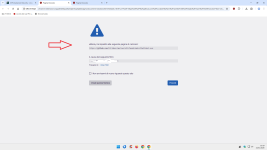
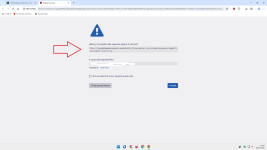
Check it out:
URLhaus | Checking your browser
URLhaus | Checking your browser
Instead, the ones I use are correct:
Okay I extended the countries to Schengen countries and 5 Eyes
I don't block Windows exe on my Linux laptop
Last edited:
You may also like...
-
 New Update Linux Mint Devs Prep Wayland-Native Cinnamon Screensaver for Linux Mint 23
- Started by lokamoka820
- Replies: 1
-
New Update Cinnamon 6.6 Desktop Environment Released with Redesigned Application Menu
- Started by lokamoka820
- Replies: 41
-
Technology Ubuntu, Fedora, Linux Mint Eye Age Verification Amid California Law Backlash
- Started by lokamoka820
- Replies: 1
-
 Dedoimedo: Linux Mint 22.1 Xia Cinnamon review - Reasonable, rounded
- Started by Gandalf_The_Grey
- Replies: 0
-
New Update Linux Mint Is Getting a Night Light Feature in Cinnamon, Framework Laptop Support
- Started by lokamoka820
- Replies: 4