
No, sorry, it is still in Nightly. I meant because Brave Origin will be free on Linux, I am using Brave again.What does “Brave is free on Linux” mean?
Have you installed Brave Origin?
Last edited:


Open MalwareTips from your Home Screen or desktop. Follow discussions, find answers and pick up where you left off.
If you cannot find an install option, update your browser or use its bookmark option to keep MalwareTips close.
After installation, open the app and sign in. Enable push notifications in Preferences if you want alerts. On iPhone and iPad, push requires a Home Screen web app and iOS or iPadOS 16.4 or later.
Sign in to manage notificationsInstallation is optional. Your notification settings stay under your control.
 Thread starter
LinuxFan58
Thread starter
LinuxFan58

 .
.
No, sorry, it is still in Nightly. I meant because Brave Origin will be free on Linux, I am using Brave again.What does “Brave is free on Linux” mean?
Have you installed Brave Origin?

 ). It is used to be 0,3 to 0.4 difference (so on 19 average that is only 1 to 2 %), but since a week or three the difference between Brave + AdGuard is nothing to 0.1 (so practically no difference). Brave in standard mode used to be 0.2 slower than AG (also only custom rules plus Kees1958 Mv3) , but Brave standard is now nearly as fast as uBol or AG, that is nice (may be I am sticking to the same setup now, because there is nothing to gain anymore).
happy wife is a happy life,
)
), Enabled Brave-Origin in the system settings and ran some test (adblock result is with Brave shield disabled and uBol enabled with custom rules only). This 1-2 (1 = uBol with custom rules, 2 = nuke them with Brave Shields) approach allows me to use only one Brave Profile. I hope Brave soon ads the auto-container option like Firefox has (FF facilitates opening websites automatically in a specific container, in Brave it is still a manual open, but auto open is planned in future versions). I am not on glasfiber, but on Ziggo coax (speedtest is via Wifi).
). It is used to be 0,3 to 0.4 difference (so on 19 average that is only 1 to 2 %), but since a week or three the difference between Brave + AdGuard is nothing to 0.1 (so practically no difference). Brave in standard mode used to be 0.2 slower than AG (also only custom rules plus Kees1958 Mv3) , but Brave standard is now nearly as fast as uBol or AG, that is nice (may be I am sticking to the same setup now, because there is nothing to gain anymore).
happy wife is a happy life,
)
), Enabled Brave-Origin in the system settings and ran some test (adblock result is with Brave shield disabled and uBol enabled with custom rules only). This 1-2 (1 = uBol with custom rules, 2 = nuke them with Brave Shields) approach allows me to use only one Brave Profile. I hope Brave soon ads the auto-container option like Firefox has (FF facilitates opening websites automatically in a specific container, in Brave it is still a manual open, but auto open is planned in future versions). I am not on glasfiber, but on Ziggo coax (speedtest is via Wifi).
Food for thought: When you are going on a hike in Ciociaria, do you have the maps of Europe, mid-east Asia and north Africa with you, in case you get lost?There's very little difference between Brave and Brave Origin in the Speedometer 3.1 test.
I see you ran the adblock test.
It would be interesting if you tried the CoverYouTracks test:
Cover Your Tracks
brave://settings/searchEngines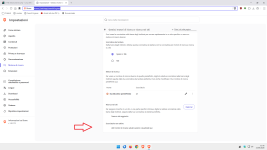
It is my experience that it is hard to add new searc engines. I had to add the url and search parm when I wanted to try out Startpage (I initially had removed all stuf I did not use, so no idea whether startpage is a default which I removed ir never was a standard listed engine, either way I had to manually add it)@LinuxFan58
Hi,
Hi, you mentioned elsewhere that Brave doesn't add inactive saved search engines.
That hasn't been my experience:
Code:brave://settings/searchEngines
View attachment 298171
I'm currently using an extension, but if I search using a search engine that isn't on the list,for example, Ecosia,the search engine where I placed the red arrow appears.
Is there a specific flag or policy in Brave that I can't seem to find that prevents this?
TH.
It is my experience that it is hard to add new searc engines. I had to add the url and search parm when I wanted to try out Startpage (I initially had removed all stuf I did not use, so no idea whether startpage is a default which I removed ir never was a standard listed engine, either way I had to manually add it)
View attachment 298213

If StartPage is bundled with your browser setup, if you want to make your personalized pref=*****, you must delete it and re-add with different username (PageStart or what you want, then after i advise newtabredirect (icpgjfneehieebagbmdbhnlpiopdcmna) extension (put your custom startpage address). and for keep all these parameters upon restart : several policies :It is my experience that it is hard to add new searc engines. I had to add the url and search parm when I wanted to try out Startpage (I initially had removed all stuf I did not use, so no idea whether startpage is a default which I removed ir never was a standard listed engine, either way I had to manually add it)
View attachment 298213
  "DefaultSearchProviderEnabled": true,
  "DefaultSearchProviderKeyword": "YOUR KEYWORD",
  "DefaultSearchProviderName": "PAGESTART OR SOMETHING ELSE",
  "DefaultSearchProviderSearchURL": "https://www.startpage.com/do/search?query={searchTerms}&prfe=XXXXXXXXXXXXXXXXXXXXXXXXXXXXXXXXXXXXXXXXXXXXXXXXXXXXXXXXXXX",
  "DefaultSearchProviderSuggestURL": "https://www.startpage.com/osuggestions?q=%s&prfe=XXXXXXXXXXXXXXXXXXXXXXXXXXXXXXXXXXXXXXXXXXXXXXXXXXXXXXXXXXXXXXX",

  "HomepageIsNewTabPage": false,
  "HomepageLocation": "https://www.startpage.com/do/mypage.pl?prfe=XXXXXXXXXXXXXXXXXXXXXXXXXXXXXXXXXXX",
"NewTabPageLocation": "https://www.startpage.com/do/mypage.pl?prfe=XXXXXXXXXXXXXXXXXXXXXXXXX",If StartPage is bundled with your browser setup, if you want to make your personalized pref=*****, you must delete it and re-add with different username (PageStart or what you want, then after i advise newtabredirect (icpgjfneehieebagbmdbhnlpiopdcmna) extension (put your custom startpage address). and for keep all these parameters upon restart : several policies :
JSON:"DefaultSearchProviderEnabled": true, "DefaultSearchProviderKeyword": "YOUR KEYWORD", "DefaultSearchProviderName": "PAGESTART OR SOMETHING ELSE", "DefaultSearchProviderSearchURL": "https://www.startpage.com/do/search?query={searchTerms}&prfe=XXXXXXXXXXXXXXXXXXXXXXXXXXXXXXXXXXXXXXXXXXXXXXXXXXXXXXXXXXX", "DefaultSearchProviderSuggestURL": "https://www.startpage.com/osuggestions?q=%s&prfe=XXXXXXXXXXXXXXXXXXXXXXXXXXXXXXXXXXXXXXXXXXXXXXXXXXXXXXXXXXXXXXX", "HomepageIsNewTabPage": false, "HomepageLocation": "https://www.startpage.com/do/mypage.pl?prfe=XXXXXXXXXXXXXXXXXXXXXXXXXXXXXXXXXXX", "NewTabPageLocation": "https://www.startpage.com/do/mypage.pl?prfe=XXXXXXXXXXXXXXXXXXXXXXXXX",
Members who viewed this thread in the last 5 minutes


