Advanced Security M4RT1NE2 Security Configuration 2024

  • Thread starter Thread starter ForgottenSeer 94633
  • Start date Start date
Last updated
Feb 20, 2023
Main use of this computer
For home and private use
Operating system
macOS 15 Sequoia
On-device encryption
Windows BitLocker / Device Encryption
Device sign-in security
    • Windows Hello PIN or biometric sign-in (face / fingerprint / Touch ID)
Security updates
Allow security updates
Update channels
Allow stable updates only
User Account Control (UAC)
Always notify
Smart App Control
On
Network firewall
Enabled
Real-time protection
Microsoft Defender + WHHL
Device firewall
Microsoft Defender Firewall
Custom security settings
Auto playback - disabled
O&O shut up 11 (recommended settings)
O&O App Buster ((system slimmed down)
Periodic malware scanners
Scan once a month using the following scanners:
  • EMSISOFT
  • Malwarebytes Anti-Malware
  • NPE
  • KVRT
Malware sample testing
I do not participate in malware testing
Environment for malware testing
None
Browsers and extensions
Google Chrome with
  • Ublock Origin
  • AVG Online Security
Secure DNS
Quad9 DNS
Desktop VPN
Windscribe VPN
Password and passkey manager
KeePass 2.x
Maintenance tools
HiBit Uninstaller
BleachBit
CCleaner
File and photo backups
Hasleo Backup Suite
AOMEI Backupper Standard
Subscriptions
    • None
System recovery
Once every fortnight, the entire system partition is copied to an external drive.
Usage and exposure
    • Visiting familiar websites
    • Visiting unknown or untrusted websites
    • Working from home
    • Opening email attachments
    • Online shopping and card payments
    • Logging into my bank account
    • Downloading software and files from reputable sites
    • Streaming audio/video content from trusted sites or paid subscriptions
Computer specs
ACER AN515-54-551F
Feedback preference

Suggestions on the main improvements

@Asterixpl Do you have an idea how your Trojan.Win32.Qhosts (A) got past Bitdefender and VS? Or was it a fp (or another system)?
Because this setup seems really solid for me.
Edit:
Thanks for your detailed answer :)
 
Last edited:
@Asterixpl Do you have an idea how your Trojan.Win32.Qhosts (A) got past Bitdefender and VS? Or was it a fp (or another system)?
Because this setup seems really solid for me.
I have no idea how this happened. The best part is that the laptop did not give any signs of being compromised. Everything was running normally (system updates, browsing the internet, etc) I scanned the computer with BD TS and nothing was detected. I decided to install EEK (portable version) and it detected the threat and removed it nicely.
Scanning with other scanners later detected nothing.
My mistake - I could have saved that file for analysis.
Thanks to this, I learned a new thing today. To do a Farbar Recovery Scan Tool scan once in a while - review the logs or here on the forum cosmetically give it a check.
Thanks to EEK I learned that I had an infection (I guess that's what you can call it)
 
As of today, I no longer use Opera. My main browser is MS EDGE.

Reason ? - I found that there is no sense in using third party browsers like Opera, FF, Chrome.

I added BD Anti-Tracker, AdGuard as addons.

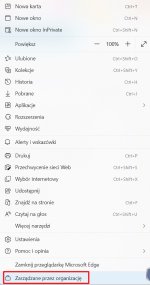
One thing puzzles me: I have this message:

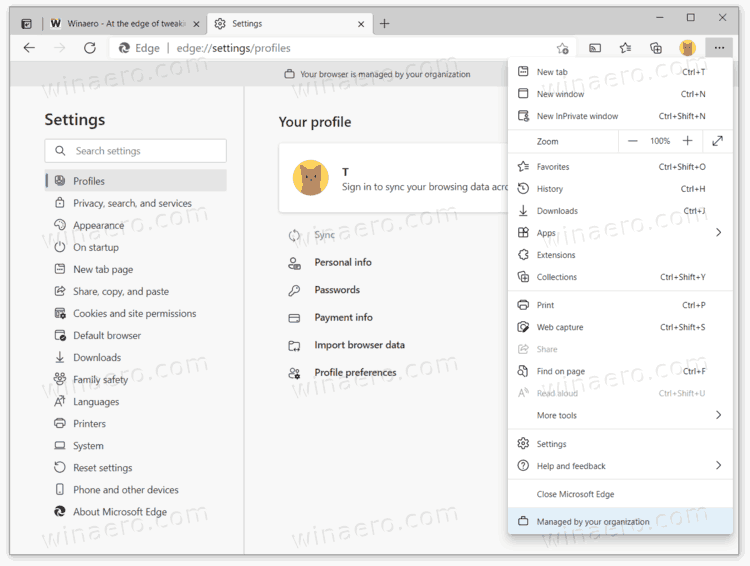
Managed by organization

Is it normal ? Do you also have this ?

Screenshot_11.jpg

Screenshot_12.jpg
 
As of today, I no longer use Opera. My main browser is MS EDGE.

Reason ? - I found that there is no sense in using third party browsers like Opera, FF, Chrome.

I added BD Anti-Tracker, AdGuard as addons.

One thing puzzles me: I have this message:

Managed by organization

Is it normal ? Do you also have this ?

View attachment 267184

View attachment 267185
Are you logged in with Microsoft account ?
 
As of today, I no longer use Opera. My main browser is MS EDGE.

Reason ? - I found that there is no sense in using third party browsers like Opera, FF, Chrome.

I added BD Anti-Tracker, AdGuard as addons.

One thing puzzles me: I have this message:

Managed by organization

Is it normal ? Do you also have this ?

View attachment 267184

View attachment 267185

I had same "issue" once in the past, for me was the solution this guide below:
 
Is it better to turn it off or leave it as it is ?
If it doesn't cause any issues it is preferred to leave it as it is.
But if you don't want to see "Managed by organization" you can turn it off and change those settings in Edge yourself.
I did that and also turned the location and windows update options off, but it is up to personal preference.
 

I pity such a licence. Overall, ARCABIT is not so bad.
Recently, they even improved detection (new scanning functions were introduced). The program is developing on the plus side, it is of Polish production.

Second point.

I am not going to buy AV software anymore.
 
Last edited by a moderator:

Recently browsing

Members who viewed this thread in the last 5 minutes

You may also like...

Continue exploring the conversation.

Back
Top