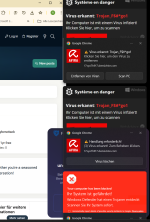
malware popup is blocking screen

Status
Not open for further replies.

Raibu63

New Member
Thread author
Aug 19, 2025
1
0
1
Hi, this popup is constantly on the right side of the screen . started yesterday . tried detecting it with malwarebytes but it didn´t find it1755604929440.png
 
Hello..! Welcome to MalwareTips..! :) My name is icotonev and I'm here to help you remove malware ..!



Please follow the following instruction ..:

Download Farbar Recovery Scan Tool and save it to your desktop. --> IMPORTANT

If your antivirus software detects the tool as malicious, it’s safe to allow FRST to run. It is a false-positive detection.
If English is not your primary language, right click on FRST.exe/FRST64.exe and rename to FRSTEnglish.exe/FRST64English.exe

Note
: You need to run the version compatible with your system. If you are not sure which version applies to your system download both of them and try to run them. Only one of them will run on your system, that will be the right version.
  • Double-click the FRST icon to run the tool. When the tool opens click Yes to disclaimer.
  • Press Scan button and wait for a while.
  • The scanner will produced two logs on your Desktop: FRST.txt and Addition.txt.
  • Please attach the content of these two logs in your next reply.
---------------------------------------------------

In your next reply, please include:
  • FRST.txt
  • Addition.txt
 
Due to lack of activity, this topic is now closed. You requested help but did not respond to follow-up questions or instructions within three days and your topic has been moved here.
If you still need help, open a new topic, and wait for a new helper.
 
Status
Not open for further replies.