
Solved may i be infected? popup

Dirk41

Level 17
Thread author
Verified
Top Poster
Mar 17, 2016
797
2,496
1,568
Earth
hi everyone and thanks in advance for the help. i am from italy.
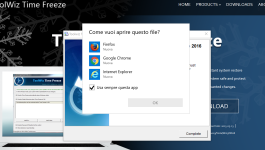
i am not sure if i have a malware or something just see this: screenshot uploaded it's italian,i called the picture virus.
someone suggested me i could have a virus because i couldn't access the internet in "safe mode with internet". so i did scan with malwarbyte adwcleaner roguekiller junkremovaltool and kaspersky tools.. then i discovered i can access the internet in "safemode with internet" but just with ethernet.

anyway i don't know about that pop up.
when i surf the net with sandboxie nothing strange appears

thank you
 

Attachments

Hello,


FRST.gif
Fix with Farbar Recovery Scan Tool

icon_exclaim.gif
This fix was created for this user for use on that particular machine.
icon_exclaim.gif

icon_exclaim.gif
Running it on another one may cause damage and render the system unstable.
icon_exclaim.gif

Download attached fixlist.txt file and save it to the Desktop:

Both files, FRST and fixlist.txt have to be in the same location or the fix will not work!

  • Right-click on
    FRST.gif
    icon and select
    RunAsAdmin.jpg
    Run as Administrator to start the tool.
    (XP users click run after receipt of Windows Security Warning - Open File).
  • Press the Fix button just once and wait.
  • If for some reason the tool needs a restart, please make sure you let the system restart normally. After that let the tool complete its run.
  • When finished FRST will generate a log on the Desktop, called Fixlog.txt.

Please attach it to your reply.
 

Attachments

  • Like
Reactions: Dirk41
thank you very much for the quick reply. I'll do it now. may i ask you (if i don't bother) what you found wrong in my previus attachements?
I really appreciate your work.

"Both files, FRST and fixlist.txt have to be in the same location or the fix will not work!" -> i put them on desktop

EDIT: i am really sorry i think i made a mistake: since i was in sandboxie,i selected to save on desktop,but it saved them in download folder. so thinking it wouldn't have worked i deleted them and download again without using sandboxie. but now ".exe" file has not been downoloaded,just fixlit.txt.
how can i do? really sorry, it0s the first time i use this tools
 
maybe you have to know also that since i bought my surface pro 4, it always have had an error in the registry (discovered during sfc /scannow) that could be resolved but doesn't seem to affect the pc
 
And sorry man, wait to reply. Because for the same problem , I am not sure the attachments i provided in the firs post where from desktop. Sorry again.
Later I 'll provide the correct files.
 
sorry man i have an update:
i called surface support and they said that message appears normally when a new program is installed

and it's normal i can't use wifi in "safe mode with internt",because i can surf the net with ethernet

so i suppose i don't need assistence anymore. sorry for bothering. i appreciate anywat