Solved Memory not enough

Status
Not open for further replies.

JB007

Level 26
Thread author
Verified
Top Poster
Well-known
Forum Veteran
May 19, 2016
1,567
1
6,553
2,469
France
Hello,
Merry Christmas all:)
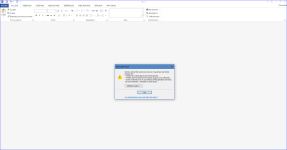
Since 23 December 2016 when I try to open a Word or Excel document I get an error message : "Memory not enough".
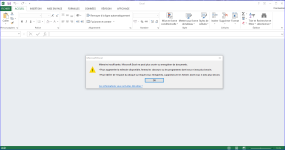
Mémoire3.PNG Mémoire4.PNG
Two days earlier I have a similar message when I was on Internet (Chrome), but I did not try to open Office documents and I can continue to use my PC and Internet after closing Chrome and restart it.
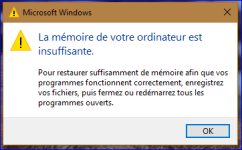
Mémoire1.PNG
On my system I have 32 Go of RAM and the problem persists even if all other programs are closed.
Can someone help me ?
Thank you:)
 
Hello @BoraMurdar
Your solution is good but do you have some explanation ?
If I look to the old Office documents already registered on my PC they are not blocked:
View attachment 128583
because they come from a reliable source from your PC
those files which have the button "Unblock" mean the files come from unreliable source (internet)

I have a solution which you can solve it forever without having to unblock every file. I will edit my post later, now I'm searching for pictures

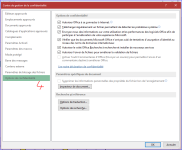
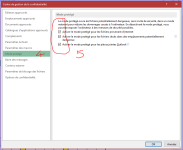
note: this may decrease your security. You can uncheck all of them or just uncheck 1 or 2 of them depend on your usage (I unchecked only the first one. It's fine for me). However, this will work for everything sometimes doesn't work for excel files. I may put extra steps if you need

do this for all office apps

9dxNB0h.png
9dxNB0h.png
 
Last edited:
Upvote 0
because they come from a reliable source from your PC
those files which have the button "Unblock" mean the files come from unreliable source (internet)

I have a solution which you can solve it forever without having to unblock every file. I will edit my post later, now I'm searching for pictures
Hi @Evjl's Rain
Nice to see you again :) and thanks for your help.
This issue seems less difficult to solve than my previous;)
You are right, I received these files with Email from well known friends, and another downloaded from a secure website.
But it is not the first time I received or download Office files and never had this problem.
 
Upvote 0
Hi @Evjl's Rain
Nice to see you again :) and thanks for your help.
This issue seems less difficult to solve than my previous;)
You are right, I received these files with Email from well known friends, and another downloaded from a secure website.
But it is not the first time I received or download Office files and never had this problem.
hi @JB007 refresh the page again, I just put the solution :)
if you need some heko, just post it here, we will help
 
Upvote 0
Also do this if you have the same problem with Excel (only). This solution seems stupid but it does fix the issue (check -> close -> uncheck again). Sometimes you have to do it again
File > Options > Advanced - In General section (go very much down in Advanced), check "Ignore Other applications that use Dynamic Data Exchange (DDE)". Close and re-start the Excel. Uncheck "Ignore Other applications that use Dynamic Data Exchange (DDE)". Close and re-start Excel again. You should not get the error anymore. (Basically, DDE should remain unchecked)
 
Upvote 0
because they come from a reliable source from your PC
those files which have the button "Unblock" mean the files come from unreliable source (internet)

I have a solution which you can solve it forever without having to unblock every file. I will edit my post later, now I'm searching for pictures

note: this may decrease your security. You can uncheck all of them or just uncheck 1 or 2 of them depend on your usage (I unchecked only the first one. It's fine for me). However, this will work for everything sometimes doesn't work for excel files. I may put extra steps if you need

do this for all office apps

9dxNB0h.png
9dxNB0h.png
Hi @Evjl's Rain
Thanks for the detailed explanations.
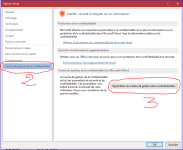
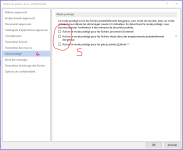
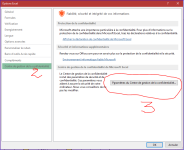
All is OK for Word, the images are for French people;) :
W1.PNG W2et3.PNG W4et5.PNG
But with Excel I cannot find the last step:(
E1.PNG E2et3.PNG E4et..PNG
 
Upvote 0
Upvote 0
Hi @Jeff_T - Testing Group
Thanks for your explanations.
I just checked the memory of my PC, I think it's OK but after the restart I cannot find the summary of the check as indicated during the memory scan:confused:
Where can I find this summary ?

You may try the following steps:

a) Under ‘Event Viewer’ expand ‘Windows Log’ and right-click on ‘System’ and click on ‘Find’.

b) Type in ‘MemoryDiagnostics-Results’ and click on ‘Find Next’.
 
Upvote 0
the option is in "Mode Protege" (8th one)
for excel it's recommended to perform the "Ignore Other applications that use Dynamic Data Exchange (DDE)" thingie
Hi @Evjl's Rain
Can you explain a bit more for a newbie like me what is the "Ignore Other applications that use Dynamic Data Exchange (DDE)" thingie for Excel ?
Thanks;)
 
Upvote 0
You may try the following steps:

a) Under ‘Event Viewer’ expand ‘Windows Log’ and right-click on ‘System’ and click on ‘Find’.

b) Type in ‘MemoryDiagnostics-Results’ and click on ‘Find Next’.
Hello @Jeff_T - Testing Group
Again thanks for your help and kindness.
I apologize but I cannot find the right words in French for typing to search the log:(
Mémoiretest.PNG
 
Upvote 0
Hi @Evjl's Rain
Can you explain a bit more for a newbie like me what is the "Ignore Other applications that use Dynamic Data Exchange (DDE)" thingie for Excel ?
Thanks;)
I don't know it too :D
what I know about it is: DDE allows the applications to communicate and interact with each others (data and memory)
I don't understand why it causes the problem which prevents excel from opening a file from an unreliable source. I was so angry with it because everything I got came from the internet + Disabling those 3 checkboxes in Protected view couldn't solve the problem totally

I did a thorough google search for a solution and that was what I found :D
 
Last edited:
Upvote 0
Hello @Jeff_T - Testing Group
Again thanks for your help and kindness.
I apologize but I cannot find the right words in French for typing to search the log:(
View attachment 128731

Search online using a French top level domain "How to use Microsoft Memory Diagnostic Tool" and "Microsoft Memory Diagnostic Logs."

Other than that, perhaps there is a French-Canadian here at MT that can assist with the translation.
 
Upvote 0
If it were me, then I would just clean install the OS and move on.

These sorts of issues have taken me sometimes months to get sorted out. In the end, what I learned after the monumental effort wasn't worth the aggravation.
Hello @Jeff_T - Testing Group
Do not you think that reinstalling the OS is an extreme solution to solve an issue with a single program ?o_O
If my understanding is good this issue is an Office issue and reinstalling Windows 10 will not solve an Office issue?o_O
 
  • Like
Reactions: SHvFl
Upvote 0
Status
Not open for further replies.