Malware News Microsoft Defender Stops QNET Ransomware Attack in 128 Seconds With Automatic Device Isolation

Parkinsond

Level 65
Thread author
Verified
Top Poster
Well-known
Dec 6, 2023
5,423
17,024
6,369
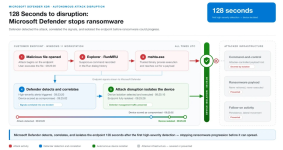
The attack began after a user opened a malicious file, likely delivered through email or a browser download.

It launched mshta.exe, a legitimate Windows utility, which contacted attacker-controlled infrastructure to collect a remote payload and prepare persistent activity.

One flagged suspicious command activity connected to RunMRU registry use, while a correlation engine judged the combined behavior to be malicious rather than normal administration.

The final time from first detection to isolation was 128 seconds. The affected device lost internal and external network access, except for security-management traffic, ending its communication with the attacker-controlled service and leaving an auditable timeline.
1785921752435.png

 
Can any firewall with prompts, such as WFC, abort the attack by denying mshta.exe internet connectivity?
Yes, WFC/SimpleWall/etc. similar Firewall blocks first then show a prompt. They can't halt the connection while showing a prompt like a third-party AV firewall.

So looks like there wouldn't have been any second-stage payload if mshta.exe was blocked in the firewall.
The mshta.exe process contacted an attacker-controlled URL and retrieved a second-stage payload.
 
Can any firewall with prompts, such as WFC, abort the attack by denying mshta.exe internet connectivity?
Yes, WFC/SimpleWall/etc. similar Firewall blocks first then show a prompt. They can't halt the connection while showing a prompt like a third-party AV firewall.

So looks like there wouldn't have been any second-stage payload if mshta.exe was blocked in the firewall.


Which is the reason I quit using the free version of Glasswire, as the prompt came after the connection was established, and not before in blocking it like with WFC set to notify.
 
Last edited:
Isn't it the same for WFC? Maybe @Andy Ful can clarify.

I do not use WFC, but it probably can be configured to blosk/alert connections to the Mshta LOLBin. Similarly, this attack could be prevented by hardening the firewall to block outbound connections to popular LOLBins.
 
Last edited:
I do not use WFC, but it probably can be configured to blosk/alert connections to the Mshta LOLBin. Similarly, this attack could be prevented by hardening the firewall to block outbound connections to popular LOLBins.
I was mainly asking about the ability to hold a connection then ask the user and then allow/disallow the connection based on user's choice. When I used WFC the last time, it could show the pop-up asking but clicking allow doesn't mean the app will immediately start working, the pop-up was shown after the connection has already been blocked since as far I know, without using an separate and appropriate network driver, firewall apps can't hold the connection.
There's even a firewall app (forgot the name) that can do it but it requires disabling memory integrity to install their driver.