Serious Discussion Microsoft Edge Stable (Chromium) Now Available for Download

I was unable to reproduce this. I wonder if there was a driver conflict or something?
Don't think it's a driver related issue since it's happening on Edge only. Maybe Edge related something is trying to reduce its impact on CPU/Ram since I'm gaming and ending up causing an issue. Maybe removing the game from ram by mistake? Your system config is far better than mine. So maybe it's not trying anything extreme on yours. But again, it's just an assumption. I have plans to freshly install Windows when 22H2 comes up next month. I'll try to test again after that.
 
Updated to Version 105.0.1343.25

Feature updates​


Policy updates​

New policies​

Deprecated policies​

Additional policy changes​


Updated to Version 105.0.1343.25

Feature updates​


Policy updates​

New policies​

Deprecated policies​

Additional policy changes​


Microsoft has released the latest Microsoft Edge Stable Channel (Version 105.0.1343.25), which incorporates the latest Security Updates of the Chromium project. For more information, see the Security Update Guide

This update contains the following Microsoft Edge-specific update:
What is the version information for this release?

Microsoft Edge VersionDate ReleasedBased on Chromium Version
105.0.1343.259/1/2022105.0.5195.52/53/54
 
Edge is so buggy: I can't access my autohide taskbar while using Edge. I have to minimize it to get to it. This isn't happening with any other browser.
Not sure what you mean. When I am using edge the taskbar is hidden until I move my mouse down to the taskbar area and then the bar shows like it should.
 

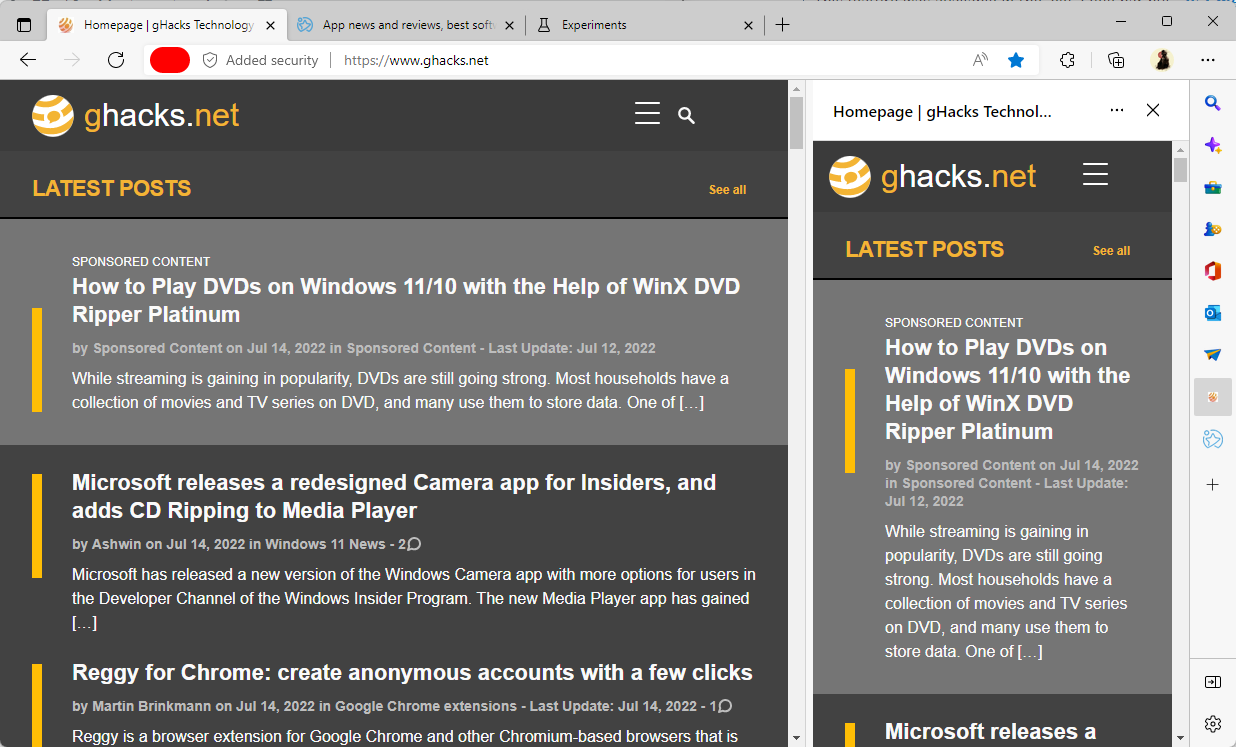
The new sidebar in Microsoft Edge helps you multitask smarter​

At Microsoft Edge, we’re always thinking of ways to help you make the most of your time online – and often times, this involves multitasking. But, multitasking is hard to do well – you start with writing an email, and then you toggle to another tab to grab a link … and next thing you know, you’ve lost your focus and are buried in a new task. That got us thinking: how can Microsoft Edge help you strike the right balance of focus and function? And today, we’re excited to announce that we’ve introduced the sidebar in Microsoft Edge to help you achieve more without losing your flow.

The new sidebar in Microsoft Edge lets you access tools and features side-by-side within your browser, even as you navigate between tabs. From being able to search specifically within the page you’re viewing, to using tools to do quick math without opening another tab, we’ve found a way to help you be more productive without losing your place as you browse.

Today, these features include search, Discover, tools, Games, Office, and Outlook. We plan to add new features to the sidebar in the future, but for now, let us introduce you to the current lineup.
 

Workaround for Microsoft Edge 105 startup problems​

Edge 105 may not start properly anymore after the update to version 105. Our colleagues at Deskmodder have found a workaround for the issue. The issue seems to be caused by Registry keys that seem to have been added to the Registry by accident during the update.

Edge users who are affected by the startup issue need to delete MetricsReportingEnabled keys in the Registry.
  1. Open the Registry Editor: use Windows-R to open the run box, type regedit and hit the Enter-key.
  2. Confirm the UAC prompt.
  3. Select Edit > Find.
  4. Search for MetricsReportingEnabled.
  5. Delete the one or two instances of the key in the Registry.
Microsoft Edge should start normally after the keys have been deleted.

It is unclear how widespread the issue is. Microsoft deprecated the MetricsReportingEnabled and SendSiteInformationToImproveServices policies when it released Microsoft Edge 86 and made them obsolete in Edge 89.

Cautious Edge users may want to create a system backup before updating Edge to a new version. Most users may want to wait until the issue is resolved on Microsoft's end before updating Edge.
 

The new sidebar in Microsoft Edge helps you multitask smarter​


It cannot add a site to the sidebar in Edge stable 105.
 
Version 105.0.1343.27: September 2, 2022
Microsoft has released the latest Microsoft Edge Stable Channel (Version 105.0.1343.25), which incorporates the latest Security Updates of the Chromium project. For more information, see the Security Update Guide

This update contains the following Microsoft Edge-specific update:
What is the version information for this release?

Microsoft Edge VersionDate ReleasedBased on Chromium Version
105.0.1343.279/2/2022105.0.5195.102
 
Is it recommended to enable this setting:

edge site safety services.png

...or is it a privacy concern?
 
Is it recommended to enable this setting:

View attachment 268941

...or is it a privacy concern?
It is nice to get more information on unknown sites, which can be a security feature, but it is no active protection like SmartScreen, you must look at it yourself.
As it queries Bing, that can be a privacy concern.
If you do not use it actively, I would not enable it.
 

Version 105.0.1343.42: September 15, 2022

Stable channel security updates are listed here.
Microsoft has released the latest Microsoft Edge Stable Channel (Version 105.0.1343.42), which incorporates the latest Security Updates of the Chromium project. For more information, see the Security Update Guide