
I have this same issue. Options to open are greyed out.I'm unable to open favorites with the right-click context menu after this update. Right-click context is broken. I'm investigating.
Last edited:


Open MalwareTips from your Home Screen or desktop. Follow discussions, find answers and pick up where you left off.
If you cannot find an install option, update your browser or use its bookmark option to keep MalwareTips close.
After installation, open the app and sign in. Enable push notifications in Preferences if you want alerts. On iPhone and iPad, push requires a Home Screen web app and iOS or iPadOS 16.4 or later.
Sign in to manage notificationsInstallation is optional. Your notification settings stay under your control.
I have this same issue. Options to open are greyed out.I'm unable to open favorites with the right-click context menu after this update. Right-click context is broken. I'm investigating.
Update to Version 129.0.2792.52 (Official build)
No release notes yet.
Microsoft has released the latest Microsoft Edge Stable Channel (Version 129.0.2792.52) and Microsoft Edge Extended Stable Channel (128.0.2739.90) which incorporate the latest updates of the Chromium project.
This update contains the following Microsoft Edge-specific updates:

Fixed various bugs and performance issues, feature updates, site impacting compatibility changes, and policy updates.

Please report the bug via Edge feedback if you haven't already.I have this same issue. Options to open are greyed out.
View attachment 285540

Thanks for posting that image...I was way off, "lost in the ozone again"I have this same issue. Options to open are greyed out.
View attachment 285540

Done.Please report the bug via Edge feedback if you haven't already.
It happens to all of us from time to time.Thanks for posting that image...I was way off, "lost in the ozone again"
Version 129.0.2792.79: October 3, 2024
Fixed various bugs and performance issues.
Stable channel security updates are listed here.

 Coming to your Edge this month.
Microsoft Edge: Elevating top settings and improving settings page navigability
To make finding browser settings more efficient, Microsoft Edge is introducing three navigation improvements to Edge Settings. We are making no changes to the functionality of any setting and all settings will remain on the same page as they are today but will be behind clickable sections. The first is introducing quick access to the most used actions on the landing page of Edge Settings. Second, each densely populated page—Privacy, search, and services; Appearance; Cookies and site permissions; System and performance—will feature quick access to its most used actions. Third, for these same pages, each section will now click-through to its respective sub-settings (similar to a table of contents).
- Feature ID: 416093
- Added to roadmap: 9/12/2024
- Last modified: 9/16/2024
- Product(s): Microsoft Edge
- Cloud instance(s): Worldwide (Standard Multi-Tenant)
- Platform(s): Desktop
- Release phase(s): General Availability
Rollout Start: October 2024
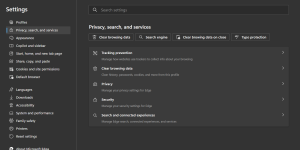
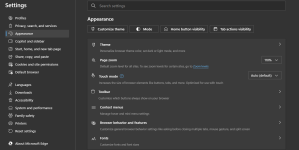
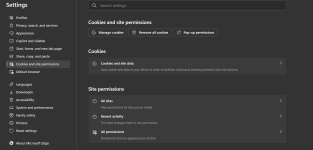

3rd party cookies are blocked on my Microsoft Edge browser by default, even when it is enabled on my settings, I don't think it is a bug, they mentioned that it will be blocked in the future, and they started to try it on some users, from your screenshots I think they already removed it.One thing I notice is that there is no setting for 3rd party cookies in the settings page.
This change was promised in earlier versions of this document, but the new wording makes it apparent they are actively developing the Storage Access API (and possibly closer to the goal), which is a positive step for Edge users.The CompatExceptions list
Based on recent user feedback Microsoft received, Microsoft Edge maintains a small list of sites (most of which are in the Disconnect Content category) that were breaking due to tracking prevention despite having the above two mitigations in place. Sites on this list are exempt from tracking prevention enforcements. The list can be found on disk at the locations described below. Users may override entries on it using the Block option in edge://settings/content/cookies.
To avoid maintaining this list moving forwards, Microsoft is currently working on the Storage Access API in the open-source codebase. The Storage Access API gives site developers a way to request storage access from users directly, providing users with more transparency into how their privacy settings are affecting their browsing experience, and giving site developers controls to quickly and intuitively unblock themselves.
After the Storage Access API is implemented, Microsoft will deprecate the CompatExceptions list and reach out to the affected sites both to make them aware of the issues, and to request that they use the Storage Access API moving forward.

October 9, 2024
Microsoft is aware of the recent Chromium security fixes. We are actively working on releasing a security fix.
Updated changelog:Updated to Version 129.0.2792.89
Release notes for Microsoft Edge Security Updates
Release notes for Microsoft Edge Security Updateslearn.microsoft.com
October 10, 2024
Microsoft has released the latest Microsoft Edge Stable Channel (Version 129.0.2792.89) and Microsoft Edge Extended Stable Channel (128.0.2739.113) which incorporate the latest updates of the Chromium project. For more information, see the Security Update Guide.

Changelog not published yet
Version 130.0.2849.46: October 17, 2024
Fixed various bugs and performance issues, Dev channel updates, announcements, feature updates, site compatibility impacting changes, and policy updates.
Stable channel security updates are listed here.
Fixed various bugs and performance issues.

Members who viewed this thread in the last 5 minutes

