
What channel version are you using? Toggle is still available on my Edge v140.xxxxGot the latest update and it enabled it and it appears no way of turning it off??


Open MalwareTips from your Home Screen or desktop. Follow discussions, find answers and pick up where you left off.
If you cannot find an install option, update your browser or use its bookmark option to keep MalwareTips close.
After installation, open the app and sign in. Enable push notifications in Preferences if you want alerts. On iPhone and iPad, push requires a Home Screen web app and iOS or iPadOS 16.4 or later.
Sign in to manage notificationsInstallation is optional. Your notification settings stay under your control.
What channel version are you using? Toggle is still available on my Edge v140.xxxxGot the latest update and it enabled it and it appears no way of turning it off??


You could delete Edge? Add use Brave??140.3485.66 i cannot remove this icon and it's driving me nuts!!!! I contacted microsoft on a live chat they connected and confirmed it was a bug. Maybe they should have better quality control. How the hell do you go screwing settings that have been apart of the OS since it came out!


Yandex is even better; any new extension is pinned by default.You could delete Edge? Add use Brave??
140.3485.66 i cannot remove this icon and it's driving me nuts!!!! I contacted microsoft on a live chat they connected and confirmed it was a bug. Maybe they should have better quality control. How the hell do you go screwing settings that have been apart of the OS since it came out!
Chrome never allowed hiding extensions button; not a big deal.Yet another example of Microsoft not giving a hoot this will fall back on them looks like they regret the reviews.
It's probably an A/B test, as @Parkinsond alluded to.Yet another example of Microsoft not giving a hoot this will fall back on them looks like they regret the reviews.

Fixed various bugs, fixes and performance issues.
Stable channel security updates are listed here.
Fixes
- Fixed an issue where a transparent overlay appeared on the address bar when in IE mode.
Microsoft has released the latest Microsoft Edge Stable Channel (Version 140.0.3485.81) which incorporates the latest Security Updates of the Chromium project. This update contains a fix for CVE-2025-10585 which has been reported by the Chromium team as having an exploit in the wild. For more information, see the Security Update Guide.


Game Assist didn't reinstall after this updateVersion 140.0.3485.81: September 19, 2025
Microsoft Edge release notes for Stable Channel
Microsoft Edge release note for the Stable Channellearn.microsoft.com

MS is afraid to get users provoked by auto-reinstall of game assist to uninstall Edge completelyGame Assist didn't reinstall after this update

Fixed various bugs and performance issues and feature updates.
Stable channel security updates are listed here.
Fixed various bugs and performance issues, feature updates, policy updates, and web platform release notes.
Stable channel security updates are listed here.
Announcements
- New PDF Viewer Enabled by Default in Microsoft Edge. In Microsoft Edge Stable version 141, the Adobe-powered PDF viewer is now the default experience for enterprise users on Windows. Migration will occur on a phased rollout and will continue over the next few months. This change enhances performance, accessibility, and compatibility, and introduces exclusive enterprise features. Admins can manage the experience using the NewPDFReaderEnabled policy which controls the default viewer in Edge for Windows or the NewPDFReaderWebView2List policy which controls viewer behavior in WebView2 apps. For more information, see the FAQ page. Also, tenant admins can find additional details in the Message Center section of the Microsoft 365 Admin Center under MC1154300.
- Local Network Access. Local Network Access in Microsoft Edge is a security feature that restricts a website’s ability to send requests to servers on your local network. When a website tries to connect, Microsoft Edge shows a prompt asking you to grant or deny permission. This protects privacy and security while maintaining compatibility with modern web standards. The ability of a website to request this permission from users is restricted to secure contexts. This feature is currently disabled by default in Microsoft Edge, but the default state will change starting in Edge 143. Enterprise administrators can configure Local Network Access policies. More information for users and administrators can be found here: Control a website’s access to the local network in Microsoft Edge.
Fixes
- Fixed an issue where a UIA (UI Automation) element recursively referenced itself as a child, causing timeouts and memory issues.
Feature Updates
- Real-time video translation. Real-time video translation. If you're learning a new language, or just like to watch foreign videos with subtitles in your preferred language, Microsoft Edge can help. With real-time video translation in Edge, you can watch videos in a different language with translated audio dub. Feature availability and functionality may vary by device type, hardware configuration (minimum 12 GB RAM and 4-core CPU), region, and platform. Availability is limited to select markets. For more information, see Real-time video translation | Microsoft Edge. Admins can control availability to this feature using the LiveVideoTranslationEnabled policy.
- Policy to enable/disable Microsoft 365 Copilot Chat in Edge for Business from showing in the toolbar. Edge for Business now has a dedicated policy, Microsoft365CopilotChatIconEnabled, to enable and disable Copilot in Edge from showing in the Edge toolbar. This policy is the sole control for managing Copilot's visibility in the toolbar and the HubsSidebarEnabledd policy will no longer control the visibility of the Copilot toolbar button.
- Tab preview on hover policy. The ShowTabPreviewEnabled policy lets administrators control whether Microsoft Edge displays a preview of the tab content when the user hovers over a tab. If the policy is enabled or not configured, Microsoft Edge shows a tab preview when the user hovers over a tab.
- Update to "Clear Browsing Data on Close" behavior. The "Clear browsing data on close" setting (edge://settings/privacy/clearBrowsingData/clearOnClose) no longer supports automatic deletion of Passwords and Autofill data. The Passwords and Autofill form data toggles have been removed from the Settings page. Manual deletion of Passwords and Autofill remains possible via the "Delete browsing data" settings. The other data types (Browsing history, Download history, Cookies, Cached images, and Site permissions) are unaffected and can still be cleared on exit. This update does not impact enterprise policies, which continue to function as expected.
Policy updates
New policies
- LiveVideoTranslationEnabled - Allows users to translate videos to different languages
- OriginKeyedProcessesEnabled - Enable origin-keyed process isolation for improved security
- RelaunchFastIfOutdated - Relaunch browser quickly when the current version is outdated
- ShowTabPreviewEnabled - Enable tab preview on hover
- WebRtcPostQuantumKeyAgreement - Enable post-quantum key agreement for WebRTC
Obsoleted policies
- GamerModeEnabled - Enable Gamer Mode (obsolete)
This update has broken the Chromium's dark mode flag. I tried all the available modes and none of them is usable.Version 141.0.3537.57 October 2, 2025
Microsoft Edge release notes for Stable Channel
Microsoft Edge release note for the Stable Channellearn.microsoft.com
It seems that this feature does what this filter list from uBO does. It's nice to have this natively in the browser
- Local Network Access. Local Network Access in Microsoft Edge is a security feature that restricts a website’s ability to send requests to servers on your local network. When a website tries to connect, Microsoft Edge shows a prompt asking you to grant or deny permission. This protects privacy and security while maintaining compatibility with modern web standards. The ability of a website to request this permission from users is restricted to secure contexts. This feature is currently disabled by default in Microsoft Edge, but the default state will change starting in Edge 143. Enterprise administrators can configure Local Network Access policies. More information for users and administrators can be found here: Control a website’s access to the local network in Microsoft Edge.

 github.com
It is broken from the previous update (140); another nice extension I am using instead of dark reader until the flag get fixed:This update has broken the Chromium's dark mode flag. I tried all the available modes and none of them is usable.
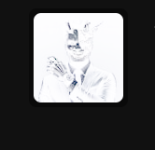
Look how it makes @Jack and my photos negative. Reminds me of my father's old camera.
View attachment 291506View attachment 291507
This is not Edge's fault. It's the same with Chrome. I'm forced to go back to using the Dark Reader extension.
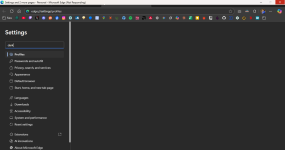
Another thing is, Edge got stuck at not responding when I tried to search something in settings. Took 2 minutes to go back to normal.
View attachment 291508
It seems that this feature does what this filter list from uBO does. It's nice to have this natively in the browser

uAssets/filters/lan-block.txt at master · uBlockOrigin/uAssets
Filter lists for uBlock Origin & uBlock Origin Lite - uBlockOrigin/uAssets

 chromewebstore.google.com
I didn't face the issue in the previous update, only after 141.It is broken from the previous update (140); another nice extension I am using instead of dark reader until the flag get fixed:
Night Shift - Chrome Web Store
Night Shift automatically shifts the colors of your browser content to the warmer end of the color spectrum after dark.
One advantage; if the dark mode is breaking a certain website, you can disable and enable the greyish shade (better than nothing).I didn't face the issue in the previous update, only after 141.
This extension works well too though I am not sure if it has any advantage over Dark Reader.
I see. Similar is possible on Dark Reader also but anyway, I tried it and on some complex website Dark Reader worked better but I will keep Night Shift in mind.One advantage; if the dark mode is breaking a certain website, you can disable and enable the greyish shade (better than nothing).
I hope to get a toggle for dark webpage flag in toolbar or sidebar, similar to already there in Yandex; if Yandex could do it, Chrome and Edge definitely can.But ultimately hoping for the chromium dark mode flag to be fixed in a near future update
It's working in both Chrome and Edge, as far as I can tell.This is not Edge's fault. It's the same with Chrome. I'm forced to go back to using the Dark Reader extension.
Members who viewed this thread in the last 5 minutes

