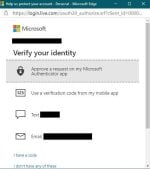
Hi, guys Microsoft is not giving me any code.
Here is a post on ms forum
I've yet to see a solution to my problem.
I actually went to try and update my security info on my account which requires a second verification (after already having logged in with my password), so I chose to send to my email, not my hotmail for some reason, but another email. Which is fine, but once I choose that option, and verify what that email address is, the verification code never actually comes--not to my inbox, and not to my junk mail. I tried using Edge browser (on my surface laptop operating on windows 10) to login which makes no difference.
What is going on???
this is the same thing as me can anyone help?

Here is a post on ms forum
I've yet to see a solution to my problem.
I actually went to try and update my security info on my account which requires a second verification (after already having logged in with my password), so I chose to send to my email, not my hotmail for some reason, but another email. Which is fine, but once I choose that option, and verify what that email address is, the verification code never actually comes--not to my inbox, and not to my junk mail. I tried using Edge browser (on my surface laptop operating on windows 10) to login which makes no difference.
What is going on???
this is the same thing as me can anyone help?
Microsoft not sending verification code to email
I've yet to see a solution to my problem. I actually went to try and update my security info on my account which requires a second verification (after already having logged in with my password), so I
answers.microsoft.com