Malware News Microsoft Reveals ClickFix Campaign Using Windows Terminal to Deploy Lumma Stealer

Khushal

Level 16
Thread author
Verified
Top Poster
Well-known
Apr 4, 2024
755
4,725
1,469
ClickFix has moved to Windows Terminal.

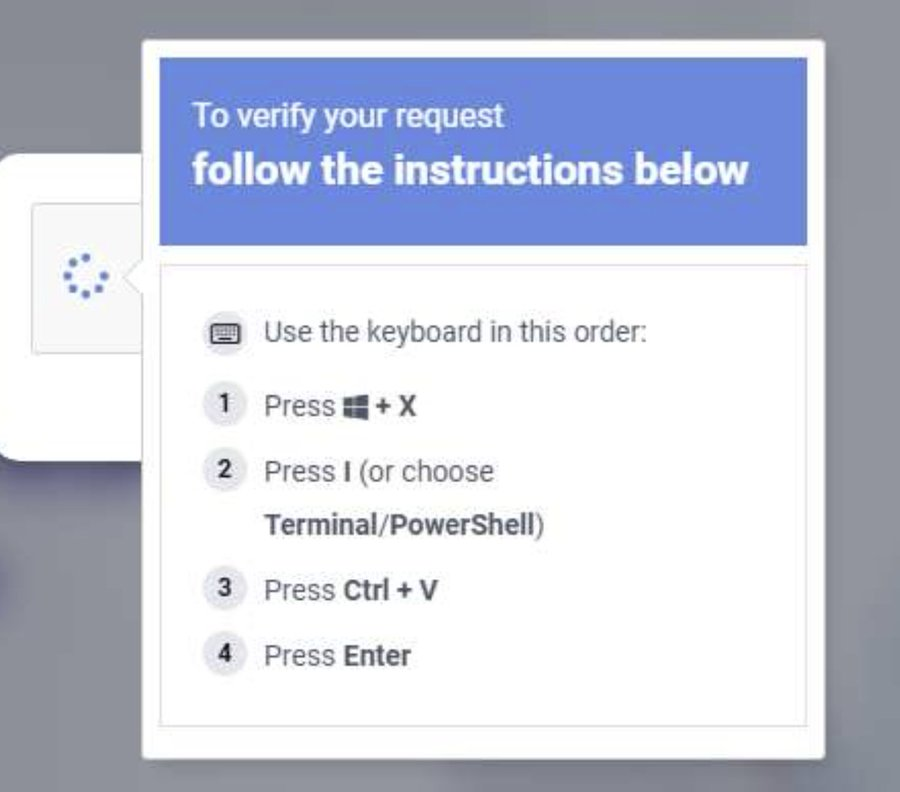
Microsoft says victims are told to open wt.exe and paste a command from fake CAPTCHA pages.

That launches PowerShell, pulls payloads, and injects Lumma Stealer into Chrome and Edge to steal saved credentials.
1772792170539.png

 
Thanks @Khushal for bringing this alert, it’s a valuable contribution to the community.What’s striking about this ClickFix campaign is that it doesn’t exploit a technical flaw, but rather relies on the user to run a command in the terminal. That action, disguised as a simple CAPTCHA, ends up installing Lumma Stealer, which steals passwords stored in Chrome and Edge.

For those looking to strengthen their defenses, here are some practical tips:

  • If a site asks you to open the terminal or paste commands, be suspicious and close the tab.
  • Use blockers and filters (uBlock, AdGuard) to stop malicious pages before they load.
  • A password manager is safer than storing credentials in the browser.
  • Keep Windows and your browser updated.
  • And above all: think twice before clicking when something feels out of the ordinary.
🚨🛡️
 
It opens the command prompt if you have set it as default; if you have set PowerShell (better 7), it opens that.

Obviously, none of this is Admin.

Ctrl + v would copy the contents of the clipboard and paste it into Powershell/command prompt, but not only that, a warning pop-up appears on the screen if someone notices a command they don't know or are unfamiliar with.
Would you enter it?

Mah !! :unsure:

P.S.

I would advise these potential users to take two extreme measures to protect themselves from fake captchas.

The best protection is to use at least the:
  • Enhanced Easy Mode
dynamic filtering, which blocks all real captchas.
Therefore, an unblocked fake captcha is a warning sign.

Since I know that the targets are Edge/Chrome, start these browsers with Chromium Command Line Switch

Code:
--disable-reading-from-canvas

which also has the effect of preventing real captchas from evolving correctly.
Again, any efficient fake captcha is a warning sign.
 
Last edited:
Executive Summary

Confirmed Facts

A widespread "ClickFix" campaign is actively using social engineering to trick users into copying commands from fake CAPTCHA pages and pasting them into Windows Terminal (wt.exe). This manual action executes PowerShell scripts that download and inject the Lumma Stealer payload into Google Chrome and Microsoft Edge to exfiltrate saved credentials.

Assessment
This campaign represents a significant shift from exploiting technical software vulnerabilities to exploiting human psychology. By guiding victims to use built-in, trusted OS tools, the attackers leverage Living-off-the-Land (LotL) techniques to successfully bypass traditional perimeter detections.

Technical Analysis & Remediation

MITRE ATT&CK Mapping

T1204.002

User Execution: Malicious File

T1059.001
Command and Scripting Interpreter: PowerShell

T1552.001
Unsecured Credentials: Credentials In Files

CVE Profile
N/A [CISA KEV Status: Inactive].
This attack does not exploit a technical flaw, but rather relies exclusively on user interaction.

Telemetry

Target Binary

"wt.exe"

Execution Shortcut
"Windows + X → I"

Target Browsers
Chrome, Edge

Constraint
Specific C2 IPs, payload hashes, and delivery URLs are absent from the provided telemetry and remain "Unknown." The behavior suggests a script-based cradle that pulls the final Lumma binary into memory.

Remediation - THE ENTERPRISE TRACK (NIST SP 800-61r3 / CSF 2.0)

GOVERN (GV) – Crisis Management & Oversight

Command
Issue a priority security advisory to all staff regarding fake CAPTCHA pages requesting terminal execution.

DETECT (DE) – Monitoring & Analysis

Command
Implement SIEM hunting queries for anomalous child processes spawned by wt.exe, specifically looking for obfuscated or heavily encoded powershell.exe execution.

RESPOND (RS) – Mitigation & Containment

Command
Isolate endpoints where wt.exe has spawned unauthorized outbound network connections or injected processes into browser executables.

RECOVER (RC) – Restoration & Trust

Command
Force session revocation and password resets for all corporate credentials stored on compromised hosts.

IDENTIFY & PROTECT (ID/PR) – The Feedback Loop

Command
Deploy Group Policy or AppLocker rules to restrict wt.exe and powershell.exe execution for non-administrative users.

Command
Implement network-level blockers and ad-filtering (e.g., uBlock) to intercept malicious landing pages before they render.

Remediation - THE HOME USER TRACK (Safety Focus)

Priority 1: Safety

Command
Disconnect from the internet immediately if you have pasted commands into a terminal window from an unknown website.

Command
Do not log into banking/email until the machine is verified clean.

Priority 2: Identity

Command
Reset passwords and cycle MFA tokens using a known clean device (e.g., your smartphone on a cellular network), because Lumma Stealer specifically targets credentials saved in Chrome and Edge.

Priority 3: Persistence

Command
Check Scheduled Tasks, Startup Folders, and Browser Extensions for unauthorized persistence mechanisms.

Hardening & References

Baseline

CIS Benchmarks for Windows OS (Restrict PowerShell Execution Policy and harden User Account Control).

Framework
NIST CSF 2.0 / SP 800-61r3.

Style
To mitigate the blast radius of infostealers like Lumma, users should utilize dedicated password managers rather than storing credentials directly within the browser's native credential store. Always think twice and close the tab if a site asks you to open the terminal or paste commands.

Source

Microsoft Threat Intelligence

The Hacker News