Technical Analysis & Remediation
MITRE ATT&CK Mapping
T1204.002
User Execution: Malicious File
T1059.001
Command and Scripting Interpreter: PowerShell
T1552.001
Unsecured Credentials: Credentials In Files
CVE Profile
N/A [CISA KEV Status: Inactive].
This attack does not exploit a technical flaw, but rather relies exclusively on user interaction.
Telemetry
Target Binary
"wt.exe"
Execution Shortcut
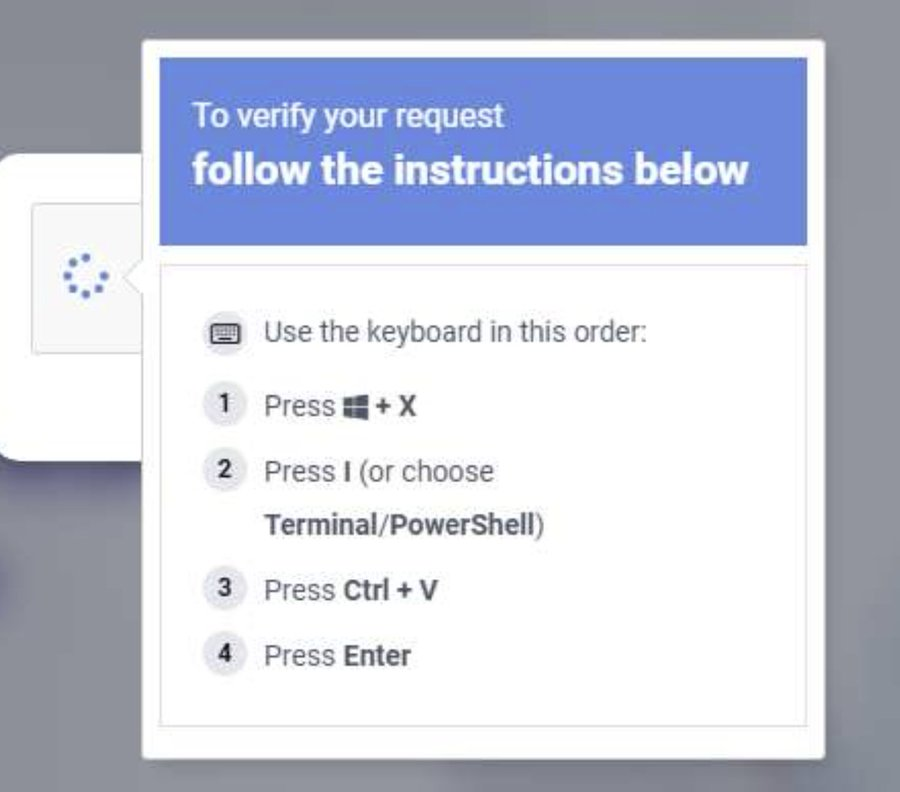
"Windows + X → I"
Target Browsers
Chrome, Edge
Constraint
Specific C2 IPs, payload hashes, and delivery URLs are absent from the provided telemetry and remain "Unknown." The behavior suggests a script-based cradle that pulls the final Lumma binary into memory.
Remediation - THE ENTERPRISE TRACK (NIST SP 800-61r3 / CSF 2.0)
GOVERN (GV) – Crisis Management & Oversight
Command
Issue a priority security advisory to all staff regarding fake CAPTCHA pages requesting terminal execution.
DETECT (DE) – Monitoring & Analysis
Command
Implement SIEM hunting queries for anomalous child processes spawned by wt.exe, specifically looking for obfuscated or heavily encoded powershell.exe execution.
RESPOND (RS) – Mitigation & Containment
Command
Isolate endpoints where wt.exe has spawned unauthorized outbound network connections or injected processes into browser executables.
RECOVER (RC) – Restoration & Trust
Command
Force session revocation and password resets for all corporate credentials stored on compromised hosts.
IDENTIFY & PROTECT (ID/PR) – The Feedback Loop
Command
Deploy Group Policy or AppLocker rules to restrict wt.exe and powershell.exe execution for non-administrative users.
Command
Implement network-level blockers and ad-filtering (e.g., uBlock) to intercept malicious landing pages before they render.
Remediation - THE HOME USER TRACK (Safety Focus)
Priority 1: Safety
Command
Disconnect from the internet immediately if you have pasted commands into a terminal window from an unknown website.
Command
Do not log into banking/email until the machine is verified clean.
Priority 2: Identity
Command
Reset passwords and cycle MFA tokens using a known clean device (e.g., your smartphone on a cellular network), because Lumma Stealer specifically targets credentials saved in Chrome and Edge.
Priority 3: Persistence
Command
Check Scheduled Tasks, Startup Folders, and Browser Extensions for unauthorized persistence mechanisms.
Hardening & References
Baseline
CIS Benchmarks for Windows OS (Restrict PowerShell Execution Policy and harden User Account Control).
Framework
NIST CSF 2.0 / SP 800-61r3.
Style
To mitigate the blast radius of infostealers like Lumma, users should utilize dedicated password managers rather than storing credentials directly within the browser's native credential store. Always think twice and close the tab if a site asks you to open the terminal or paste commands.
Source
Microsoft Threat Intelligence
The Hacker News




thehackernews.com


 ☣
☣


