multiple chrome processes

jeffsic

New Member
Thread author
Nov 4, 2014
5
0
3
seems to have happened just today. I have at least 7-10 ofgxztvl.exe *32 processes running. I obviously tried to delete the processes and run some virus/maleware programs as listed above. but they keep coming back unless I boot in safe mode. I have included the farbar logs. any help would be much appreciated.

Thanks
jeff
 

Attachments

Re-run FRST.exe as you did before ...

  • Download fixlist.txt that you find attached at the bottom of this post and save it same place you
  • Press the Fix button once and wait.
  • FRST will process fixlist.txt
  • When finished, it will produce a log fixlog.txt and will keep that log in the same folder where FRST.exe is.


> Attach here fixlog.txt logreport.
 

Attachments

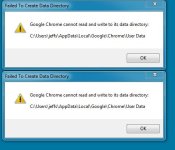
I received a couple of messages as the fix was processing. I assume it was because the fix was working but I included a picture of the errors just in case. Capture.JPG

PS. I checked and didn't see any of the processes running. Yea!! am I fixed
 

Attachments

thanks for the help. I really appreciate it. Can you tell me if this malware you got rid of has a name and is there any programs that could have stopped this. thanks

PS. donated a pitcher of beer for you guys.
 
It is a new malware.


The following will implement some post-cleanup procedures:

=> Please download DelFix by Xplode to your Desktop.

Run the tool and check the following boxes below;
checkmark.png
Remove disinfection tools
checkmark.png
Create registry backup
checkmark.png
Purge System Restore

Click Run button and wait a few seconds for the programme completes his work.
At this point all the tools we used here should be gone. Tool will create an report for you (C:\DelFix.txt)

The tool will also record healthy state of registry and make a backup using ERUNT program in %windir%\ERUNT\DelFix
Tool deletes old system restore points and create a fresh system restore point after cleaning.


Cheers :)