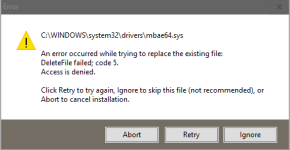
my disk usage is always 100%, but no antimalware scanners detect anything

water

New Member
i have a new gaming pc, but the disk usage is always around 100%, my pc is getting slower and slower, no scanners are detecting anything and i cant even reinstall malwarebytes without getting this error. please help a brother out:C
 

Attachments

  • Addition.txt
    Addition.txt
    35 KB · Views: 4
  • FRST.txt
    FRST.txt
    230.7 KB · Views: 3
  • daf780659a3c7fc208edf602e172c3ad.png.1bad775154e88c7217ce32fd214a3198.png
    daf780659a3c7fc208edf602e172c3ad.png.1bad775154e88c7217ce32fd214a3198.png
    8 KB · Views: 3
Hello,


Check Disk
  • Press the
    WindowsKey.png
    on your keyboard. Type cmd and right click >> Run as Administrator.
  • Copy/Enter the command below and press Enter:
  • Code:
    chkdsk C: /r
  • You should get a message to schedule Check Disk at next system restart. Please type Y and press Enter.
  • All you should do now is to restart your PC and let the Check Disk process finish uninterrupted.
Check Disk report:
  • Press the
    WindowsKey.png
    + R on your keyboard at the same time. Type eventvwr and click OK.
  • In the left panel, expand Windows Logs and then click on Application.
  • Now, on the right side, click on Filter Current Log.
  • Under Event Sources, check only Wininit and click OK.
  • Now you'll be presented with one or multiple Wininit logs.
  • Click on an entry corresponding to the date and time of the disk check.
  • On the top main menu, click Action > Copy > Copy Details as Text.
  • Paste the contents into your next reply.
 

Recently browsing

Members who viewed this thread in the last 5 minutes

Back
Top