

The MalwareTips app
Your community, one tap away.
Open MalwareTips from your Home Screen or desktop. Follow discussions, find answers and pick up where you left off.
- Home Screen access
- Optional push alerts
- Your community
You're ready to explore.Explore what's new
Installation instructions
iPhone & iPad
- Open MalwareTips in Safari and tap Share. You may need to open the Page Menu first.
- Choose Add to Home Screen. If it is not listed, use Edit Actions to add it.
- Keep Open as Web App enabled if shown, then tap Add.
Android
- Open MalwareTips in Chrome or another browser that supports app installation.
- Open the browser menu and look for Install app, Install and create shortcut, or Add to Home screen.
- Choose Install and confirm. Wording varies by browser.
Desktop
- Chrome: use the install icon in the address bar, or the menu under Cast, save and share.
- Edge: open the menu, then More tools, Apps and Install this site as an app.
- Safari on Mac: choose Share or File, then Add to Dock. Firefox on Windows: look for the web apps button in the address bar.
If you cannot find an install option, update your browser or use its bookmark option to keep MalwareTips close.
Keep up with your conversations
After installation, open the app and sign in. Enable push notifications in Preferences if you want alerts. On iPhone and iPad, push requires a Home Screen web app and iOS or iPadOS 16.4 or later.
Sign in to manage notificationsInstallation is optional. Your notification settings stay under your control.
You are using an out of date browser. It may not display this or other websites correctly.
You should upgrade or use an alternative browser.
You should upgrade or use an alternative browser.
My Services.msc :(
-
 Thread starter
Gib
Thread starter
Gib
- Start date
- 49 Replies
- 6,723 Views
- Status
- Not open for further replies.

Hello, Welcome to MalwareTips.
I'm nasdaq and will be helping you.
If you can please print this topic it will make it easier for you to follow the instructions and complete all of the necessary steps in the order listed.
===
The Farbar program is updated often.
If it's identified as suspicious by your Anti-Virus program trust it if Downloaded from this link:
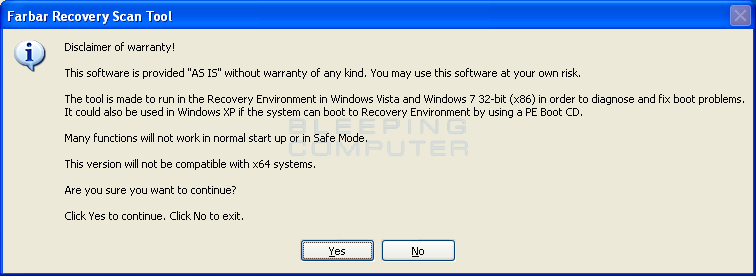
 www.bleepingcomputer.com
You can possibly restore the program from the Quarantine folder used by your Virus Protection Software.
<<<>>>
If you need additional help please ask.
I'm nasdaq and will be helping you.
If you can please print this topic it will make it easier for you to follow the instructions and complete all of the necessary steps in the order listed.
===
The Farbar program is updated often.
If it's identified as suspicious by your Anti-Virus program trust it if Downloaded from this link:
Download Farbar Recovery Scan Tool
Farbar Recovery Scan Tool, or FRST, is a portable application designed to run on Windows XP, Windows Vista, Windows 7, Windows 8, and Windows 10 in normal or safe mode to diagnose malware issues.
You can possibly restore the program from the Quarantine folder used by your Virus Protection Software.
<<<>>>
If you need additional help please ask.
Hi,
Your logs are clean of malware.
Lets see if we can fix this error.
How to Fix DCOM Error 1084 on Windows 10
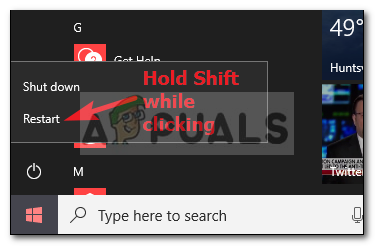
 appuals.com
<<<>>>
appuals.com
<<<>>>
Press the Windows key + r on your keyboard at the same time. This will open the RUN BOX.
Type Notepad and and click the OK key.
Please copy the entire contents of the code box below to the a new file.
Save the file as fixlist.txt in the same folder where the Farbar tool is running from.
The location is listed in the 3rd line of the Farbar log you have submitted.
Run FRST and click Fix only once and wait.
The tool will create a log (Fixlog.txt) please post it to your reply.
===
Please post the Fixlog.txt.
If the problem persists please scan the computer with the Farbar program and post fresh logs log my review.
Your logs are clean of malware.
Lets see if we can fix this error.
How to Fix DCOM Error 1084 on Windows 10
How to Fix DCOM Error 1084 on Windows 10 - Appuals.com
The ‘DCOM got Error 1084’ usually appears if you’ve recently updated your Windows which can be due to corrupt system files or registry errors. DCOM
appuals.com
Press the Windows key + r on your keyboard at the same time. This will open the RUN BOX.
Type Notepad and and click the OK key.
Please copy the entire contents of the code box below to the a new file.
Code:
start

Comment: For your security a new restore point will be created.
CreateRestorePoint:
Comment: We need to close all processes to complete the fix.
CloseProcesses:

Comment: Items from the FRST.TXT log that will be removed from the Registry.
HKLM\SOFTWARE\Policies\Mozilla\Firefox: Restriction <==== ATTENTION
S3 cpuz153; \??\C:\WINDOWS\temp\cpuz153\cpuz153_x64.sys [X]


Comment: TCP/IP Reset
CMD: netsh int ip reset c:\resetlog.txt
CMD: ipconfig /flushDNS

Comment: To rebuild the performance counter library values.
CMD: "%WINDIR%\SYSTEM32\lodctr.exe /R"
CMD: "%WINDIR%\SysWOW64\lodctr.exe /R"
CMD: "C:\Windows\SYSTEM32\lodctr.exe /R"
CMD: "C:\Windows\SysWOW64\lodctr.exe /R"

Comment: Use Farbar routine to delete temp files
C:\Windows\Temp\*.*
C:\WINDOWS\system32\*.tmp
C:\WINDOWS\syswow64\*.tmp
C:\Program Files (x86)\Temp\*.tmp

cmd: sfc /scannow
cmd: DISM.exe /Online /Cleanup-image /Scanhealth
cmd: DISM.exe /Online /Cleanup-image /Restorehealth

Comment: The system will restart.
Reboot:

End
Save the file as fixlist.txt in the same folder where the Farbar tool is running from.
The location is listed in the 3rd line of the Farbar log you have submitted.
Run FRST and click Fix only once and wait.
The tool will create a log (Fixlog.txt) please post it to your reply.
===
Please post the Fixlog.txt.
If the problem persists please scan the computer with the Farbar program and post fresh logs log my review.
Hi,
The fixlog looks good. Any remaining issues?
FYI.
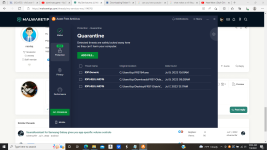
When a file is quarantined by the AV it can be recovered.
In the explample you posted I would check the box"IDP.Generic" and accept it. Making sure that the file listed is what I'm looking for.
The file should be de-quarantined and you should be able to run it.
The fixlog looks good. Any remaining issues?
FYI.
When a file is quarantined by the AV it can be recovered.
In the explample you posted I would check the box"IDP.Generic" and accept it. Making sure that the file listed is what I'm looking for.
The file should be de-quarantined and you should be able to run it.

Thanks for the information. As far as the service that I stopped and disabled, I did that yesterday. I checked this morning and the settings did not change, however, I checked a minute ago and the setting in services.msc is back to being enabled and manual.
Hi,
Letùs reset these services:
Please download the attached Fixlist.txt file to the same folder where the Farbar tool is running from.
The location is listed in the 3rd line of the FRST.txt log you have submitted.
Run FRST and click Fix only once and wait.
The Computer will restart when the fix is completed.
It will create a log (Fixlog.txt) please post it to your reply.
===
Please post the Fixlog.txt and let me know what problem persists.
Letùs reset these services:
Please download the attached Fixlist.txt file to the same folder where the Farbar tool is running from.
The location is listed in the 3rd line of the FRST.txt log you have submitted.
Run FRST and click Fix only once and wait.
The Computer will restart when the fix is completed.
It will create a log (Fixlog.txt) please post it to your reply.
===
Please post the Fixlog.txt and let me know what problem persists.
Attachments
Hi,
Please download the attached Fixlist.txt file to the same folder where the Farbar tool is running from.
The location is listed in the 3rd line of the FRST.txt log you have submitted.
Run FRST and click Fix only once and wait.
The Computer will restart when the fix is completed.
It will create a log (Fixlog.txt) please post it to your reply.
===
Please post the Fixlog.txt wait for further instructions.
Please download the attached Fixlist.txt file to the same folder where the Farbar tool is running from.
The location is listed in the 3rd line of the FRST.txt log you have submitted.
Run FRST and click Fix only once and wait.
The Computer will restart when the fix is completed.
It will create a log (Fixlog.txt) please post it to your reply.
===
Please post the Fixlog.txt wait for further instructions.
Attachments


Hi,
What I'm I doing wrong?
Why did you start a new topic here:

 malwaretips.com
What I'm I doing wrong?
Why did you start a new topic here:
Services.msc Issue
Hello, I do need help with something. I was able to stop any given service from running, however, when I try to disable one in particular, I get a "parameter is incorrect", message. Also, I had a service turned off and disabled and it changed to manual while staying idle.
malwaretips.com
Hi,
Let keep the communications on this topic.
Please post the latest Farbar logs here.
Can you tell me which services were turned/disabled and then were changed to manual.
I would like to find out if any of these services are normally set by the Operating system.
I will close the there topic.
Let keep the communications on this topic.
Please post the latest Farbar logs here.
Hello, I do need help with something. I was able to stop any given service from running, however, when I try to disable one in particular, I get a "parameter is incorrect", message. Also, I had a service turned off and disabled and it changed to manual while staying idle.
Can you tell me which services were turned/disabled and then were changed to manual.
I would like to find out if any of these services are normally set by the Operating system.
I will close the there topic.
- Status
- Not open for further replies.
Recently browsing
Members who viewed this thread in the last 5 minutes
You may also like...
-
D
Serious Discussion Eset & MD Win11 Conflict
-

- T
-

-