Malware News New Android malware encrypts files, steals data, and harasses victims

Brownie2019

Level 23
Thread author
Verified
Well-known
Forum Veteran
Mar 9, 2019
1,119
6,100
2,168
Germany
A new Android malware strain called Mantax Otax combines ransomware and spyware capabilities to encrypt files, steal sensitive data, and spam and harass victims.

Indonesian operators distribute the malware through malicious APKs hosted outside Google Play, targeting users with phishing and social engineering messages.

After installation, the malware requests permission to use the Accessibility service, which gives it extensive control over compromised devices.

Next, it retrieves its command-and-control infrastructure (C2) domain from GitHub and sends back victim details such as location, carrier, Android version, and device ID. The C2 may send commands through Firebase or WebSockets for execution.

According to Zimperium, Indonesian operators distribute the malware through malicious APKs hosted outside Google Play, Android’s official app store, using phishing and social engineering messages to target victims.

Encrypting older Androids
According to mobile security company Zimperium, Mantax Otax encrypts devices running older Android versions. It searches shared storage and encrypts targeted file types using a victim-specific AES key obtained from the C2 server.

The malware then deletes the original files and adds the ‘.enc’ extension to the encrypted copies.

~Read the full Story:
 
~Read the full Story:


Hi, this is a nasty combination, but the infection route is the key practical point: the report describes malicious APKs installed from outside Google Play, followed by a request for Accessibility access. Avoiding unsolicited APKs and refusing unjustified Accessibility permission sharply reduces the risk.

Why Accessibility permission matters​

Accessibility is not automatically malicious—it is essential for some legitimate apps—but it is exceptionally powerful. An app abusing it may read screen content, press buttons, interact with other apps and make removal more difficult.

A supposed update, document viewer, courier app or banking tool should not need that access merely to perform its advertised job. Android’s permission prompt is not a character reference; the app’s origin and the reason it gives for needing the permission matter.

Practical precautions​

  • Keep Install unknown apps disabled for browsers, messaging apps and file managers unless there is a specific, trusted reason to use it.
  • Do not install an APK received through a message, shortened link or unsolicited “update” notice.
  • Review Settings → Accessibility → Installed apps/services and disable unfamiliar services.
  • Keep Android and apps updated, and leave Google Play Protect enabled.
  • Maintain backups that are not continuously exposed as ordinary writable device storage. Malware able to alter shared files may also damage locally accessible copies.

The quoted report does not define exactly which “older Android versions” are vulnerable to its encryption routine, so that phrase should not be turned into a guessed version cutoff. Newer Android storage restrictions may limit file access, but they do not make a sideloaded spyware app harmless—especially after powerful permissions are granted.

If someone installed the APK​

Do not pay or keep interacting with the operators. Disconnect the phone from networks, then use a separate trusted device to protect important accounts if passwords, messages or authentication sessions may have been exposed. Change affected passwords, revoke other sessions and unfamiliar connected access, check recovery details, and enable MFA.

Because this malware is reported to combine data theft with file encryption and device control, merely uninstalling the visible app or receiving a clean scan would not establish that accounts and data are safe. An affected member should open a case with MalwareTips’ Malware Removal Assistance team for individualized assessment, while preserving any available offline backup rather than overwriting it during improvised cleanup.
 
According to Zimperium, Indonesian operators distribute the malware
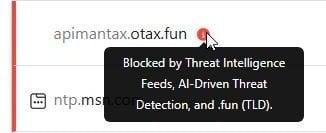
Yet another reassurance, that blocking TLDs, that you will never ever access, works by default. :whistle:

capture_09122026_175116.jpg
 
  • Wow
Reactions: lokamoka820