Malware News Point Wild provides a technical teardown of PlikanLocker, detailing its file-locking approach and exfiltration via Telegram.

Khushal

Level 16
Thread author
Verified
Top Poster
Well-known
Apr 4, 2024
703
5,212
1,469

Executive Summary​

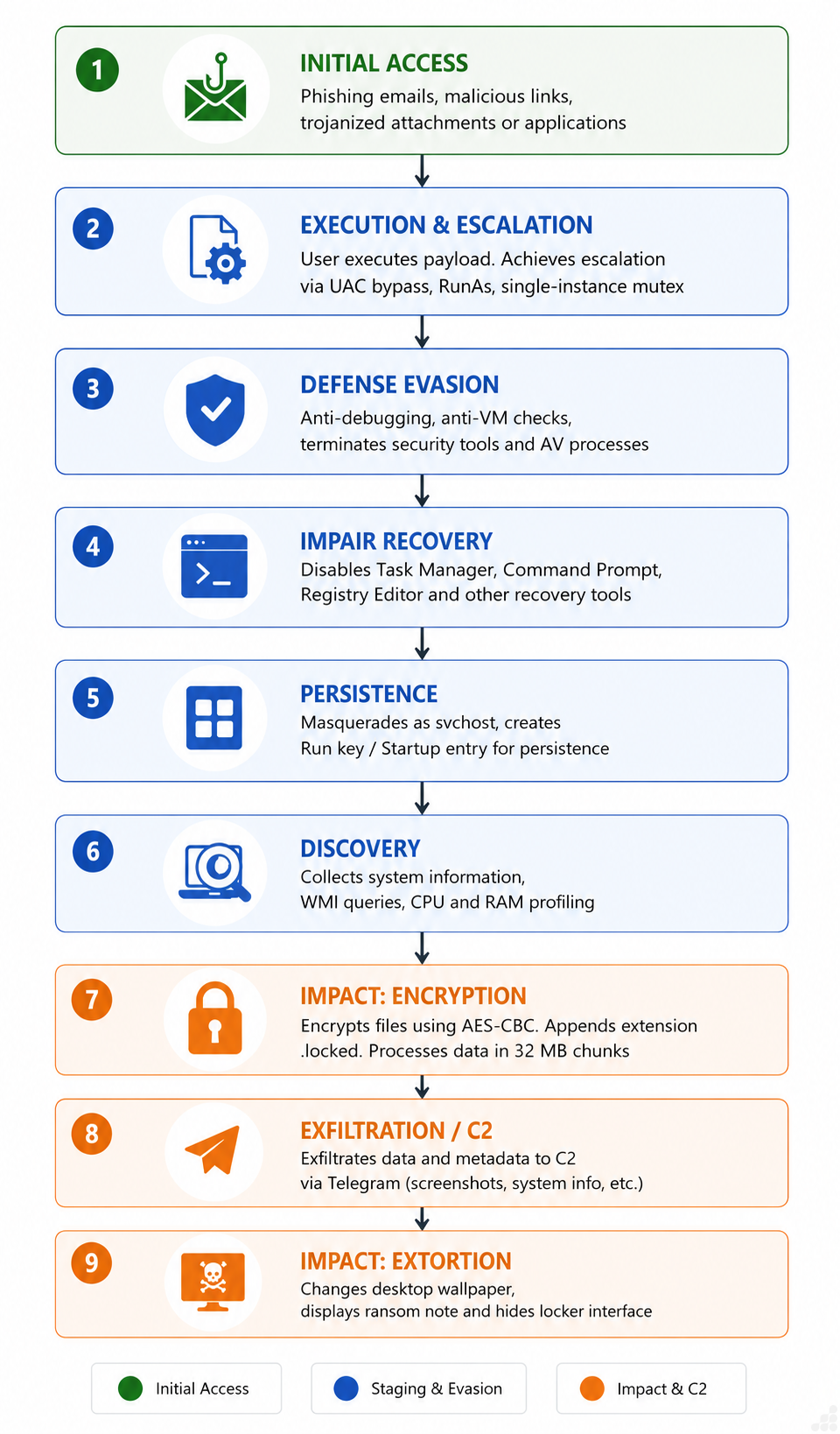
Point Wild Threat Intelligence analyzes a .NET-based locker sample that combines file extortion with aggressive system lockdown and Telegram-based command-and-control. The malware is distributed through common initial access vectors, such as phishing attachments, malicious links, and messaging or social-media lures, and on execution attempts to relaunch itself with administrator privileges via a UAC prompt, enforcing single-instance execution through a hardcoded mutex.
The malware’s use of the Telegram Bot API for exfiltration and victim tracking is the most operationally significant trait.

The PlikanLocker routine derives a key, enumerates targeted user data file types across common directories in parallel, and locks each file with AES-CBC, appending a .locked extension and a 20-byte header (ASCII LOCK marker plus a random 16-byte IV) while processing files in 32 MB chunks. Post-locking, the malware profiles the host via WMI, captures a desktop screenshot, and exfiltrates victim metadata and locking statistics to send the attacker’s Telegram bot. It concludes by hiding the desktop, taskbar, and Start button and displaying a fullscreen locker note rendered in a retro IBM BIOS-style font, blocking user interaction and instructing the victim to contact the attacker. Instead of locking the original file in place, the malware creates a new .locked file, leaving the original file intact.
fig-1_Plikan-Locker.png
 
Defensive Takeaways

Based on the supplied summary, PlikanLocker combines ransomware-style file processing with host profiling, screenshot capture, Telegram-based exfiltration, and an aggressive lock-screen mechanism. The Telegram Bot API should not be treated as benign merely because it uses a legitimate service; abuse of legitimate cloud and messaging platforms can complicate detection.

The notable detail that the malware creates a new .locked file while leaving the original file intact may improve recovery prospects, but it does not guarantee that the originals remain usable. The malware could still delete, overwrite, or otherwise damage files during later execution, and the copied files may have been partially processed. Recovery should therefore begin with isolating the system rather than continuing to interact with the locker.

Recommended Response

  • Disconnect the affected system from wired and wireless networks, removable storage, and shared drives.
  • Do not pay or contact the attacker from the compromised system.
  • Preserve relevant evidence, including the ransom note, suspicious executable, file extensions, timestamps, event logs, and security-product detections.
  • Use a known-clean device to reset credentials that may have been exposed, especially email, VPN, cloud-storage, and administrator accounts.
  • Check whether Telegram access, outbound connections, or other indicators are present on firewall, DNS, proxy, and endpoint logs.
  • Scan the affected device using reputable, up-to-date security software from trusted recovery media where possible.
  • Restore files only from verified offline or otherwise protected backups after the system has been cleaned and the initial access path has been addressed.

Organizations should also review the affected account and host for data theft, not only encryption. The reported screenshot and WMI-collected metadata indicate that the incident may involve confidentiality loss even where original files were not deleted.

The sample’s exact indicators, encryption implementation, and recoverability cannot be independently confirmed from the excerpt alone. Treat the system as compromised until a full investigation establishes otherwise.