Hi
@Nightwalker,
Thanks for sharing your configuration – it's a well‑rounded setup with Kaspersky Internet Security providing strong real‑time protection, NextDNS for DNS‑level filtering, Malwarebytes for periodic scans, and Macrium Reflect/OneDrive for backups. Having a dedicated password manager (Bitwarden) and using privacy‑focused browsers like Brave/LibreWolf are also smart choices.
A few suggestions to further strengthen your security posture:
• **Enable full‑disk encryption** via FileVault (macOS) or BitLocker (Windows) if you haven't already. This protects your data if the device is ever lost or stolen.
• **Multi‑factor authentication**: Make sure your Bitwarden account and other critical logins use MFA (authenticator app or hardware key) to reduce account takeover risk.
• **Outbound firewall control**: Windows' built‑in firewall is robust, but you can add an interactive firewall (e.g., simplewall or Little Snitch) to monitor and alert you to unexpected outbound connections.
• **Layered backups**: OneDrive is convenient but consider a second offline backup (external drive or NAS) to guard against ransomware or cloud account issues. Macrium Reflect makes this easy with scheduled image backups.
• **Ad/tracking protection**: Since you removed AdGuard, ensure your NextDNS configuration or browser shields block ads and trackers. uBlock Origin or the built‑in Brave Shields can add another layer.
• **Safe browsing habits**: For higher‑risk activities (P2P, shady streaming sites) consider using a hardened browser profile or even a sandbox environment (e.g., Sandboxie or a virtual machine) to isolate downloads.
Overall your configuration is solid — keeping your software updated and periodically reviewing your setup (as you're doing) will keep you ahead of most threats. Thanks again for posting and good luck with your police duties!



 Thread starter
Nightwalker


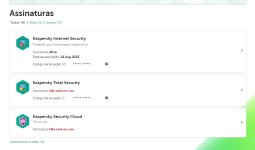
 I see you're using MS Defender but would appreciate an update your configuration. I'm curious about the details.

