

The MalwareTips app
Your community, one tap away.
Open MalwareTips from your Home Screen or desktop. Follow discussions, find answers and pick up where you left off.
- Home Screen access
- Optional push alerts
- Your community
You're ready to explore.Explore what's new
Installation instructions
iPhone & iPad
- Open MalwareTips in Safari and tap Share. You may need to open the Page Menu first.
- Choose Add to Home Screen. If it is not listed, use Edit Actions to add it.
- Keep Open as Web App enabled if shown, then tap Add.
Android
- Open MalwareTips in Chrome or another browser that supports app installation.
- Open the browser menu and look for Install app, Install and create shortcut, or Add to Home screen.
- Choose Install and confirm. Wording varies by browser.
Desktop
- Chrome: use the install icon in the address bar, or the menu under Cast, save and share.
- Edge: open the menu, then More tools, Apps and Install this site as an app.
- Safari on Mac: choose Share or File, then Add to Dock. Firefox on Windows: look for the web apps button in the address bar.
If you cannot find an install option, update your browser or use its bookmark option to keep MalwareTips close.
Keep up with your conversations
After installation, open the app and sign in. Enable push notifications in Preferences if you want alerts. On iPhone and iPad, push requires a Home Screen web app and iOS or iPadOS 16.4 or later.
Sign in to manage notificationsInstallation is optional. Your notification settings stay under your control.
You are using an out of date browser. It may not display this or other websites correctly.
You should upgrade or use an alternative browser.
You should upgrade or use an alternative browser.
NoVirusThanks OSArmor
- E Thread starter Evjl's Rain
- Start date
- 1,785 Replies
- 549,155 Views

Here is a new v1.4 (pre-release) (test15):
http://downloads.novirusthanks.org/files/osarmor_setup_1.4_test15.exe
I recommend all OSA users to change the .db file format to UTF-8:
1) Open Notepad as Admin
2) Click File -> Open and select "C:\Program Files\NoVirusThanks\OSArmorDevSvc\Exclusions.db"
3) Click File -> Save As... and choose UTF-8 under "Encoding:", then click on Save and overwrite the existing file
4) Do the same for CustomBlock.db
.
Is this a one shot thing? [scratching head] Even after uninstalling prior release?

NoVirusThanks,
Thank you for added CENT browser!
And what about Firefox 55 Nightly edition(=Basilisk) I use very frequently? Is it in FF Protection?
Basilisk is community software released by Pale Moon team and Mozilla developers.
- you wrote: "Probably enable "Block execution of .vbs scripts" by default"
.. could you add .cmd Block execution?
Chrome extension "Block Malicious File Downloads" has in description:
"Block malicious files from being unintentionally downloaded. Useful as an additional layer of security to protect against accidental clicks.
Source of malicious file types used: Windows File Extension List: Types of Files Exploited by Malware | CFOC.ORG "
- so would you use this cfoc.org list to block all these file types?
Thank you for added CENT browser!
And what about Firefox 55 Nightly edition(=Basilisk) I use very frequently? Is it in FF Protection?
Basilisk is community software released by Pale Moon team and Mozilla developers.
- you wrote: "Probably enable "Block execution of .vbs scripts" by default"
.. could you add .cmd Block execution?
Chrome extension "Block Malicious File Downloads" has in description:
"Block malicious files from being unintentionally downloaded. Useful as an additional layer of security to protect against accidental clicks.
Source of malicious file types used: Windows File Extension List: Types of Files Exploited by Malware | CFOC.ORG "
- so would you use this cfoc.org list to block all these file types?
Last edited:

The thing is that when you uninstall, it leaves behind the data files. And the dev wants us to update to the new format for them.Is this a one shot thing? [scratching head] Even after uninstalling prior release?
So if you want to do it the easy way, and you don't have a lot of custom rules, just uninstall, and then go and delete all those remaining data files.

Running Chrome under Sandboxie....
1. Loaded this thread and downloaded test15 (fyi... running test15 during this)
2. After download completes, open Chrome Downloads window (Ctrl-J) and select "test15" download "Show in folder" ...
Blocked...
Date/Time: 1/7/2018 10:52:46 AM
Process: [2780]C:\WINDOWS\explorer.exe
Parent: [6760]C:\Program Files (x86)\Google\Chrome\Application\chrome.exe
Rule: AntiExploitChrome
Rule Name: (Anti-Exploit) Protect Google Chrome
Command Line: "C:\WINDOWS\explorer.exe" "F:\Downloads"
Signer: Microsoft Windows
Parent Signer: Google Inc
1. Loaded this thread and downloaded test15 (fyi... running test15 during this)
2. After download completes, open Chrome Downloads window (Ctrl-J) and select "test15" download "Show in folder" ...
Blocked...
Date/Time: 1/7/2018 10:52:46 AM
Process: [2780]C:\WINDOWS\explorer.exe
Parent: [6760]C:\Program Files (x86)\Google\Chrome\Application\chrome.exe
Rule: AntiExploitChrome
Rule Name: (Anti-Exploit) Protect Google Chrome
Command Line: "C:\WINDOWS\explorer.exe" "F:\Downloads"
Signer: Microsoft Windows
Parent Signer: Google Inc
I am using this from first versions to latest (test15) without issues (Windows 7 x64).
Just two questions:
Does it protect portable versions of apps in anti-exploit tab?
Is there some popup that informs us that app which we launch is protected (anti-exploit)?
thx for answers
Just two questions:
Does it protect portable versions of apps in anti-exploit tab?
Is there some popup that informs us that app which we launch is protected (anti-exploit)?
thx for answers

Appreciate the work all of you are doing on this. Just installed OSArmor 1.4 (15) and think I have it set up to work with some timed scripts.
Anyone have a quick/simple explanation of how the exploit protection works? I guess nothing can protect from a malicious browser extension, unless it tries to create files, so I am just curious about how far the anti-exploit protection goes.
First very crude look at the script monitoring is that it is most usefully monitoring scripts as if the application being used to create the script is of secondary importance. I have an installed app that runs a command that launches a series of script commands. OSA seems to be ignoring the original run command and focuses on the actual script. Yet, the secondary/Windows app being used to run the script, such as cscript.exe/wscript.exe is being still noted as important for the building of whitelist rules for scripts. In the mean time, the junk that happens before the danger is not considered important. I don't know, but this seems bare bones smart.
I am amazed at how open the rules creation is btw. For example, there is a rule for denying wscript or cscript from changing script engine via //E:. Yet the command line rules for whitelisting a command takes into account which application is being affected (cscript/wscript) and then allow for the whitelisting of this specific enablement that may come in a single command line. I can still keep the rule on, even if I whitelist a single command for the use of the script //E: behavior. No other script can use the tactic so to speak. WOW, this is amazing to me. As for the other rules, those look pretty amazing.
Don't want to force things, but I could see how an awesome set of system/Windows whitelist rules (exclusions) could be established/built for each of the new rules being monitored, even for the ones that are off by default. Talk about locking down a system. Maybe Andreas could add data collection as an option for this program while testers are getting on board. Testers could turn on the rules that are disabled by default and the try things on the system to generate some blocks...for building exclusion sets or whatever. Be happy to help with anything like this if I can...
BTW, anyone can explain how the presence of //E: in a script is innately dangerous? I have it in one script that is referenced by another, so that's why I am wondering. The referenced script is kind of a complicated script that I haven't been able to break down 100%, but it has to do with editing a line in a file or some specific text in a file. The script I created, interacts with that script, telling it what to edit and where and so on...
Anyone have a quick/simple explanation of how the exploit protection works? I guess nothing can protect from a malicious browser extension, unless it tries to create files, so I am just curious about how far the anti-exploit protection goes.
First very crude look at the script monitoring is that it is most usefully monitoring scripts as if the application being used to create the script is of secondary importance. I have an installed app that runs a command that launches a series of script commands. OSA seems to be ignoring the original run command and focuses on the actual script. Yet, the secondary/Windows app being used to run the script, such as cscript.exe/wscript.exe is being still noted as important for the building of whitelist rules for scripts. In the mean time, the junk that happens before the danger is not considered important. I don't know, but this seems bare bones smart.
I am amazed at how open the rules creation is btw. For example, there is a rule for denying wscript or cscript from changing script engine via //E:. Yet the command line rules for whitelisting a command takes into account which application is being affected (cscript/wscript) and then allow for the whitelisting of this specific enablement that may come in a single command line. I can still keep the rule on, even if I whitelist a single command for the use of the script //E: behavior. No other script can use the tactic so to speak. WOW, this is amazing to me. As for the other rules, those look pretty amazing.
Don't want to force things, but I could see how an awesome set of system/Windows whitelist rules (exclusions) could be established/built for each of the new rules being monitored, even for the ones that are off by default. Talk about locking down a system. Maybe Andreas could add data collection as an option for this program while testers are getting on board. Testers could turn on the rules that are disabled by default and the try things on the system to generate some blocks...for building exclusion sets or whatever. Be happy to help with anything like this if I can...
BTW, anyone can explain how the presence of //E: in a script is innately dangerous? I have it in one script that is referenced by another, so that's why I am wondering. The referenced script is kind of a complicated script that I haven't been able to break down 100%, but it has to do with editing a line in a file or some specific text in a file. The script I created, interacts with that script, telling it what to edit and where and so on...

Here is a new v1.4 (pre-release) (test16):
http://downloads.novirusthanks.org/files/osarmor_setup_1.4_test16.exe
*** Please do not share the download link, we will delete it when we'll release the official v1.4 ***
So far this is what's new compared to the previous pre-release:
+ Block execution of .msc scripts (unchecked by default)
+ Block execution of .bat scripts (unchecked by default)
+ Improved some internal rules related to the options added on test15
+ Updated Configurator and "Exclusions Helper" GUI
+ Minor fixes and optimizations
+ Fixed some false positives
To install this pre-release, first uninstall the old one.
@Telos
Thanks for reporting that FP, it should be fixed on test16, please confirm.
@Prorootect
Yes.
The .vb and .ws extensions do not work (are unassigned).
The other important ones, like .pif, .com, .scr, .hta, .jar, .cpl, .cmd, .js, .jse, .wsf, .vbs, .vbe, .ps1 are already covered.
I added .msc and .bat in this test16 build, but be aware that blocking .bat scripts may generate many FPs.
@DavidLMO
Yeah, as @shmu26 said, it is because the uninstaller does not remove the .db files.
If you do not have saved exclusions or custom-block rules, you can uninstall it, remove the folder "C:\Program Files\NoVirusThanks\OSArmorDevSvc\" and install the new build.
@ozone
Yes, here is a screenshot with LibreOffice portable (the exploit payload has been blocked):
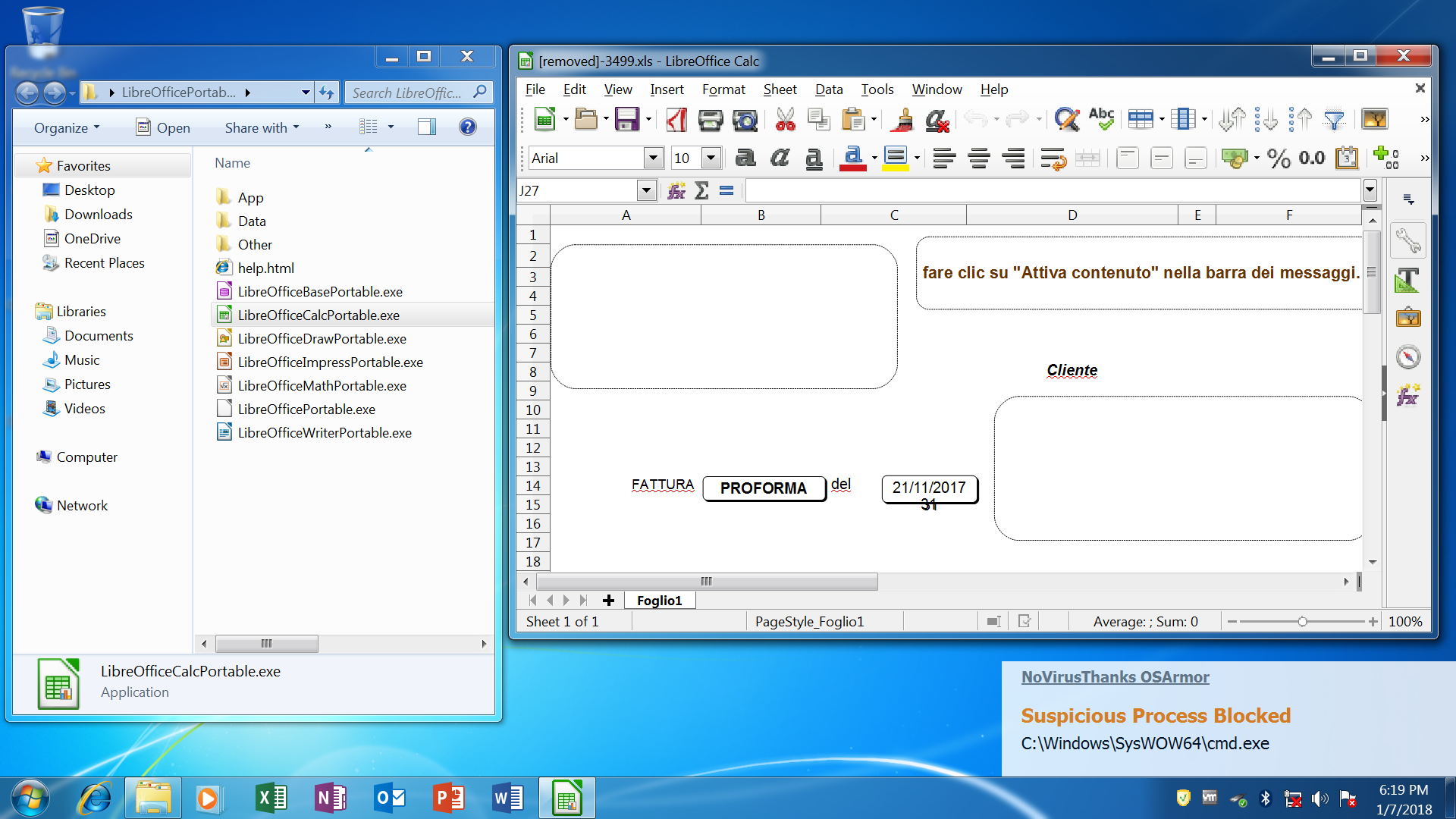
Not at the moment.
@AtlBo
Thanks for the feedback, much appreciated and glad you like how OSArmor works
The Anti-Exploit module accurately monitors child processes executed from vulnerable processes and performs many smart checks and can block the payload of the exploit, see this video for more info:
It does not monitor for browser extensions.
The //E: parameter is used with wscript.exe and cscript.exe and can change the script engine, for example wscript.exe can load a javascript file with .tmp extension with like "wscript.exe //E:JScript C:\file.tmp" and this technique is also used by malware\exploits.
You can read more info here: Wscript
http://downloads.novirusthanks.org/files/osarmor_setup_1.4_test16.exe
*** Please do not share the download link, we will delete it when we'll release the official v1.4 ***
So far this is what's new compared to the previous pre-release:
+ Block execution of .msc scripts (unchecked by default)
+ Block execution of .bat scripts (unchecked by default)
+ Improved some internal rules related to the options added on test15
+ Updated Configurator and "Exclusions Helper" GUI
+ Minor fixes and optimizations
+ Fixed some false positives
To install this pre-release, first uninstall the old one.
@Telos
Thanks for reporting that FP, it should be fixed on test16, please confirm.
@Prorootect
And what about Firefox 55 Nightly edition? Is it in FF Protection?
Yes.
so would you use this cfoc.org list to block all these file types?
The .vb and .ws extensions do not work (are unassigned).
The other important ones, like .pif, .com, .scr, .hta, .jar, .cpl, .cmd, .js, .jse, .wsf, .vbs, .vbe, .ps1 are already covered.
I added .msc and .bat in this test16 build, but be aware that blocking .bat scripts may generate many FPs.
@DavidLMO
Yeah, as @shmu26 said, it is because the uninstaller does not remove the .db files.
If you do not have saved exclusions or custom-block rules, you can uninstall it, remove the folder "C:\Program Files\NoVirusThanks\OSArmorDevSvc\" and install the new build.
@ozone
Does it protect portable versions of apps in anti-exploit tab?
Yes, here is a screenshot with LibreOffice portable (the exploit payload has been blocked):
Is there some popup that informs us that app which we launch is protected (anti-exploit)?
Not at the moment.
@AtlBo
Thanks for the feedback, much appreciated and glad you like how OSArmor works
Anyone have a quick/simple explanation of how the exploit protection works? I guess nothing can protect from a malicious browser extension, unless it tries to create files, so I am just curious about how far the anti-exploit protection goes.
The Anti-Exploit module accurately monitors child processes executed from vulnerable processes and performs many smart checks and can block the payload of the exploit, see this video for more info:
It does not monitor for browser extensions.
BTW, anyone can explain how the presence of //E: in a script is innately dangerous?
The //E: parameter is used with wscript.exe and cscript.exe and can change the script engine, for example wscript.exe can load a javascript file with .tmp extension with like "wscript.exe //E:JScript C:\file.tmp" and this technique is also used by malware\exploits.
You can read more info here: Wscript
Last edited:
The //E: parameter is used with wscript.exe and cscript.exe and can change the script engine, for example wscript.exe can load a javascript file with .tmp extension with like "wscript.exe //E:JScript C:\file.tmp" and this technique is also used by malware\exploits.
Thanks. That's exactly what this referenced .bat does. It makes a copy of the edited file, then removes the old file and renames the .tmp file to the proper name for the file.
This anti-exploit for MS Office is priceless.

Looking forward to the .bat blocks. I didn't realize that OSA didn't do this already, so I already have rules in place that I believe will work
.OSA is a super geeked behavior blocker. I think, @andreas, you have unfolding a very good and comprehensive application for deployment on networked PCs. Good fortunes to you with OSA.
Thanks the work on this so far.
No issues w/test16. Opened Sandboxie session Chrome Downloads window... Open folder launches explorer without interference. Thank you.

Not to be rude, and I appriciate all the work you and your team is doing NVT
but what does that mean? That kind of confused me even more lol
does that mean signed driver wont be until final release or wont be until after the final release?
For final release we miss:
but what does that mean? That kind of confused me even more lol
does that mean signed driver wont be until final release or wont be until after the final release?
D
Deleted member 178
Works great here. not a single issue on my side since the first version
Does dlls can be blocked? (especially system.management.automation.dll)?
Does dlls can be blocked? (especially system.management.automation.dll)?
P
plat1098
also with all the Advanced options checked.
All of them? I only have 6 for now on a clean system to see how it goes--the top three pertaining to AppData disabled specifically . That's a lot of protection enabled.

I've only tried it 24 hours: but I'm like that of a beast. When they finish it I'll try it another way, thank you!All of them? I only have 6 for now on a clean system to see how it goes--the top three pertaining to AppData disabled specifically . That's a lot of protection enabled.
P
plat1098
I am not very brave...actually a wimp when it comes to stuff like this, especially since this machine is very temperamental with the Fall CU. Maybe I will check off one more tomorrow and then run away.
Well. You are cautious. that's very good.I am not very brave...actually a wimp when it comes to stuff like this, especially since this machine is very temperamental with the Fall CU. Maybe I will check off one more tomorrow and then run away.
Feature suggestion: let the user choose between 3 pre-set configurations:
1 medium security
2 high security
3 paranoid security
Or whatever you want to call them...
OSA has so many options that it is hard for the average user to know what is good for him. So that's where pre-set configs are very helpful.
1 medium security
2 high security
3 paranoid security
Or whatever you want to call them...
OSA has so many options that it is hard for the average user to know what is good for him. So that's where pre-set configs are very helpful.
Question about the AppData protections. These come across to me as something that would be very helpful for a single system admin to have access to from the alert to create an exclusion. However, I realize that OSArmor can also be a great standard set of policies for networked standard user accounts, where any options should be impossible. For Andreas, I see how it must be important to keep that aspect of the program first in mind. However, is there a way to have a choice in configuration between home single system user, where user can make choices, or networked (either single user or network administrator), where choices are only available to the administrator?
From there, I like @shmu's concept for medium/high/paranoid setting for a home single system user. Might make the initial choice simple. BTW, I was also considering whether adding a number near the system tray or something in red that could indicate unviewed blocks. Maybe this could be something of an option like with Voodoo Shield's shield so that users can know what's happening on the system.
Really hope @NoVirusThanks yields good profits from OSArmor, and I would never like being considered someone who would attempt to advise a developer on what his best options for marketing his product may be . Yet I find that Binisoft doesn't get any complaints from its customers over its 5 PCs for $10 lifetime with Windows Firewall Control. Anyway, I feel like there can be lots of room for applications of this type, whether it's one PC or 5 or $5 or $15 (etc.), and that users would gratefully pay as soon as they are able to do so. No matter what OSA is off to a very good start, so I am looking forward to see where it goes. Good luck to Andreas and hope he is able to sort through the issues quickly without pressure. It must be hard to be a developer in the early stages of a good idea...
From there, I like @shmu's concept for medium/high/paranoid setting for a home single system user. Might make the initial choice simple. BTW, I was also considering whether adding a number near the system tray or something in red that could indicate unviewed blocks. Maybe this could be something of an option like with Voodoo Shield's shield so that users can know what's happening on the system.
Really hope @NoVirusThanks yields good profits from OSArmor, and I would never like being considered someone who would attempt to advise a developer on what his best options for marketing his product may be . Yet I find that Binisoft doesn't get any complaints from its customers over its 5 PCs for $10 lifetime with Windows Firewall Control. Anyway, I feel like there can be lots of room for applications of this type, whether it's one PC or 5 or $5 or $15 (etc.), and that users would gratefully pay as soon as they are able to do so. No matter what OSA is off to a very good start, so I am looking forward to see where it goes. Good luck to Andreas and hope he is able to sort through the issues quickly without pressure. It must be hard to be a developer in the early stages of a good idea
...
Last edited:

There are no popups nothing blocked in log.
I still get slow boot with latest test16 version, I have noticed that Privatefirewall service pfsvc.exe doesn't startup automatically on boot if OSArmorDevSvc.exe is set to startup automatically, if I disable or set to manual OSArmorDevSvc.exe then Privatefirewall service pfsvc.exe is starting automatically on boot like it should. So OSArmor prevents Privatefirewall service to startup that's why I get slow boot.* Fix issues reported by @Stas (and others) on XP OS
Recently browsing
Members who viewed this thread in the last 5 minutes
You may also like...
-

-
 Advanced Plus Security enaph's PC Security Config
 -

-

-
