

Official Windows 8.1 Update 1 Download Links Revealed

Status
Not open for further replies.

BoraMurdar

Super Moderator
Thread author
Verified
Staff Member
Well-known
Forum Veteran
Aug 30, 2012
6,595
28,354
7,479
Serbia
Official-Windows-8-1-Update-1-Download-Links-Revealed.jpg


Windows 8.1 Update 1 is now available for download, but Microsoft is yet to officially reveal the update, preferring instead to remain tight-lipped and let users get the pack using all sorts of tricks.

It turns out, however, that Redmond itself has published Update 1 on its servers and although the company hasn’t revealed the download links publicly, the guys over at MyDigitalLife forums have spotted them and published them online.

Since Microsoft is serving the downloads, these are most likely the official packages that are expected to be delivered to users in early April via Windows Update. Of course, you are strongly recommended to back up your existing Windows 8.1 installation and only then start downloading.

As you can see for yourselves, Microsoft has also debuted several prerequisites, which means that an existing Windows 8.1 installation needs to be prepared for the new update with the help of several patches. A fully up-to-date Windows 8.1 version is also required, so make sure you install all previous rollups and patches released by Microsoft in the last few months.

Update 1 seems to be available for both x86 and x64 devices, so you can download it no matter your system configuration, just check twice before getting any patch.
 
Playing with Windows 8.1.1 (or whatever it's name) right now
So far no problems :)

First things that bats an eye
  • boots directly to desktop
  • better arrangement of the apps
  • OneDrive
  • all metro apps has minimize and close buttons (special like ^^ )
    msyyck.jpg
  • Shutdown, User Account and Search button on Start
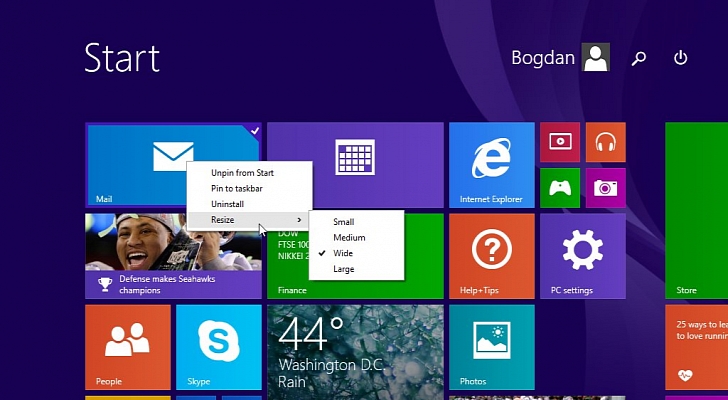
  • Right click menu when clicking on apps in Start
  • .... so far :)
 
BoraMurdar,

Did you turn off your security when installing this update?
 
Just making sure! ;) I am going to download then....

[BoraMurdar] just protecting myself if anything goes wrong :D
Kidding, just note that this comes directly from MS servers but MS didn't yet release the updates, so... problems may occur.
  • Install updates by the order told on MyDigital Life Forums
  1. Two Preparation updates
  2. One main update (Windows 8.1 Update 1 )
  3. At last, three Supplement Packages
  • Reboot whenever it's asking to
  • Wait... It may took 30min to install the update(s)
Backup your important data,registry and create system restore point for just in case.

Not saying anything, but even if MS releases this update through Windows Update, still can cause problems to some users. (it wouldn't be the first time :D )
Have a nice day ;)
 
Order
1 KB2919442 Preparation Update
2 KB2939087 Preparation Update
3 KB2919355 Update 1
4 KB2932046 Supplement File
5 KB2938439
6 KB2937592
 
  • Like
Reactions: Shadowave
Order
1 KB2919442 Preparation Update
2 KB2939087 Preparation Update
3 KB2919355 Update 1
4 KB2932046 Supplement File
5 KB2938439
6 KB2937592
Downloading Update 1 KB2919355 ( x64) not working for me, can anyone help me with this?
 
Downloading Update 1 KB2919355 ( x64) not working for me, can anyone help me with this?
turn on automatic update and install all the updates till date.
Close all applications and security software before installing new updates.
Install windows 8.1 update 1 updates in given order. restart whenever asked. Install all the given updates.
 
Status
Not open for further replies.