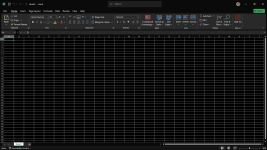
Even MS Office has no dark mode for excel sheet; only UI.
True, but softmaker office and libreoffice both do.


Open MalwareTips from your Home Screen or desktop. Follow discussions, find answers and pick up where you left off.
If you cannot find an install option, update your browser or use its bookmark option to keep MalwareTips close.
After installation, open the app and sign in. Enable push notifications in Preferences if you want alerts. On iPhone and iPad, push requires a Home Screen web app and iOS or iPadOS 16.4 or later.
Sign in to manage notificationsInstallation is optional. Your notification settings stay under your control.
 Thread starter
silversurfer
Thread starter
silversurfer
Even MS Office has no dark mode for excel sheet; only UI.

Do you recommend Softmaker office over OnlyOffice?True, but softmaker office and libreoffice both do.
How compatible is OnlyOffice with Microsoft Office?True, but softmaker office and libreoffice both do.
How compatible is OnlyOffice with Microsoft Office?
Just installed today for the first time; created a docx file and opened it by online MS Word; very good, no difference between both.How compatible is OnlyOffice with Microsoft Office?

I wish every spreadsheet app had this. We tend to look at numbers more than text on the screen.Still no dark spreadsheet mode.

New features
All Editors
- Redesigned interface of the main application window
- Added new interface themes: Modern Light and Modern Dark
- Added saving of the last selected languages in spellcheck lists
- Added Arabic spellcheck dictionary used in sixteen dialects
- Added AI-powered macro generation from descriptions and VBA-to-JavaScript conversion
- Added the interface translation into Urdu (ur-PK, Urdu (Pakistan))
- Added support for TextArt text settings inside chart labels
- Added support for drawing the Up/Down Bars chart elements
- Merged local and cloud template lists into a unified view
- The list of templates is now processed on the client side, not on the server
- The installed system languages are now displayed at the top of the text/document/dictionary list
- Added a contrast-reducing effect for control buttons in inactive windows
- Added the option to select a printer in the print preview menu
- The Print using the system dialog option has been added to the print preview menu
- The ability to configure format associations for modern Windows OS in the EXE package installation wizard has been unlocked
Document Editor
- Added correct display of previews for paragraph numbers for RTL
- Improved positioning and settings of TextArt for RTL
- Improved drawing of borders and fill for paragraphs with RTL direction
- Enabled accurate cursor navigation with arrow keys based on the paragraph's text direction
- Added the ability to display numbers using Hindi digits
- Added a setting in the File menu for selecting the preferred font size: Western/Chinese for the Chinese interface language (Chinese (Simplified))
- Added a Borders button to the Home toolbar to quickly set paragraph settings
- Added support for the MD format for reading
Spreadsheet Editor
- Added support for displaying bidirectional text
- Added the ability to select external data from another spreadsheet
Presentation Editor
- Added the ability to set the paragraph direction (Text Direction > RTL) on the toolbar and in the advanced settings
- Added the ability to view animations with text
- Added the "Preserve" option to the Slide Master context menu
Forms
- Changed the appearance of the Signature and Image fields: the placeholder and signature icon are now always displayed
- Improved user experience when filling in the Signature and Image fields
- Added a new "type": "signature" for the Signature field, used in the process of filling out forms
PDF Editor
- Added the ability to set RTL direction for text
- The Edit Text option is available in the Community Edition build
- Implemented a PDF form editor
- Added copying pages between PDF files
Diagrams
- Release of the first version of the Diagram Viewer with the ability to open VSD and VSDX files for viewing
Convert
- Added conversion of the XLSB format to the editor's internal format, allowing editing and saving in XLSX without preliminary conversion
 github.com
Even MS Office does not have.There's still no "Dark Document" button for spreadsheets like there is for writer documents.
That is how it looks like on my side.MS Office 2024 does. I use it all the time. Libreoffice does too.
I do not have this option as shown by my screenshot; did you use add-in to get dark cells?That's odd. The only difference on my end is that I'm using ab LTSC version. But here it's dark by default.
I do not have this option as shown by my screenshot; did you use add-in to get dark cells?
Mine installed a couple of weeks ago and is updated to the latest build; I cannot get why it does not look like yours; must some missing settings.Nope. In fact, I literally just reinstalled MSO seconds before. There were settings changes of any kind. That's default for me.
Fixes
All Editors
- The display of the cursor and text selection is now limited by the size of the object/shape
- Fixed some icons for Modern themes when the interface scale is higher than 200%
- Improved appearance of the autoshape Merge/Flip icons for the Modern themes
- Fixed the application freezes on the first launch during the template preview generation process
- Fixed the ability to paste code in the Macros window
- Fixed work of the Open existing file (Open Document) shortcut on the Home page
- Improved display of icons for Clouds connection on the main page of the application
- Changed the font for the Urdu Interface language
- Fixed the position of the editor version line in the About window
- Improved display of the main page of the application for Windows XP
- Fixed pausing when connecting to the portal if the debug window is open
- Fixed the Copyright line for editor files (Windows)
Document Editor
- Fixed stopping work of the editor when editing footer in some DOCX files
- Fixed errors during Compare/Combine/Text from file operations with files containing images
- Fixed a crash when restoring a placeholder with a list when deleting Content Control content
- Fixed significant increasing of the file size due to including CJK fonts when exporting to PDF
- Fixed auto-detection of the document language in the text with the Text Direction > RTL option
Spreadsheet Editor`
- Fixed stopping work of the editor when trying to reference a cell with a formula
- Fixed appearing the #NAME error in the final file when using a custom function and exporting to PDF
- Fixed a problem with saving custom function to a file
- Fixed an issue with autofitting row height when changing column width if Wrap Text is applied to a cell
- Fixed display of the Zoom option value in the bottom toolbar in RTL UI with the Sheet RTL option disabled
- Fixed the incorrect position of the percent sign in the status bar for Zoom with Chinese (Simplified)
- Fixed stopping work of the application when exporting a spreadsheet to PDF
Presentation Editor
- Fixed stopping work of the editor when applying some animations from the Emphasis Effects section to an image
- Fixed the editor crash when deleting slides sequentially from preview panel
- Fixed stopping work of the editor when copying all content on the slide in some PPTX files
- Fixed incorrect translations of tools in the Draw menu of the Presenter View window
- Fixed changing word order in the bidirectional text when opening some PPTX files in the application
Forms
- Fixed stopping work of the editor after applying the TextArt setting to the Signature field
- Fixed stopping work of the editor when restoring a file connection after a long period of inactivity
- Fixed cursor change for Content Control buttons
- Fixed missing the Clear Fields icons in the form viewing mode for the Modern themes
PDF Editor
- Fixed stopping work of the editor when performing Cut/Paste operations simultaneously on the thumbnail panel
- Fixed display of the text after breaking and restoring a session when working with some PDF files
- Fixed saving form field settings when there are no other changes in the editor
- Blocked the ability to change the contents of the document when the connection is lost
- Fixed an error when trying to copy page contents from the thumbnail panel for XPS/DjVu formats
- Blocked the ability to display of the form field titles in the embedded mode
- Fixed display of the form field highlight when undoing and redoing actions
- Fixed blocking the ability to enter text immediately after inserting a Text Comment
- Fixed an error that occurred in the application when quickly opening several documents one after another
Diagram
- Fixed display of the slide in the working area when opening some VSTX files
Convert
- Fixed crash when converting some DOCX files to an image
- Fixed crash when converting some HWP files to the binary format
- Fixed endless conversion of some HWP files to the binary format
- Fixed endless conversion of some DOC files to the binary format
- Fixed the appearance of an error when opening the result of converting some HWP files to DOCX in third-party editors
- Fixed crash when converting some DOC files to the binary format
- Fixed the appearance of an error when opening the result of converting some XLS files to XLSX in third-party editors
- Fixed crash when converting some DOCX files to the binary format
- Fixed the difference in display of autoshapes after converting some VSDX files to PNG
github.com
Members who viewed this thread in the last 5 minutes