

The MalwareTips app
Your community, one tap away.
Open MalwareTips from your Home Screen or desktop. Follow discussions, find answers and pick up where you left off.
- Home Screen access
- Optional push alerts
- Your community
You're ready to explore.Explore what's new
Installation instructions
iPhone & iPad
- Open MalwareTips in Safari and tap Share. You may need to open the Page Menu first.
- Choose Add to Home Screen. If it is not listed, use Edit Actions to add it.
- Keep Open as Web App enabled if shown, then tap Add.
Android
- Open MalwareTips in Chrome or another browser that supports app installation.
- Open the browser menu and look for Install app, Install and create shortcut, or Add to Home screen.
- Choose Install and confirm. Wording varies by browser.
Desktop
- Chrome: use the install icon in the address bar, or the menu under Cast, save and share.
- Edge: open the menu, then More tools, Apps and Install this site as an app.
- Safari on Mac: choose Share or File, then Add to Dock. Firefox on Windows: look for the web apps button in the address bar.
If you cannot find an install option, update your browser or use its bookmark option to keep MalwareTips close.
Keep up with your conversations
After installation, open the app and sign in. Enable push notifications in Preferences if you want alerts. On iPhone and iPad, push requires a Home Screen web app and iOS or iPadOS 16.4 or later.
Sign in to manage notificationsInstallation is optional. Your notification settings stay under your control.
You are using an out of date browser. It may not display this or other websites correctly.
You should upgrade or use an alternative browser.
You should upgrade or use an alternative browser.
Advice Request Other than Microsoft Authenticator, what's the next best app?
Share practical recommendations that address the author's needs.

Upvote
0
Authenticator app with backup.You mean for 2FA? Because Microsoft Authenticator can handle 2FA and Windows/ Microsoft login requests via Push.
For 2FA i can recommend andOTP and Aegis (if Android is your OS)
Upvote
0

I've already used google, lastpass and microsoft authenticator. Currently, my top choice is Microsoft for 2 reasons:
1) It has a backup option
2) Microsoft is working in a password manager and using Microsoft Authenticator to enable it on mobile devices. I'm not using microsoft password manager yet, but i believe they will improve it in the future. So i keep with microsoft authenticator in case i will use it as my password manager in the future.
1) It has a backup option
2) Microsoft is working in a password manager and using Microsoft Authenticator to enable it on mobile devices. I'm not using microsoft password manager yet, but i believe they will improve it in the future. So i keep with microsoft authenticator in case i will use it as my password manager in the future.
Upvote
0
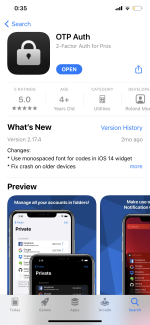
This app allows you to backup your 2FA keys to iCloud (AES 256 encrypted). It also allows you to export (backup) your data and store it in your personal cloud. The best feature is that it allows you to store your 2FA keys in folders.
Upvote
0

I'm using Microsoft Authenticator, but before my 2FA app was Authy | Two-factor Authentication (2FA) App & Guides
 authy.com
Use our backup feature incase you lose your phone. We encrypt your data, and only decrypt on the devices using a password only you know. (and must not forget!)
Backup - Authy
authy.com
Upvote
0

I use to use Authy but something happened with its timing of OTP tokens, so whenever I tried to log into a site where I activated 2FA, the site replied it was invalid. Tech support was useless.
Because of this problem logins become useless, and since I had several with 2FA activated, I became SOL. It took several days, and several emails to site technical support people to reset my 2FA so I could login again, and re-enable the feature.
Since then, I reverted to Microsoft Authenticator for just my Microsoft accounts, and Google Authenticator for everything else. Never looked back.
The moral to all of you who use 2FA is make sure you are using a reliable Authenticator app, and download Recovery Codes as backup. I did not do the latter which made everything worse because I trusted my app never expecting a problem.
Because of this problem logins become useless, and since I had several with 2FA activated, I became SOL. It took several days, and several emails to site technical support people to reset my 2FA so I could login again, and re-enable the feature.
Since then, I reverted to Microsoft Authenticator for just my Microsoft accounts, and Google Authenticator for everything else. Never looked back.
The moral to all of you who use 2FA is make sure you are using a reliable Authenticator app, and download Recovery Codes as backup. I did not do the latter which made everything worse because I trusted my app never expecting a problem.
Upvote
0
Recently browsing
Members who viewed this thread in the last 5 minutes


