


What of the following software do you use as password manager? In particular I want to find a solution able to auto-fill login credentials in both websited and desktop apps that is secure and stored encrypted data, possibly locally and/or in the cloud.
Battle Password Managers in 2020
- Thread starter camo7782
- Start date
You are using an out of date browser. It may not display this or other websites correctly.
You should upgrade or use an alternative browser.
You should upgrade or use an alternative browser.
- Compare list
- [LIST]
[*]1Password
[*]BitWarden
[*]Dashlane
[*]KeePass 2
[*]LastPass
[*]RoboForm
[/LIST]
- In-depth Comparison
F
ForgottenSeer 55474
I use Lastpass Premium, & I have never had any problems 
I have both Lastpass & Bitdefender Wallet, which works just fine.
I have both Lastpass & Bitdefender Wallet, which works just fine.

I use Bitwarden and was thinking about doing something similar with Keepass. Now that I've seen someone doing the same I would do this as well.Bitwarden: Online, quite safe, very handy, multi-platform sync.
Keepass (portable): Offline with Bitwarden database imported, used as backup of Bitwarden or when im not on my machines.

Same here. I have the Premium version from ages and still using it.Sticky Password here. Never had any problem with it.

I tried Bitwarden a few days ago. I would stay with it, but it much less user friendly than LasPass. For example: lastpass add an icon inside the login and password windows that let you easily choose what login you want. After you choose it it will add the correspondent password, even if you go to the "next page". Bitwarden doesn't have that icon, so you have to click on the extension everytime you need it. Besided that, it doesnt remember your login option if you change the page.
F
ForgottenSeer 823865
It does, just not by default, you just need to enable it in the settings. (just not as efficiently than Lastpass)I tried Bitwarden a few days ago. I would stay with it, but it much less user friendly than LasPass. For example: lastpass add an icon inside the login and password windows that let you easily choose what login you want.
After you choose it it will add the correspondent password, even if you go to the "next page". Bitwarden doesn't have that icon, so you have to click on the extension everytime you need it. Besided that, it doesnt remember your login option if you change the page.
Anyway, you just click in the extension instead of the password box, same click, just not a the same place ^^
Last edited by a moderator:


Keepass Portable: I find it integrates well with Firefox Portable even without a Firefox add-on. The only other one I tried was Password Safe, but I found it had fewer features and a confusing interface.
Couldn't find an easy way to import Bitwarden's database to KeePass so ended up with KeePassXC which is a fork of KeePass with better design and some additional features.I use Bitwarden and was thinking about doing something similar with Keepass. Now that I've seen someone doing the same I would do this as well.
F
ForgottenSeer 823865
It is simple, in the extension go to settings > export > enter master password > selectCouldn't find an easy way to import Bitwarden's database to KeePass so ended up with KeePassXC which is a fork of KeePass with better design and some additional features.
Then in KeePass, import the saved file by selecting Bitwarden Json.
Job done.
Last edited by a moderator:
I have only json and csv format in the export sectionIt is simple, in the extension go to settings > export > enter master password > select KeePass v2 format as output file. > save it where you want.
Then in KeePass, import the saved file.
Job done.

F
ForgottenSeer 823865
My mistake, sorry, i mixed up with importing a keepass database.I have only json and csv format in the export section
Indeed you export the Json file and import it in keepass.


Somehow this escaped my eyes I guess. Mine was opening exolorer to browse for keepass database only. I'll have to check again. Anyway, KeePassXC is fine too.My mistake, sorry, i mixed up with importing a keepass database.
Indeed you export the Json file and import it in keepass.
View attachment 232734
F
ForgottenSeer 823865
I never tried the XC version, what are the differences (beside being multi-platform)?Somehow this escaped my eyes I guess. Mine was opening exolorer to browse for keepass database only. I'll have to check again. Anyway, KeePassXC is fine too.
It has a browser extension if you want to use that and some other features. Tbh, I don't know enough about both products to point out the differences. Maybe just install and check it out?I never tried the XC version, what are the differences (beside being multi-platform)?
F
ForgottenSeer 823865
yep will test, thanks.It has a browser extension if you want to use that and some other features. Tbh, I don't know enough about both products to point out the differences. Maybe just install and check it out?

Running BW on Docker. No "cloud" worries.I'll take a guess: probably because Keepass is not in the cloud.

i am happy that they add Truekey import feature to its import list
they are active at their form in sourceforge
I donated to them for such great project
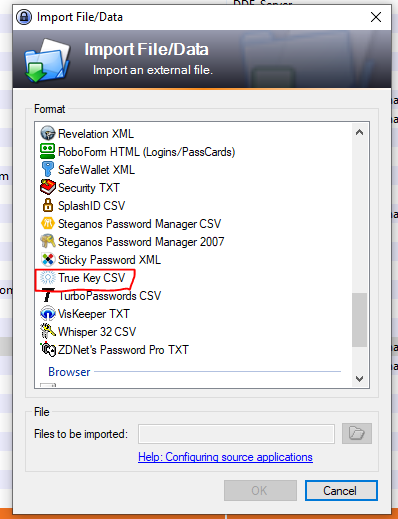
they are active at their form in sourceforge
I donated to them
for such great project
Last edited:

It does, just not by default, you just need to enable it in the settings. (just not as efficiently than Lastpass)
Anyway, you just click in the extension instead of the password box, same click, just not a the same place ^^
View attachment 232731
Thanks for the suggestion. However, please note that it clearly gives a warning for being an experimental feature. Use at your own risk.
You may also like...
-

-
 Hot Take Researcher Exposes Zero-Day Clickjacking Vulnerabilities in Major Password Managers
- Started by Andy Ful
- Replies: 125
-
 Serious Discussion Password Managers: Essential Security Tool or a Massive Risk?
- Started by Bot
- Replies: 9
-
-
 Security News UK fines LastPass over 2022 data breach impacting 1.6 million users
- Started by Gandalf_The_Grey
- Replies: 1