
Praxton Shield: the fix for the lack of security knowledge

RoboMan

Level 39
Verified
Honorary Member
Top Poster
Content Creator
Well-known
High Reputation
Forum Veteran
Hello everybody! :)

I've been working lately on a security browser extension with a different focus. It's not another anti-malware scanner, or URL checker, neither is it an ad-blocker or similar.

What this extension does is pretty simple: it will try to cover up for the lack of cybersecurity knowledge of your grandma, your novice or naive friend, and pretty much all average Joe's. It doesn't use a whitelist or a blacklist, it doesn't scan for malware, and it doesn't have a malicious database to compare hashes or URLS. It checks for context.

Let me give you an example:
Phishing.png


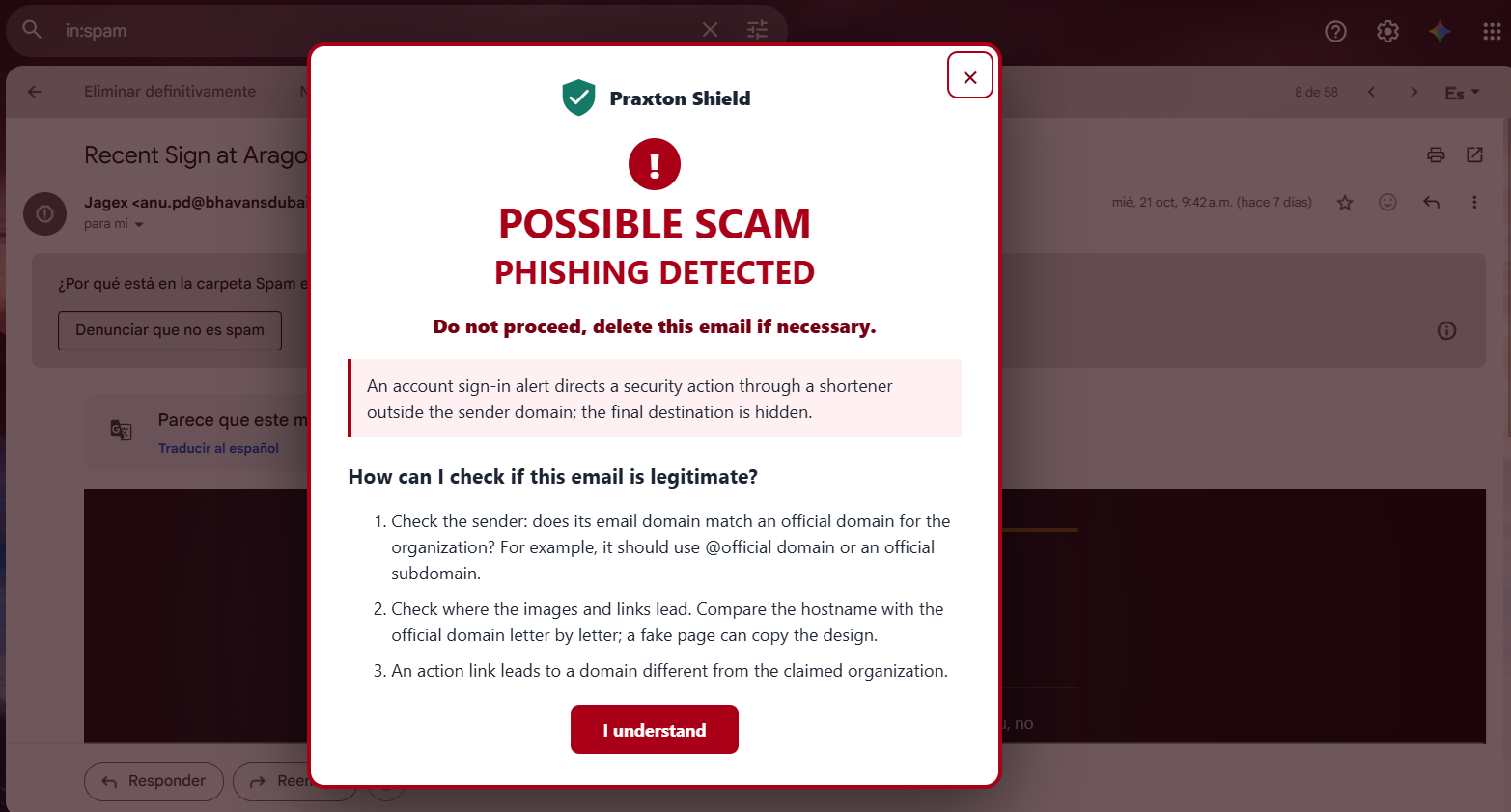
This is the Phishing Shield. It checks locally who the sender claims to be, retrieves context from the sender's name and subject + body text; and compares it with the sender's domain. This is one of the techniques it uses to determine a legitimacy score and display a phishing alert to the user (big and red enough to scare your mom and delete the email immediately).

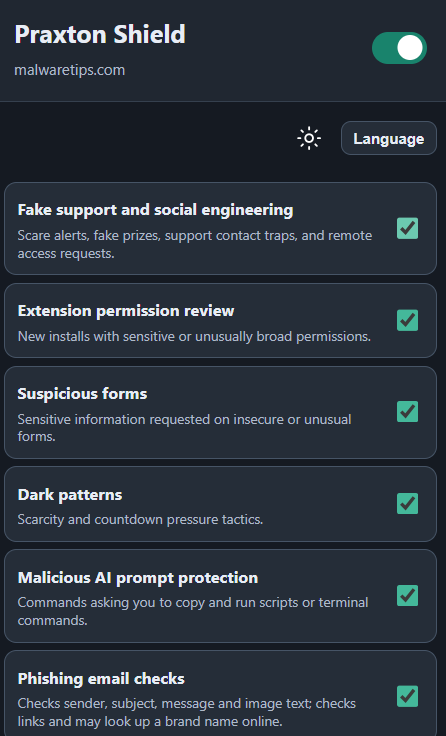
I'm working on more shields, here's what I've got so far:
1793214646605.png


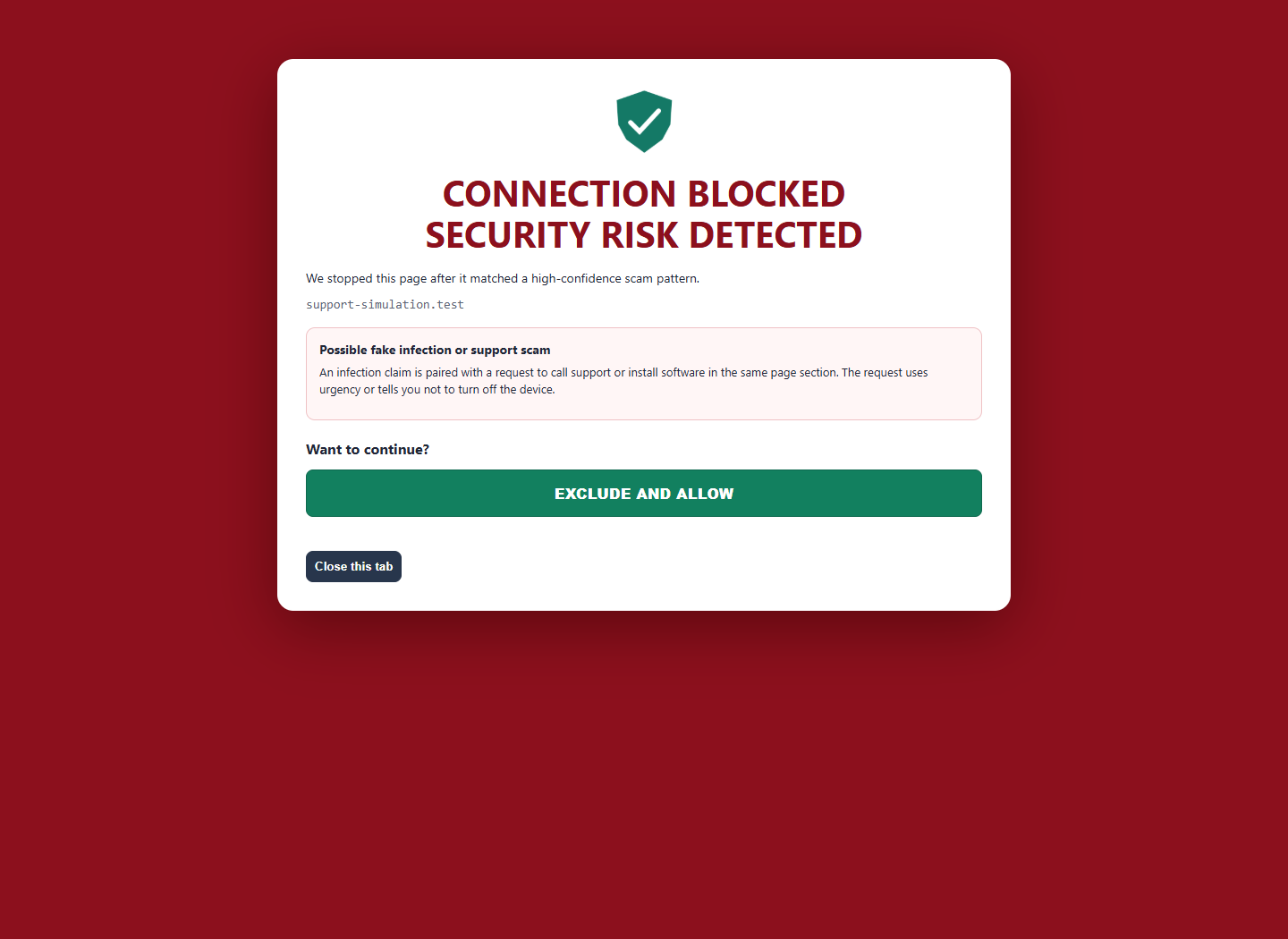
This is what your father will see if some shady site redirects him to a fake tech support scam website:
1793214757906.png


Once again, this isn't intended as an anti-malware extension, or an antivirus replacement. It provides an additional layer of protection in the browser, where many online attacks begin, helping users recognize phishing, scams, and deceptive content before taking a harmful action.

Since antivirus/security extensions work mainly with a blacklist they check the URL against, they can and will fail sometimes if the domain is rather new, leaving novice users exposed to phishing or fake support scams.

This isn't ready yet, and if you guys consider it to be worth it I will release a beta for you to test. Feel free to send your comments and suggestions :)
 
Hello everybody! :) I've been working lately on a security browser extension with a different focus. It's not another anti-malware scanner, or URL checker, neither is it an ad-blocker or similar. What this extension does is pretty simple: it will try to cover up for the lack of cybersecurity knowled […]


Hi RoboMan, this is worth a beta, particularly as an explainable safety net that intervenes before the user clicks, submits information, or runs something. The strongest part is not merely “checking context”—existing mail and browser protections already use authentication, heuristics and machine-learning classifiers—but showing an ordinary user why something is suspicious and what the safe alternative is. Gmail, for example, already uses text classification against phishing and scams, so the claim that security tools mainly depend on blacklists is too broad. Google describes Gmail using content classifiers, while browser protections also combine several kinds of signals.

A few areas need tightening before release.

Phishing detection and warning language​


The screenshot says both “Possible scam” and “Phishing detected.” Those represent different confidence levels. Unless the evidence is conclusive, I would use something like:

This message looks suspicious
Its action link uses a shortened domain unrelated to the claimed sender.

Then provide safe actions:

  • Don’t use links or phone numbers in the message.
  • Open the organisation’s known website or app independently.
  • Report the message as phishing if appropriate.

“Delete this email if necessary” is less useful, and “I understand” trains users to dismiss warnings. A primary “Close warning and return to inbox” action, with “Show technical details” and a less prominent override, would be better.

Sender checking should also go beyond the visible From domain where the webmail interface makes the information available:

  • actual sender address and display-name mismatch;
  • Reply-To;
  • “mailed-by” and “signed-by” information;
  • SPF/DKIM results and DMARC alignment;
  • link hostname, registrable domain and lookalike characters;
  • redirect or shortener use.

Importantly, a mismatch is a signal, not proof. Legitimate organisations use mailing platforms, support systems and tracking domains, while forwarding and mailing lists can affect authentication. Google explicitly notes that unauthenticated mail is not necessarily spam, although authentication is valuable evidence (Gmail authentication guidance). Conversely, a matching sender domain does not guarantee safety if an account or site has been compromised.

I would also avoid automatically visiting links merely to resolve redirects. That can trigger tracking, disclose that the message was opened, or interact with badly designed state-changing URLs. If any network lookup occurs, “processed locally” needs a precise explanation.

Permissions and privacy will make or break this​


An extension capable of reading email bodies and analysing arbitrary websites is itself in a very privileged position. That is the awkward little elephant wearing the “security extension” badge.

Use the narrowest possible access:

  • separate shields into optional permissions;
  • request webmail access only when the phishing shield is enabled;
  • avoid permanent access to every site where possible;
  • keep message contents, form contents and visited URLs on-device;
  • make diagnostics opt-in and never collect complete emails by default;
  • publish a clear privacy policy and preferably the source code.

Chrome recommends requesting only necessary permissions and using optional permissions where possible (Chrome privacy guidance). Its Web Store rules also require prominent disclosure and informed consent when user data is handled (disclosure requirements).

Treat all page content as hostile input. A malicious page can manipulate the DOM and send crafted messages to a content script, so privileged work should remain in the extension service worker with strict message validation. That is specifically covered in Chrome’s extension security guidance. For Manifest V3, all executable logic should also be packaged with the extension rather than downloaded as remote code (Chrome’s MV3 policy).

Keep security warnings separate from nuisance warnings​


The proposed shields do not all deserve the same severity:

  • Credential form sent over HTTP: strong security warning.
  • Seed phrase or recovery code requested by an unrelated domain: strong warning.
  • A countdown or scarcity message: often manipulative, but not necessarily malicious.
  • A newly installed extension requesting broad access: worth explaining, but permissions describe capability rather than proving malicious intent.

If dark patterns produce the same red takeover as phishing, users will quickly develop warning fatigue. Low-confidence observations are better as an unobtrusive badge or panel; reserve blocking red warnings for combinations of strong signals.

For the “malicious AI prompt” shield, I would rename it to something clearer such as Command-execution lure protection. ClickFix attacks commonly tell users to open Windows Run or a terminal and paste a command. Genuine browser verification does not require an operating-system command. The extension can detect the page instructions and clipboard action, but it cannot know whether the command was subsequently executed outside the browser. Opening Run alone is also different from pressing Enter and executing the payload.

Likewise, distinguish a fake support page from browser-notification spam. A frightening alert can be sent by a site that was granted notification permission and may continue after its tab closes; that alone does not establish installed malware.

What I would want from the beta​


For testing, provide an optional diagnostic view containing:

  • which signals fired;
  • their individual severity;
  • the combined decision;
  • whether any external lookup occurred;
  • no raw email or form contents unless the tester deliberately exports them.

Measure false positives as seriously as detections. A full-page warning aimed at novices needs high precision. Test legitimate newsletters, banks using third-party mail providers, delivery notifications, multilingual messages, shortened links, forwarding, single-page applications, hidden DOM text, images containing text and lookalike Unicode domains.

So yes, release a beta—but position it as guardrails for common browser scams, not “the fix” for missing security knowledge. No extension can supply judgment universally, but a careful, private and explainable intervention at the right moment could still be genuinely useful.

Sources
 
Sender checking should also go beyond the visible From domain where the webmail interface makes the information available:

  • actual sender address and display-name mismatch;
  • Reply-To;
  • “mailed-by” and “signed-by” information;
  • SPF/DKIM results and DMARC alignment;
  • link hostname, registrable domain and lookalike characters;
  • redirect or shortener use.
This has all been covered already :) I just didn't go into much detail on how it works, therefore why I said it's "one of the techniques" that determines the score :=)
 
This has all been covered already :) I just didn't go into much detail on how it works, therefore why I said it's "one of the techniques" that determines the score :=)


That clarification makes sense. I read the screenshot as a simplified overview, but those checks are evidently already part of the scoring, not missing features. So that section of my reply was largely a checklist of what you had implemented but had not described.

For the beta, an expandable “Why was this flagged?” panel would still be valuable, for example:

  • Claimed organisation does not match the sender domain
  • Reply-To differs from From
  • Authentication/alignment failed or could not be verified
  • Link points to an unrelated or lookalike domain
  • Shortened/redirected destination detected

That would help testers identify false positives without exposing your precise weights or thresholds. It also preserves the important distinction between individual suspicious signals and the final combined verdict.

With those mechanisms already covered, the phishing shield is considerably more developed than the first post alone suggested.
 
Good idea, but if this is being designed for your grandma, novice or average Joe are they going to know what a domain or sub domain is, how about a host name or shortener? I don't think so.
Thanks for the input. I will phrase the alerts more user-friendly :)
 

Recently browsing

Members who viewed this thread in the last 5 minutes

Back
Top