

The MalwareTips app
Your community, one tap away.
Open MalwareTips from your Home Screen or desktop. Follow discussions, find answers and pick up where you left off.
- Home Screen access
- Optional push alerts
- Your community
You're ready to explore.Explore what's new
Installation instructions
iPhone & iPad
- Open MalwareTips in Safari and tap Share. You may need to open the Page Menu first.
- Choose Add to Home Screen. If it is not listed, use Edit Actions to add it.
- Keep Open as Web App enabled if shown, then tap Add.
Android
- Open MalwareTips in Chrome or another browser that supports app installation.
- Open the browser menu and look for Install app, Install and create shortcut, or Add to Home screen.
- Choose Install and confirm. Wording varies by browser.
Desktop
- Chrome: use the install icon in the address bar, or the menu under Cast, save and share.
- Edge: open the menu, then More tools, Apps and Install this site as an app.
- Safari on Mac: choose Share or File, then Add to Dock. Firefox on Windows: look for the web apps button in the address bar.
If you cannot find an install option, update your browser or use its bookmark option to keep MalwareTips close.
Keep up with your conversations
After installation, open the app and sign in. Enable push notifications in Preferences if you want alerts. On iPhone and iPad, push requires a Home Screen web app and iOS or iPadOS 16.4 or later.
Sign in to manage notificationsInstallation is optional. Your notification settings stay under your control.
You are using an out of date browser. It may not display this or other websites correctly.
You should upgrade or use an alternative browser.
You should upgrade or use an alternative browser.
PUP.Optional.Delta.A
- Status
- Not open for further replies.

Hi,
Please download zoek.zip or zoek.rar by smeenk (
 ) from here or here and save it to your Desktop.
Unpack the archive...
Please download zoek.zip or zoek.rar by smeenk (
Unpack the archive...
- Close any open browsers
- Temporarily disable your AntiVirus program. (If necessary)
If you are unsure how to do this please read this or this Instruction.
- Double click on zoek.exe to run the tool .
Please wait while the tool does not start...
- Copy the text present inside the code box below and paste it into the large window in the zoek tool:
NOTICE: This script was written specifically for this user, for use on that particular machine. Running this on another machine may cause damage to the operating system
Code:createsrpoint; gpt.ini;z C:\Windows\System32\GroupPolicy;v C:\Windows\SysWOW64\GroupPolicy;v StandardSearch; emptyfolderscheck; installer-list; installedprogs; uninstall-list; - Click on button.

Please wait until a logreport will open (this can be after reboot)
- Save notepad to your Desktop and attach here zoek-results.log
Note: It will also create a log in the C:\ directory named "zoek-results.log"
carol4315
It says in the 'posting rules' for this sites forum that you just need to be a little patient for the team to get back to you, it didn't take them more than a day in assisting me.
It also says above in red a warning if you will notice:
***NOTICE: This script was written specifically for this user, for use on that particular machine. Running this on another machine may cause damage to the operating system.
And here is a link from this site that assists in removing the problem. It also states that if you still have problems after trying these steps to post it in a new thread, and they will ask you for several of the reports that will have been saved from when you did the steps.
It says in the 'posting rules' for this sites forum that you just need to be a little patient for the team to get back to you, it didn't take them more than a day in assisting me.
It also says above in red a warning if you will notice:
***NOTICE: This script was written specifically for this user, for use on that particular machine. Running this on another machine may cause damage to the operating system.
And here is a link from this site that assists in removing the problem. It also states that if you still have problems after trying these steps to post it in a new thread, and they will ask you for several of the reports that will have been saved from when you did the steps.
I wasn't sure if you needed the attached file information or that should have taken care of the problem? I was not able to connect with your server yesterday, sorry for the delay.Thank you for any help you can give!
Attachments
Hello again, Astael
First, go to Control Panel and uninstall following:
- Java 7 Update 17
- Adobe Reader X
Latest versions of Java and Adobe Reader available here --> http://www.java.com/en/ and here http://get.adobe.com/uk/reader/
Make sure to uncheck optional offers.
> Re-run zoek with the script below and attach here fresh zoek log results.
NOTICE: This script was written specifically for this user, for use on that particular machine. Running this on another machine may cause damage to the operating system
First, go to Control Panel and uninstall following:
- Java 7 Update 17
- Adobe Reader X
Latest versions of Java and Adobe Reader available here --> http://www.java.com/en/ and here http://get.adobe.com/uk/reader/
Make sure to uncheck optional offers.
***** NEXT *****
> Re-run zoek with the script below and attach here fresh zoek log results.
NOTICE: This script was written specifically for this user, for use on that particular machine. Running this on another machine may cause damage to the operating system
Code:
C:\Windows\System32\GroupPolicy\gpt.ini;f
C:\Windows\System32\GroupPolicy\Machine;fs
C:\Windows\System32\GroupPolicy\User;fs
C:\Users\Temperance\AppData\Locallow\YahooCouponAddO;fs
C:\Windows\system32\config\systemprofile\AppData\Locallow\Yahoo! Companion;fs
C:\Windows\system32\config\systemprofile\AppData\Locallow\Yahoo!;fs
autoclean;
emptyalltemp;
emptyclsid;
ipconfig /flushdns;bWhat exactly won't download?
Ok, when you're ready, follow my instructions above.
How is the situation now?
How is the situation now?
Hello,
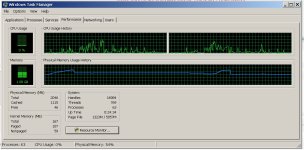
It seems everything is running much smoother now. I do not know very much about computers. And I usually know something is wrong when I open windows task manager and with no programs running other than the internet there are a lot of sharp spikes. When I first came to this website for the problem I was having the CPU was spiking from 0% to 100%. But now it seems much better. I have attached a photo of the Task manager.
I really appreciate all your help!
I had read somewhere on MalwareTips purchasing 'Malwarebytes Anti-Malware' is a good way to go? Do you suggest this more than the 'Hit Man Pro'?
I also have 'Microsoft Security Essentials' that does a daily scan.
Thank you again! Sending a donation to your beer fund! -Cheers!-
Attachments
Thanks, you're very welcome 
Malwarebytes is great product and I prefer it more than Hitman Pro.
Since your PC is clean, we're done here, unless you have something to ask
I can recommend you this software to avoid Adware in the future:
http://unchecky.com/
Read here how it works --> http://www.howtogeek.com/179758/how-to-avoid-junkware-offers-with-unchecky/
• The following will implement some post-cleanup procedures:
=> Please download DelFix by Xplode to your Desktop.
Run the tool and check the following boxes below;
 Remove disinfection tools
Create registry backup
Purge System Restore
Click Run button and wait a few seconds for the programme completes his work.
At this point all the tools we used here should be gone. Tool will create an report for you (C:\DelFix.txt)
The tool will also record healthy state of registry and make a backup using ERUNT program in %windir%\ERUNT\DelFix
Tool deletes old system restore points and create a fresh system restore point after cleaning.
Malwarebytes is great product and I prefer it more than Hitman Pro.
Since your PC is clean, we're done here, unless you have something to ask
I can recommend you this software to avoid Adware in the future:
http://unchecky.com/
Read here how it works --> http://www.howtogeek.com/179758/how-to-avoid-junkware-offers-with-unchecky/
• The following will implement some post-cleanup procedures:
=> Please download DelFix by Xplode to your Desktop.
Run the tool and check the following boxes below;
Click Run button and wait a few seconds for the programme completes his work.
At this point all the tools we used here should be gone. Tool will create an report for you (C:\DelFix.txt)
The tool will also record healthy state of registry and make a backup using ERUNT program in %windir%\ERUNT\DelFix
Tool deletes old system restore points and create a fresh system restore point after cleaning.

carol4315
New Member
Am I to do what you told the other member Aestal? Sorry getting over flu.Tried remove comment won't download.....Sorry...Will keep waiting made small donation but will make another if you n help...Thanks.
No, your topic is located here
http://malwaretips.com/threads/pup-optional-delta-a.25602/#post-184768
Please follow instructions there.
http://malwaretips.com/threads/pup-optional-delta-a.25602/#post-184768
Please follow instructions there.
carol4315
New Member
Thanks, you're very welcome
Malwarebytes is great product and I prefer it more than Hitman Pro.
Since your PC is clean, we're done here, unless you have something to ask
I can recommend you this software to avoid Adware in the future:
http://unchecky.com/
Read here how it works --> http://www.howtogeek.com/179758/how-to-avoid-junkware-offers-with-unchecky/
• The following will implement some post-cleanup procedures:
=> Please download DelFix by Xplode to your Desktop.
Run the tool and check the following boxes below;
Remove disinfection tools
Create registry backup
Purge System Restore
Click Run button and wait a few seconds for the programme completes his work.
At this point all the tools we used here should be gone. Tool will create an report for you (C:\DelFix.txt)
The tool will also record healthy state of registry and make a backup using ERUNT program in %windir%\ERUNT\DelFix
Tool deletes old system restore points and create a fresh system restore point after cleaning.
Carol, I already gave you the topic you opened. Please just follow instructions from there, and forgot about this topic.
http://malwaretips.com/threads/pup-optional-delta-a.25602/#post-184768
http://malwaretips.com/threads/pup-optional-delta-a.25602/#post-184768
- Status
- Not open for further replies.
Recently browsing
Members who viewed this thread in the last 5 minutes
You may also like...
-

-
-

-
 New Update AVG's latest browser extension
 -