Advanced Security rashmi Security Config 2025

Last updated
Apr 4, 2025
How it's used?
For home and private use
Operating system
Windows 11
On-device encryption
N/A
Log-in security
    • Basic account password (insecure)
Security updates
Allow security updates
Update channels
Allow stable updates only
User Access Control
Notify me only when programs try to make changes to my computer
Smart App Control
Off
Network firewall
Enabled
Real-time security
Microsoft Defender
Firewall security
Microsoft Defender Firewall
About custom security
Hard_Configurator (Recommended)
ConfigureDefender (High)
FirewallHardening (Recommended H_C)

Windows Defender Firewall: Block all incoming connections, including those in the list of allowed apps
Periodic malware scanners
Norton Power Eraser
Malware sample testing
I do not participate in malware testing
Environment for malware testing
N/A
Browser(s) and extensions
Chrome
Edge
uBlock Origin Lite
McAfee WebAdvisor
Secure DNS
NextDNS
Desktop VPN
HideAway
Password manager
Sticky Password
File and Photo backup
Copy-Paste
Subscriptions
    • None
System recovery
Hasleo
Risk factors
    • Browsing to popular websites
    • Making audio/video calls
    • Opening email attachments
    • Buying from online stores, entering banks card details
    • Logging into my bank account
    • Downloading software and files from reputable sites
    • Requesting and accepting remote access
    • Streaming audio/video content from trusted sites or paid subscriptions
Computer specs
HP Pavilion
8 GB RAM
500 GB HDD
What I'm looking for?

Looking for medium feedback.

I've tried the Symantec Browser Extension, and after testing it, I removed it
Symantec browser protection and Norton safe web extensions have the highest false positive detection; I keep for investigational purspose; when I suspect the result by the other two extensions (McAfee or Trafficlight, whichever the active one), I enable the other two; the most probable correct result is the one which gets at least two positivie or negative detections or more.
 
I'm also using Hard_Configurator. How can I use Firewall hardening ( H_C )? Is there any specific option in Hard Configurator to do firewall hardening ?
How can I use Configure Defender?
 
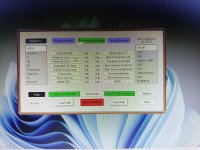
Maybe like this?:)

1755284537798.png
 
May be it's updated version. My H_C tool showing mentioned options in different positions. Built in update is possible or I have to download new version every time after release?

Could you post the screenshot to the H_C thread?
 
Could you post the screenshot to the H_C thread?
Okay I'll check later sorry actually I'll be busy in next few days .
 
I'm also using Hard_Configurator. How can I use Firewall hardening ( H_C )? Is there any specific option in Hard Configurator to do firewall hardening ?
How can I use Configure Defender?
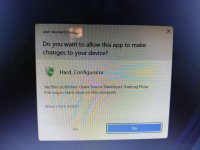
I'm not sure what you mean by "Firewall H_C" in your config. It looks like you're using an older version of H_C. I suggest uninstalling H_C. You can do this through the "Tools" section. Alternatively, post a screenshot of your H_C. Follow any other steps the uninstallation process mentions. Restart your system after uninstalling. Download the latest H_C from the link in @Andy Ful's post here. Run the H_C package. Complete the recommended actions. The H_C interface has ConfigureDefender and FirewallHardening at the top. Run each tool. Apply the recommended "High" profile for ConfigureDefender. Apply the "Recommended H_C" config for FirewallHardening. Post in your config thread if you need further help.

You are currently running ESET Home Security Essential. Is a firewall included? ConfigureDefender and FirewallHardening won't work with ESET/third-party security suites (AV + FW) on your system.

@Andy Ful, Does H_C support the "Windows 11 IoT LTSC" that @anirbandutta01 has?
 
@Andy Ful, Does H_C support the "Windows 11 IoT LTSC" that @anirbandutta01 has?

The security features configured via H_C should work on any Windows 11 editions. However, I did not test H_C on Windows 11 IoT LTSC.
The simplest test would be copying the H_C shortcut from the Desktop to the Downloads folder and running it. It should be blocked by SRP settings, and the event should be visible in the H_C.
 
Any experience with the Microsoft Defender Browser Extension? How effective is it?
I've already tested it, it uses SmartScreen. If you use EDGE, it's not necessary because EDGE already has SmartScreen built in. Using it in another Chromium-based browser, I don't think it's necessary and it won't add much to your web protection, because it's not as effective as BD/McAfee, exactly as @Trident said in the post above. I will test Microsoft Defender Browser Extension one day, and I will let you know more for sure about its effectiveness.m (y)
 
Back to McAfee WebAdvisor. Bitdefender TrafficLight worked well for me, but I couldn't make it work on Chrome and Edge on our kids' systems. Bitdefender TrafficLight stays grayed out, showing disabled settings. Disabling "QUIC Protocol" in Chrome and Edge flags also didn't help.

McAfee WebAdvisor showed a message for the installer version. I'll try McAfee WebAdvisor on our kids' systems if McAfee shows this message only once or rarely.
 
McAfee WebAdvisor showed a message for the installer version
Never dispalyed such a message for me.
I have tried trafficlight, webadvisor, and symantec; my personal opinion: stick with webadvisor; it the sweet spot between true positive detection rate and false positive detections rate.
 
Last edited: