Solved Safesearch Removal - IE, FF and GC

Pics
 

Attachments

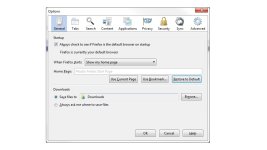
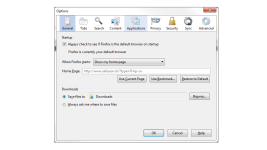
  • Default Restore.jpg
    Default Restore.jpg
    79.3 KB · Views: 54
  • Reversion.png
    Reversion.png
    42.3 KB · Views: 49
It appears so. IE has reverted back to msn.com which I assume is the default, but don't know since I never use it. I hardly use Chrome and have no idea where to even change the homepage after looking around the settings, but it appears that google is now the default search engine.
 
51a612a8b27e2-Zoek.png
Scan with ZOEK

Please download ZOEK by Smeenk and save it to your desktop (preferred version is the *.exe one)
Temporary disable your AntiVirus and AntiSpyware protection - instructions here.

  • Right-click on
    51a612a8b27e2-Zoek.png
    icon and select
    RunAsAdmin.jpg
    Run as Administrator to start the tool.
  • Wait patiently until the main console will appear, it may take a minute or two.
  • In the main box please paste in the following script:
    Code:
    createsrpoint;
    autoclean;
    emptyalltemp;
    ipconfig /flushdns;b
  • Make sure that Scan All Users option is checked.
  • Push Run Script and wait patiently. The scan may take a couple of minutes.
  • When the scan completes, a zoek-results logfile should open in notepad.
  • If a reboot is needed, it will be opened after it. You may also find it at your main drive (usually C:\ drive)

Post its content into your next reply.
 
Zoek.exe v5.0.0.0 Updated 15-01-2015
Tool run by Patrick on Thu 01/15/2015 at 15:38:38.59.
Microsoft Windows 7 Home Premium 6.1.7601 Service Pack 1 x64
Running in: Normal Mode Internet Access Detected
Launched: C:\Users\Patrick\Desktop\zoek.exe [Scan all users] [Script inserted]

==== Older Logs ======================

C:\zoek-results2015-01-13-172003.log 15063 bytes

==== System Restore Info ======================

1/15/2015 3:42:54 PM Zoek.exe System Restore Point Created Succesfully.

==== Empty Folders Check ======================

C:\PROGRA~3\Malwarebytes' Anti-Malware (portable) deleted successfully

==== Deleting CLSID Registry Keys ======================


==== Deleting CLSID Registry Values ======================


==== Deleting Services ======================


==== Batch Command(s) Run By Tool======================


==== Deleting Files \ Folders ======================

C:\PROGRA~3\Malwarebytes' Anti-Malware (portable) not found

==== Firefox Start and Search pages ======================

ProfilePath: C:\Users\Patrick\AppData\Roaming\Mozilla\Firefox\Profiles\z14t3idv.default-1421262341810
user_pref("browser.startup.homepage", "");

==== Firefox Extensions ======================

AppDir: C:\Program Files (x86)\Mozilla Firefox
- Skype Click to Call - %AppDir%\extensions\{AB2CE124-6272-4b12-94A9-7303C7397BD1}
- Java Console - %AppDir%\extensions\{CAFEEFAC-0016-0000-0033-ABCDEFFEDCBA}
- Java Console - %AppDir%\extensions\{CAFEEFAC-0016-0000-0035-ABCDEFFEDCBA}
- Default - %AppDir%\browser\extensions\{972ce4c6-7e08-4474-a285-3208198ce6fd}

==== Firefox Plugins ======================

Profilepath: C:\Users\Patrick\AppData\Roaming\Mozilla\Firefox\Profiles\z14t3idv.default-1421262341810
8560995C727974F27F2A1CE68909FEB9 - C:\Windows\SysWOW64\Macromed\Flash\NPSWF32_16_0_0_257.dll - Shockwave Flash
D2377C9458EFEB094E38B8C874AA214C - C:\Users\Patrick\AppData\Local\Google\Update\1.3.25.11\npGoogleUpdate3.dll - Google Update
76EFD64CD206B93E2EB5320A23C19AD7 - C:\Users\Patrick\AppData\Roaming\Mozilla\plugins\npgoogletalk.dll - Google Talk Plugin
2AB6A7F373290AE20A19CF5F306E8C97 - C:\Users\Patrick\AppData\Roaming\Mozilla\plugins\npo1d.dll - Google Talk Plugin Video Renderer
68D35C9DD8E7AE14EA539F69331A5441 - C:\Users\Default\AppData\Local\HuluDesktop\instances\0.9.11.1\nphdplg.dll - Hulu Desktop
F7E675EBDE6DA3A1665F2DCFA683322F - C:\Windows\SysWOW64\Adobe\Director\np32dsw.dll - Shockwave for Director / Shockwave for Director


==== Chromium Look ======================

Google Chrome Version: 39.0.2171.95 (Possible outdated, latest Stable version: 39.0.2171.99)


==== Chromium Startpages ======================

C:\Users\Patrick\AppData\Local\Fast Browser\User Data\Default\Preferences
"homepage": "http://www.safesear.ch/?type=20141109",
"startup_urls": [ "http://www.safesear.ch/?type=20141109" ],
"urls_to_restore_on_startup": [ "http://www.safesear.ch/?type=20141109" ]


==== Set IE to Default ======================

Old Values:
[HKEY_CURRENT_USER\Software\Microsoft\Internet Explorer\Main]
"Start Page"="http://go.microsoft.com/fwlink/p/?LinkId=255141"

New Values:
[HKEY_CURRENT_USER\Software\Microsoft\Internet Explorer\Main]
"Start Page"="http://go.microsoft.com/fwlink/p/?LinkId=255141"

==== All HKCU SearchScopes ======================

HKEY_CURRENT_USER\SOFTWARE\Microsoft\Internet Explorer\SearchScopes
"DefaultScope"="{0633EE93-D776-472f-A0FF-E1416B8B2E3A}"
{012E1000-F331-11DB-8314-0800200C9A66} Google Url="http://www.google.com/search?q={searchTerms}"
{0633EE93-D776-472f-A0FF-E1416B8B2E3A} Bing Url="http://www.bing.com/search?q={searchTerms}&src=IE-SearchBox&FORM=IE8SRC"

==== Empty IE Cache ======================

C:\Windows\system32\config\systemprofile\AppData\Local\Microsoft\Windows\Temporary Internet Files\Content.IE5 emptied successfully
C:\Users\Default\AppData\Local\Microsoft\Windows\Temporary Internet Files\Content.IE5 emptied successfully
C:\Users\Patrick\AppData\Local\Microsoft\Windows\Temporary Internet Files\Low\Content.IE5 emptied successfully
C:\Windows\SysNative\config\systemprofile\AppData\Local\Microsoft\Windows\Temporary Internet Files\Content.IE5 emptied successfully
C:\Windows\sysWoW64\config\systemprofile\AppData\Local\Microsoft\Windows\Temporary Internet Files\Content.IE5 emptied successfully
C:\Windows\serviceprofiles\networkservice\AppData\Local\Microsoft\Windows\Temporary Internet Files\Content.IE5 emptied successfully
C:\Windows\serviceprofiles\Localservice\AppData\Local\Microsoft\Windows\Temporary Internet Files\Content.IE5 emptied successfully
C:\Windows\sysWOW64\config\systemprofile\AppData\Local\Microsoft\Windows\Temporary Internet Files\Content.IE5 emptied successfully
C:\Users\Patrick\AppData\Local\Microsoft\Windows\Temporary Internet Files\Content.IE5\1RH9BTLS will be deleted at reboot

==== Empty FireFox Cache ======================

C:\Users\Patrick\AppData\Local\Mozilla\Firefox\Profiles\z14t3idv.default-1421262341810\cache2 emptied successfully

==== Empty Chrome Cache ======================

C:\Users\Patrick\AppData\Local\Google\Chrome\User Data\Default\Cache emptied successfully

==== Empty All Flash Cache ======================

Flash Cache Emptied Successfully

==== Empty All Java Cache ======================

Java Cache cleared successfully

==== C:\zoek_backup content ======================

C:\zoek_backup (files=12 folders=5 284863 bytes)

==== Empty Temp Folders ======================

C:\Users\Default\AppData\Local\Temp emptied successfully
C:\Users\Default User\AppData\Local\Temp emptied successfully
C:\Users\Patrick\AppData\Local\Temp will be emptied at reboot
C:\Windows\serviceprofiles\networkservice\AppData\Local\Temp emptied successfully
C:\Windows\serviceprofiles\Localservice\AppData\Local\Temp emptied successfully
C:\Windows\Temp will be emptied at reboot

==== After Reboot ======================

==== Empty Temp Folders ======================

C:\Windows\Temp successfully emptied
C:\Users\Patrick\AppData\Local\Temp successfully emptied

==== Empty Recycle Bin ======================

C:\$RECYCLE.BIN successfully emptied

==== Deleting Files / Folders ======================

"C:\Users\Patrick\AppData\Local\Microsoft\Windows\Temporary Internet Files\Content.IE5\1RH9BTLS" not found

==== EOF on Thu 01/15/2015 at 16:32:24.33 ======================
 
FRST.gif
Scan with Farbar Recovery Scan Tool

Please re-run Farbar Recovery Scan Tool to give me a fresh look at your system.
  • Right-click on
    FRST.gif
    icon and select
    RunAsAdmin.jpg
    Run as Administrator to start the tool.
    (XP users click run after receipt of Windows Security Warning - Open File).
  • Make sure that Addition option is checked.
  • Press Scan button and wait.
  • The tool will produce two logfiles on your desktop: FRST.txt and Addition.txt.
Please include their content into your next reply.
 
Uninstall Search Protect 1.0


FRST.gif
Fix with Farbar Recovery Scan Tool

icon_exclaim.gif
This fix was created for this user for use on that particular machine.
icon_exclaim.gif

icon_exclaim.gif
Running it on another one may cause damage and render the system unstable.
icon_exclaim.gif

Download attached fixlist.txt file and save it to the Desktop:

Both files, FRST and fixlist.txt have to be in the same location or the fix will not work!

  • Right-click on
    FRST.gif
    icon and select
    RunAsAdmin.jpg
    Run as Administrator to start the tool.
    (XP users click run after receipt of Windows Security Warning - Open File).
  • Press the Fix button just once and wait.
  • If for some reason the tool needs a restart, please make sure you let the system restart normally. After that let the tool complete its run.
  • When finished FRST will generate a log on the Desktop, called Fixlog.txt.

Please attach it to your reply.


adwcleaner_new.png
Fix with AdwCleaner

Please download AdwCleaner by Xplode and save the file to your Desktop.
  • Right-click on
    adwcleaner_new.png
    icon and select
    RunAsAdmin.jpg
    Run as Administrator to start the tool.
  • Wait until the database is updated.
  • Accept the Terms of use and click Scan.
  • When finished, please click Clean.
  • Upon completion, click Report. A log (AdwCleaner[S*].txt) will open.

Please include the contents of that file in your reply.

Note: Reports will be saved in your system partition, usually at C:\Adwcleaner
 

Attachments

  • Like
Reactions: yigido
# AdwCleaner v4.108 - Report created 18/01/2015 at 15:16:10
# Updated 17/01/2015 by Xplode
# Database : 2015-01-18.1 [Live]
# Operating System : Windows 7 Home Premium Service Pack 1 (64 bits)
# Username : Patrick - PATRICK-PC
# Running from : C:\Users\Patrick\Desktop\adwcleaner_4.108.exe
# Option : Clean

***** [ Services ] *****


***** [ Files / Folders ] *****


***** [ Scheduled Tasks ] *****


***** [ Shortcuts ] *****


***** [ Registry ] *****

Key Deleted : HKLM\SOFTWARE\DeviceVM

***** [ Browsers ] *****

-\\ Internet Explorer v11.0.9600.17496


-\\ Mozilla Firefox v35.0 (x86 en-US)


-\\ Google Chrome v39.0.2171.99

[C:\Users\Patrick\AppData\Local\Google\Chrome\User Data\Default\Web Data] - Deleted [Search Provider] : hxxp://www.safesear.ch/web/?type=ss-ch-ds-ox&q={searchTerms}
[C:\Users\Patrick\AppData\Local\Google\Chrome\User Data\Default\Web Data] - Deleted [Search Provider] : hxxp://search.aol.com/aol/search?q={searchTerms}
[C:\Users\Patrick\AppData\Local\Google\Chrome\User Data\Default\Web Data] - Deleted [Search Provider] : hxxp://www.ask.com/web?q={searchTerms}

*************************

AdwCleaner[R0].txt - [6739 octets] - [09/11/2014 19:59:26]
AdwCleaner[R1].txt - [7539 octets] - [12/01/2015 12:23:53]
AdwCleaner[R2].txt - [1539 octets] - [12/01/2015 16:12:36]
AdwCleaner[R3].txt - [1282 octets] - [14/01/2015 09:49:26]
AdwCleaner[R4].txt - [1775 octets] - [18/01/2015 15:07:43]
AdwCleaner[S0].txt - [6653 octets] - [09/11/2014 20:27:13]
AdwCleaner[S1].txt - [7700 octets] - [12/01/2015 12:27:13]
AdwCleaner[S2].txt - [1608 octets] - [12/01/2015 16:14:46]
AdwCleaner[S3].txt - [1348 octets] - [14/01/2015 09:54:08]
AdwCleaner[S4].txt - [1704 octets] - [18/01/2015 15:16:10]

########## EOF - C:\AdwCleaner\AdwCleaner[S4].txt - [1764 octets] ##########
 

Attachments

FRST.gif
Scan with Farbar Recovery Scan Tool

Please re-run Farbar Recovery Scan Tool to give me a fresh look at your system.
  • Right-click on
    FRST.gif
    icon and select
    RunAsAdmin.jpg
    Run as Administrator to start the tool.
    (XP users click run after receipt of Windows Security Warning - Open File).
  • Make sure that Addition option is checked.
  • Press Scan button and wait.
  • The tool will produce two logfiles on your desktop: FRST.txt and Addition.txt.
Please include their content into your next reply.
 
Shortcut Cleaner 1.3.4 by Lawrence Abrams (Grinler)
http://www.bleepingcomputer.com/
Copyright 2008-2015 BleepingComputer.com
More Information about Shortcut Cleaner can be found at this link:
http://www.bleepingcomputer.com/download/shortcut-cleaner/

Windows Version: Windows 7 Home Premium Service Pack 1
Program started at: 01/19/2015 04:00:26 PM.

Scanning for registry hijacks:

* No issues found in the Registry.

Searching for Hijacked Shortcuts:

Searching C:\Users\Patrick\AppData\Roaming\Microsoft\Windows\Start Menu\

Searching C:\ProgramData\Microsoft\Windows\Start Menu\

Searching C:\Users\Patrick\AppData\Roaming\Microsoft\Internet Explorer\Quick Launch\

Searching C:\Users\Public\Desktop\

Searching C:\Users\Patrick\Desktop


0 bad shortcuts found.

Program finished at: 01/19/2015 04:00:47 PM
Execution time: 0 hours(s), 0 minute(s), and 20 seconds(s)
 
Let's try to uninstall Firefox now, but we will remove all user data.

1) Uninstall Firefox
2) Delete these folders if they exist

C:\Program Files\Mozilla Firefox
C:\Program Files (x86)\Mozilla Firefox
C:\Users\username\AppData\Local\Mozilla\Firefox
C:\Users\username\AppData\Local\Mozilla Firefox
C:\Users\username\AppData\Roaming\Mozilla\Extensions
C:\Users\username\AppData\Roaming\Mozilla\Firefox

3) Reboot and reinstall Firefox.
 
I am unable to find the AppData folder. In search bar i come up with files in that path, but cannot get to the folder. A search for mozilla does not bring up any further files that you have listed so I am continuing with the reboot.