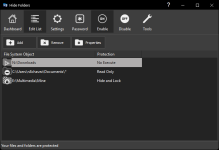
Is it possible to create a folder dedicated for suspicious downloaded files, with the property of "not allowing execution of files inside"?


Open MalwareTips from your Home Screen or desktop. Follow discussions, find answers and pick up where you left off.
If you cannot find an install option, update your browser or use its bookmark option to keep MalwareTips close.
After installation, open the app and sign in. Enable push notifications in Preferences if you want alerts. On iPhone and iPad, push requires a Home Screen web app and iOS or iPadOS 16.4 or later.
Sign in to manage notificationsInstallation is optional. Your notification settings stay under your control.

I don't want to limit access to the folder; I need to prevent executables inside from auto-running.I really, really like Hide Folders. I use it it the exact way you mention, as well as protection my system images directory. It's well worth the cost.
OSArmor/AppGuard? One of those should do the trick. OSArmor can restrict files running from Downloads or any other folder last time I checked.I don't want to limit access to the folder; I need to prevent executables inside from auto-running.
Any alternative native tricks of folder properties?OSArmor/AppGuard? One of those should do the trick. OSArmor can restrict files running from Downloads or any other folder last time I checked.
I'm not sure about native, but there has to be some Windows controls you can use since most security tools are based on Windows internals.Any alternative native tricks of folder properties?
Never tried VM before; I was looking for a more simple solution.I'm not sure about native, but there has to be some Windows controls you can use since most security tools are based on Windows internals.
Sorry not much help, your use case is kind of new. Have you considered using a VM without network activity/disable network adapter like VirtualBox or VMware?
Hiding folder does not prevent execution of its contents!It doesn't get simpler than Hide Folders.
Apologies; I thought you refer to folder propertiesDon't get hung up on the name. I literally gave you a screenshot, showing that it can do exactly what you're asking for.

Members who viewed this thread in the last 5 minutes