Open MalwareTips in Safari and tap Share. You may need to open the Page Menu first.
Choose Add to Home Screen. If it is not listed, use Edit Actions to add it.
Keep Open as Web App enabled if shown, then tap Add.
Android
Open MalwareTips in Chrome or another browser that supports app installation.
Open the browser menu and look for Install app, Install and create shortcut, or Add to Home screen.
Choose Install and confirm. Wording varies by browser.
Desktop
Chrome: use the install icon in the address bar, or the menu under Cast, save and share.
Edge: open the menu, then More tools, Apps and Install this site as an app.
Safari on Mac: choose Share or File, then Add to Dock. Firefox on Windows: look for the web apps button in the address bar.
If you cannot find an install option, update your browser or use its bookmark option to keep MalwareTips close.
Keep up with your conversations
After installation, open the app and sign in. Enable push notifications in Preferences if you want alerts. On iPhone and iPad, push requires a Home Screen web app and iOS or iPadOS 16.4 or later.
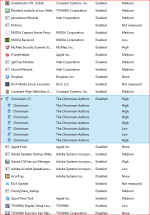
So every time I boot up now I noticed my start window looks strange. It's like a blank "Yahoo" page where normally my yahoo page is populated. I close it, click on the chrome icon and my normal start page comes up. I went in to Internet Options and noticed the start page has been changed so I changed it back and applied and ok'd but when I boot up the blank yahoo page comes up. I attached a screen shot of my task manager start up page showing the Chromium. Can you please help me get rid of it and show me how to check for anything else I might need to check for? Thank you.
My name is Argus and and I will be helping you with your computer problems.
Before we begin, please note the following:
I will be working on your Malware issues, this may or may not, solve other issues you have with your machine.
The logs can take some time to research, so please be patient with me.
Stay with the topic until I tell you that your system is clean. Missing symptoms does not mean that everything is okay.
Instructions that I give are for your system only!
Please do not run any tools until requested ! The reason for this is so I know what is going on with the machine at any time. Some programs can interfere with others and hamper the recovery process.
Please perform all steps in the order received. If you can't understand something don't hesitate to ask.
Again I would like to remind you to make no further changes to your computer unless I direct you to do so. I will not be able to help you if you do not follow my instructions.
Fix with Farbar Recovery Scan Tool
This fix was created for this user for use on that particular machine.
Running it on another one may cause damage and render the system unstable.
Download attached fixlist.txt file and save it to the Desktop:
Both files, FRST and fixlist.txt have to be in the same location or the fix will not work!
Right-click on
icon and select
Run as Administrator to start the tool.
(XP users click run after receipt of Windows Security Warning - Open File).
Press the Fix button just once and wait.
If for some reason the tool needs a restart, please make sure you let the system restart normally. After that let the tool complete its run.
When finished FRST will generate a log on the Desktop, called Fixlog.txt.
The last few days have been nuts, I really haven't been on
but when I boot up now the right page comes up. I won't
really be on for a few more days but when I do I will keep
a look out but so far so good. Nothing weird has been coming
up. Thanks!
The following will implement some post-cleanup procedures:
Download DelFix by Xplode and save it to your desktop.
Run the tool by right click on the
icon and Run as administrator option.
Make sure that these ones are checked:
Remove disinfection tools
Purge system restore
Reset system settings
Push Run and wait until the tool completes his work.
All tools we used should be gone. Tool will create an report for you (C:\DelFix.txt)
The tool will also record healthy state of registry and make a backup using ERUNT program in %windir%\ERUNT\DelFix
Tool deletes old system restore points and create a fresh system restore point after cleaning.
Recently browsing
Members who viewed this thread in the last 5 minutes