By Staff Site Issues and Feedback

@Jack,
One issue was posted before but is still not fixed.
In the 'Unread posts' overview, often one thread has the subject title missing.
It can be the first thread in the overview, like in the below screenshot, but it can be any other thread in the overview. It's never more than one thread title missing, just one.
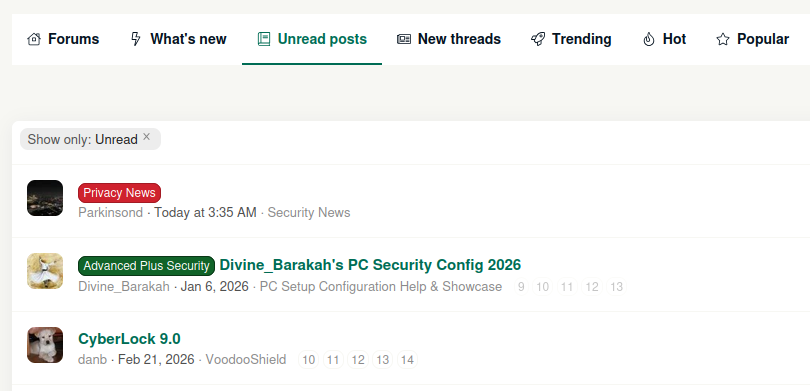
missing thread title.png
 
@Jack,
One issue was posted before but is still not fixed.
In the 'Unread posts' overview, often one thread has the subject title missing.
It can be the first thread in the overview, like in the below screenshot, but it can be any other thread in the overview. It's never more than one thread title missing, just one.


View attachment 299570
When this happens if I refresh the page the missing title briefly appears before it then goes blank, maybe that will help in identifying the problem.
 
@Jack,
One issue was posted before but is still not fixed.
In the 'Unread posts' overview, often one thread has the subject title missing.
When this happens if I refresh the page the missing title briefly appears before it then goes blank, maybe that will help in identifying the problem.
Thanks, Bill.
I think I must have noticed that in the past, but I had forgotten about it.
And as you said, perhaps what you mentioned can help in identifying the problem.
 
  • Like
Reactions: Sorrento
@Jack,
One issue was posted before but is still not fixed.
In the 'Unread posts' overview, often one thread has the subject title missing.
It can be the first thread in the overview, like in the below screenshot, but it can be any other thread in the overview. It's never more than one thread title missing, just one.

View attachment 299570

1787510034090.png
 
@Jack

In the PC-Security setup I can only choose this option:
  • Buying from online stores, entering banks card details
In Netherlands (and many other countries) we buy from store using payment service which connect to our bank. On my phone I have to open an app, enter a code, take a picture of the payment request QR and confirm the payment by entering a code again on the phone app.

Long story short: I never enter bank card details when I buy online!, so could add the option
  • Buying from online stores, using strong customer authorization (SCA)
 
The 'never ask me again' setting for notifications doesn't stick. I must have answered that question a trillion times. Every time I login it asks if i want notifications. NO ALREADY !!! Save the setting under my profile and leave me alone. I DONT LIKE POPUPS DISTURBING ME. I WILL RETURN TO THE FORUM WHEN I HAVE TIME.
 
The 'never ask me again' setting for notifications doesn't stick. I must have answered that question a trillion times. Every time I login it asks if i want notifications. NO ALREADY !!! Save the setting under my profile and leave me alone. I DONT LIKE POPUPS DISTURBING ME. I WILL RETURN TO THE FORUM WHEN I HAVE TIME.
Hey Victor,
I will look into what is going on .. Thanks!
 
The 'never ask me again' setting for notifications doesn't stick. I must have answered that question a trillion times. Every time I login it asks if i want notifications. NO ALREADY !!! Save the setting under my profile and leave me alone. I DONT LIKE POPUPS DISTURBING ME. I WILL RETURN TO THE FORUM WHEN I HAVE TIME.
Do you have any browser extension or privacy setting that clears cookies when you close the browser or log out?

That pop-up preference is currently stored in a browser cookie, and logging out of MalwareTips should not normally remove it. Could you let me know which browser and device you’re using? I’m also working on saving “Never ask again” directly to your MalwareTips profile so it stays disabled across browsers and devices.
 
The 'never ask me again' setting for notifications doesn't stick. I must have answered that question a trillion times. Every time I login it asks if i want notifications. NO ALREADY !!! Save the setting under my profile and leave me alone. I DONT LIKE POPUPS DISTURBING ME. I WILL RETURN TO THE FORUM WHEN I HAVE TIME.
The “Never ask again” option was previously saved only as a browser cookie, which could be cleared or lost --- especially with a communtiy such as ours that use a lot of anti tracking extensions :P.

We’ve now fixed it so the preference is saved directly to your MalwareTips account. Please click “Never ask again” one final time when the notification prompt appears. After that, it should remain disabled whenever you’re logged in, including on other browsers and devices.

You can also manage this preference later under Account → Preferences.