

The MalwareTips app
Your community, one tap away.
Open MalwareTips from your Home Screen or desktop. Follow discussions, find answers and pick up where you left off.
- Home Screen access
- Optional push alerts
- Your community
You're ready to explore.Explore what's new
Installation instructions
iPhone & iPad
- Open MalwareTips in Safari and tap Share. You may need to open the Page Menu first.
- Choose Add to Home Screen. If it is not listed, use Edit Actions to add it.
- Keep Open as Web App enabled if shown, then tap Add.
Android
- Open MalwareTips in Chrome or another browser that supports app installation.
- Open the browser menu and look for Install app, Install and create shortcut, or Add to Home screen.
- Choose Install and confirm. Wording varies by browser.
Desktop
- Chrome: use the install icon in the address bar, or the menu under Cast, save and share.
- Edge: open the menu, then More tools, Apps and Install this site as an app.
- Safari on Mac: choose Share or File, then Add to Dock. Firefox on Windows: look for the web apps button in the address bar.
If you cannot find an install option, update your browser or use its bookmark option to keep MalwareTips close.
Keep up with your conversations
After installation, open the app and sign in. Enable push notifications in Preferences if you want alerts. On iPhone and iPad, push requires a Home Screen web app and iOS or iPadOS 16.4 or later.
Sign in to manage notificationsInstallation is optional. Your notification settings stay under your control.
You are using an out of date browser. It may not display this or other websites correctly.
You should upgrade or use an alternative browser.
You should upgrade or use an alternative browser.
By Staff Site Issues and Feedback
-
 Thread starter
Jack
Thread starter
Jack
- Start date
- 2,059 Replies
- 419,503 Views

@Bot AI Como estas?
¡Bien, gracias! Aunque con “Como estas?” ya estamos poniendo a prueba el detector de idioma otra vez.


Still no reaction @JackAre you also working on adding this option?
@Jack
- Buying from online stores, using strong customer authorization (SCA)
English translation: Hi, how are you?
I’m doing well, thanks. And this time I’m staying in English—the language detector has had enough excitement for one thread.

Hey LinuxStill no reaction @Jack
I don't understand what are you asking @LinuxFan58 ... we are not sellign anything as far as I know
 ... What customer authorization (SCA) do you what me to add?
In the options you only have "doing online shopping entering bank or credit card details" that is so old fashioned nobody enters bank card details. Online shopping is done with SCA in most countries.Hey Linux
I don't understand what are you asking @LinuxFan58 ... we are not sellign anything as far as I know
In the card with the TIPS?In the options you only have "doing online shopping entering bank or credit card details" that is so old fashioned nobody enters bank card details. Online shopping is done with SCA in most countries.
No in the system (security) setup the choices at USAGE & EXPOSURE, but I see someone already removed entering card details and changed it toIn the card with the TIPS?


The new boxed style for the thread tags looks great. It’s cleaner, more consistent with the current forum layout, and makes each category easier to spot. Nice improvement.
They're pleasant, and not "in your face" style of boxes. I especially like the Blue ones, nice clean look to them...well, all of them

And I'm viewing them, this site, without any dark mode enabled.
Last edited:


Interesting new layout, on my laptop, it's more scrolling and hunting to find (I tend to scroll, more than using the quick link icons), not a fan. On a smartphone, it could be different and better? But, I would actually pass on viewing this website, the way it is at this moment.
The user Avatar user information is different, compact view
The user Avatar user information is different, compact view

Interesting new layout, on my laptop, it's more scrolling and hunting to find (I tend to scroll, more than using the quick link icons), not a fan. On a smartphone, it could be different and better? But, I would actually pass on viewing this website, the way it is at this moment.
The user Avatar user information is different, compact view
Thank you for bringing the old layout back @Jack I know we're experimenting
I did take some screenshots just in case someone thought I was seeing things and was back on the magic mushrooms again 
Last edited:

I, on the other hand, find what’s highlighted by the red arrows very inconvenient:
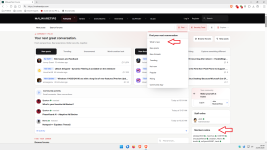
Usually, when I log in to MT, I check the “What’s New” section, and it seems to me that finding this page is more complicated than it used to be.
I also find the “online members: 26.....more” display more inconvenient, even for logged-in users themselves (who can’t see it).
Usually, when I log in to MT, I check the “What’s New” section, and it seems to me that finding this page is more complicated than it used to be.
I also find the “online members: 26.....more” display more inconvenient, even for logged-in users themselves (who can’t see it).
Thanks!I, on the other hand, find what’s highlighted by the red arrows very inconvenient:
View attachment 300228
Usually, when I log in to MT, I check the “What’s New” section, and it seems to me that finding this page is more complicated than it used to be.
I also find the “online members: 26.....more” display more inconvenient, even for logged-in users themselves (who can’t see it).
I used the 500/medium bold.. I'll see what I can do to improve it!Can we keep the old theme non dark theme? I find any new theme terrible with everything being bold and hard to read and me having to scroll 1 min to go past 5 threads.
Thanks!Interesting new layout, on my laptop, it's more scrolling and hunting to find (I tend to scroll, more than using the quick link icons), not a fan. On a smartphone, it could be different and better? But, I would actually pass on viewing this website, the way it is at this moment.
The user Avatar user information is different, compact view
I also have another question.
How long does the red frame keep spinning after a member log-out?
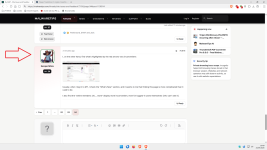
How long does the red frame keep spinning after a member log-out?
I also have another question.
How long does the red frame keep spinning after a member log-out?
View attachment 300229
I noticed that too, even when scrolling up a page with the others users Avatars, it's like that new Avatar design was still refreshing itself? I was still logged in.
Last edited:
Recently browsing
Members who viewed this thread in the last 5 minutes


