


The MalwareTips app
Your community, one tap away.
Open MalwareTips from your Home Screen or desktop. Follow discussions, find answers and pick up where you left off.
- Home Screen access
- Optional push alerts
- Your community
You're ready to explore.Explore what's new
Installation instructions
iPhone & iPad
- Open MalwareTips in Safari and tap Share. You may need to open the Page Menu first.
- Choose Add to Home Screen. If it is not listed, use Edit Actions to add it.
- Keep Open as Web App enabled if shown, then tap Add.
Android
- Open MalwareTips in Chrome or another browser that supports app installation.
- Open the browser menu and look for Install app, Install and create shortcut, or Add to Home screen.
- Choose Install and confirm. Wording varies by browser.
Desktop
- Chrome: use the install icon in the address bar, or the menu under Cast, save and share.
- Edge: open the menu, then More tools, Apps and Install this site as an app.
- Safari on Mac: choose Share or File, then Add to Dock. Firefox on Windows: look for the web apps button in the address bar.
If you cannot find an install option, update your browser or use its bookmark option to keep MalwareTips close.
Keep up with your conversations
After installation, open the app and sign in. Enable push notifications in Preferences if you want alerts. On iPhone and iPad, push requires a Home Screen web app and iOS or iPadOS 16.4 or later.
Sign in to manage notificationsInstallation is optional. Your notification settings stay under your control.
You are using an out of date browser. It may not display this or other websites correctly.
You should upgrade or use an alternative browser.
You should upgrade or use an alternative browser.
Troubleshooting SlimJet Installation Probs
-
 Thread starter
JakeXPMan
Thread starter
JakeXPMan
- Start date
- 7 Replies
- 5,538 Views
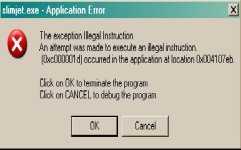


Did you perform a system restore? Not sure the problem but it may likely deal on the OS you use?
Nope, no restoring. I use XP SP3. Should be working but doesn't, won't even open the browser at all.
-
Slimjet is compatible with Windows XP (w/ sp2), Windows Vista, Windows 7, Windows 8/8.1, Windows 2003/2008/2012.
Last edited:
Upvote
0

- I would try disabling all anti-malware before the install.
- Not sure if XP allows installations in Safe Mode, but if not you could do a clean boot as a substitute.
- Next I would reset file permissions on C: drive before install. Tweaking.com is a good way to do that.
Upvote
0
- I would try disabling all anti-malware before the install.
- Not sure if XP allows installations in Safe Mode, but if not you could do a clean boot as a substitute.
- Next I would reset file permissions on C: drive before install. Tweaking.com is a good way to do that.
Tweaking.com was something that I just was told about by a helpful MT user, the programs look great,
I was curious of using these, "windows repair, reset registry permissions, and the two tweakers".
I can't find much on how to use them, I am not brave with registry and file associations.
I do have an oddball error here and there I'd like to fix, with Winamp a "close app error", SlimJet "Unusable app error", and Lunascape 7 "Qwkit" cannot read memory error. I uninstalled Lunascape.
Other then that, no programs have any obvious problems for me... net functions great, as well as games, booting etc.
but resetting windows settings, associations and tweaking (safely) sounds like a nice option to get Slim Jet running, but are these tweaking.com programs safe? Would my new settings effect my browsers/programs and the like?
For example... which repair programs do i need a clean boot for, and which can be run without?
Do I need to run these in a specific order? Sorry all the questions, just using top caution.
Upvote
0
Caution is a good thing. Tweaking has saved my hide several times, but one time it made the system worse. Not sure why (edit: probably my fault, as I wasn't being very careful), but I wasn't concerned either, as I had an image backup. Tweaking has a lot of protections built into it, like registry backup, doing more mundane things first like chkdsk, SFC, MBAM, etc, but there's nothing like a backup system image to ease the mind and save time. The site has a very helpful forum.
Upvote
0
Recently browsing
Members who viewed this thread in the last 5 minutes
You may also like...
-
 Serious Discussion Possible License Key Issues Affecting AVG and Gen Digital Products
 - R
- S
-
 Hot Take Brave is beginning to suck.
 - A