

The MalwareTips app
Your community, one tap away.
Open MalwareTips from your Home Screen or desktop. Follow discussions, find answers and pick up where you left off.
- Home Screen access
- Optional push alerts
- Your community
You're ready to explore.Explore what's new
Installation instructions
iPhone & iPad
- Open MalwareTips in Safari and tap Share. You may need to open the Page Menu first.
- Choose Add to Home Screen. If it is not listed, use Edit Actions to add it.
- Keep Open as Web App enabled if shown, then tap Add.
Android
- Open MalwareTips in Chrome or another browser that supports app installation.
- Open the browser menu and look for Install app, Install and create shortcut, or Add to Home screen.
- Choose Install and confirm. Wording varies by browser.
Desktop
- Chrome: use the install icon in the address bar, or the menu under Cast, save and share.
- Edge: open the menu, then More tools, Apps and Install this site as an app.
- Safari on Mac: choose Share or File, then Add to Dock. Firefox on Windows: look for the web apps button in the address bar.
If you cannot find an install option, update your browser or use its bookmark option to keep MalwareTips close.
Keep up with your conversations
After installation, open the app and sign in. Enable push notifications in Preferences if you want alerts. On iPhone and iPad, push requires a Home Screen web app and iOS or iPadOS 16.4 or later.
Sign in to manage notificationsInstallation is optional. Your notification settings stay under your control.
You are using an out of date browser. It may not display this or other websites correctly.
You should upgrade or use an alternative browser.
You should upgrade or use an alternative browser.
smart hdd
malwarekiller
New Member
Welcome to the forums!  Lets start dealing with your firewall and update issues
Download and Install Combofix
Download ComboFix from one of the following locations:
Link 1
Link 2
VERY IMPORTANT !!! Save ComboFix.exe to your Desktop
* IMPORTANT - Disable your AntiVirus and AntiSpyware applications, usually via a right click on the System Tray icon. They may otherwise interfere with our tools. If you have difficulty properly disabling your protective programs, refer to this link here
Notes:
1. Do not mouse-click Combofix's window while it is running. That may cause it to stall.
2. Do not "re-run" Combofix. If you have a problem, reply back for further instructions.
3. If after the reboot you get errors about programmes being marked for deletion then reboot, that will cure it.
Please make sure you include the combo fix log in your next reply as well as describe how your computer is running now
NEXT
run farbar service scanner
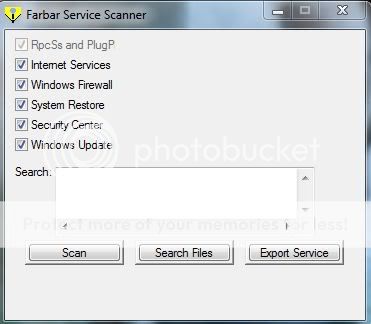
Tick "All" options.
Press "Scan".
It will create a log (FSS.txt) in the same directory the tool is run.
Please copy and paste the log to your reply.
Lets start dealing with your firewall and update issuesDownload and Install Combofix
Download ComboFix from one of the following locations:
Link 1
Link 2
VERY IMPORTANT !!! Save ComboFix.exe to your Desktop
* IMPORTANT - Disable your AntiVirus and AntiSpyware applications, usually via a right click on the System Tray icon. They may otherwise interfere with our tools. If you have difficulty properly disabling your protective programs, refer to this link here
- Double click on ComboFix.exe & follow the prompts.
- Accept the disclaimer and allow to update if it asks
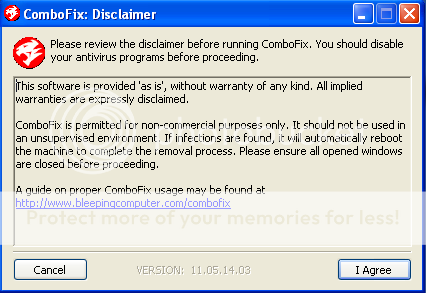
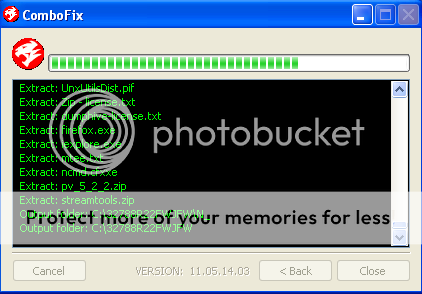
- When finished, it shall produce a log for you.
[*]Please include the C:\ComboFix.txt in your next reply.
Notes:
1. Do not mouse-click Combofix's window while it is running. That may cause it to stall.
2. Do not "re-run" Combofix. If you have a problem, reply back for further instructions.
3. If after the reboot you get errors about programmes being marked for deletion then reboot, that will cure it.
Please make sure you include the combo fix log in your next reply as well as describe how your computer is running now
NEXT
run farbar service scanner
Tick "All" options.
Press "Scan".
It will create a log (FSS.txt) in the same directory the tool is run.
Please copy and paste the log to your reply.
this is my log reports from combofix and fss. fss would not run at first took 3 times before it saved to my desktop because it said was not a popular file to run and would not give the option to run. but did finally save to desktop. pc has slowed down and will not let me download any software. tried microsoft fix it to fix uploads but stops 3/4 ways through.
malwarekiller
New Member
Ok big question: Do u have a live net connection in normal mode??
also what are your current problems with windows updates and firewall?
also what are your current problems with windows updates and firewall?
malwarekiller said:Ok big question: Do u have a live net connection in normal mode??
also what are your current problems with windows updates and firewall?
my windows update still goes to automatic delay start even after i reset it. i have not recieved any other updates since the last one i was able to dl. but seems computer runs slower and will not run software like microsoft fix it. i do not understand live net connection or normal mode. msessentials shows unprotected orange sign.switches back and forth. never had that problem before hdd. i don't know if this is a problem but i uninstalled avg and upgraded to avast antivirus on 4/10/12 but it still shows on my pc hidden icons and in downloaded software.
but of late, my microsoft works 9 documents will not open as of today 4/16/12. worked yesterday but today they will not open. with a message of "words cannot access one or more files it needs to run the word processor.the files may have been renamed , deleted , or moved. try reinstalling Works , and then starting the program again. to which i reinstalled works 9 only to get the same message again.ran malwarebytes again nothing found. i use incredimail app but it stopped working. i uninstalled then dl straight from the site and it downloaded. but when i clicked install or run for a very split second something opened and closed.but it did not install incredimail app.
razzle said:but of late, my microsoft works 9 documents will not open as of today 4/16/12. worked yesterday but today they will not open. with a message of "words cannot access one or more files it needs to run the word processor.the files may have been renamed , deleted , or moved. try reinstalling Works , and then starting the program again. to which i reinstalled works 9 only to get the same message again.ran malwarebytes again nothing found. i use incredimail app but it stopped working. i uninstalled then dl straight from the site and it downloaded. but when i clicked install or run for a very split second something opened and closed.but it did not install incredimail app.
recieved important windows update for microsoft works. update kb2680317. failed 5 times to install. when i shut down pc it stayed on to update something. checked w/u shows file failed.
malwarekiller
New Member
Hi the windows updates delayed start setting is just fnormal and windows will put it to default if u change that....
Download Windows Repair (all in one) from here:
http://www.tweaking.com/content/page/windows_repair_all_in_one.html
Install the program then run
Go to step 2 and allow it to run Disc check
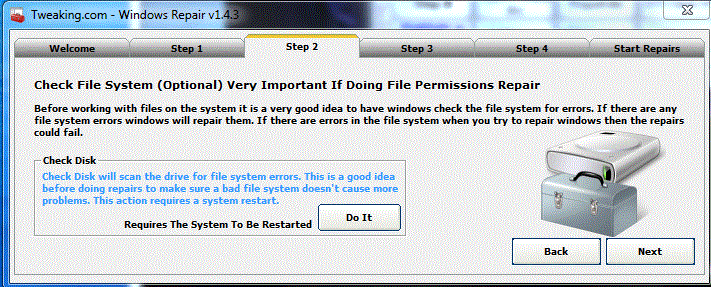
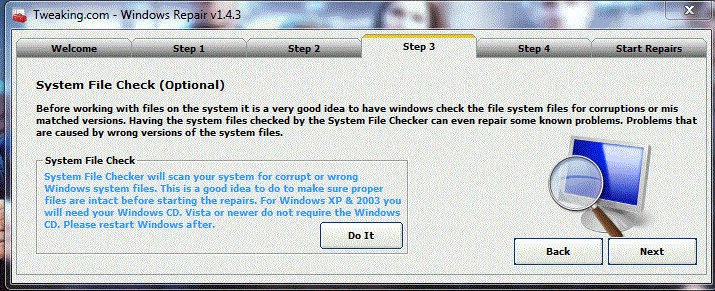
Once that is done then go to step 3 and allow it to run SFC
On the start repairs tab select advanced mode and click start
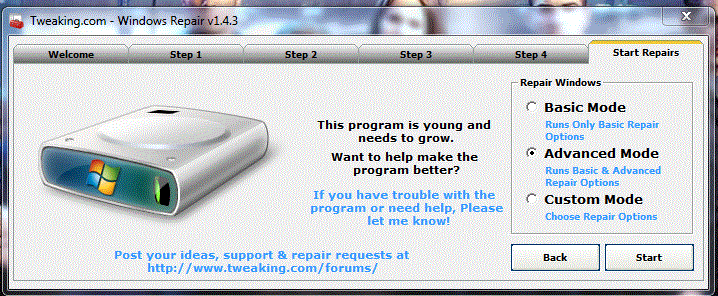
Select all the items given and tick restart system when finished then click Start
Download Windows Repair (all in one) from here:
http://www.tweaking.com/content/page/windows_repair_all_in_one.html
Install the program then run
Go to step 2 and allow it to run Disc check
Once that is done then go to step 3 and allow it to run SFC
On the start repairs tab select advanced mode and click start
Select all the items given and tick restart system when finished then click Start
thank you for your time and effort. so far the tweak program has done the trick. everything seems to work fine so far. the only issue is the microsoft works 9 update kb2680317. since the tweak fix i have trouble installing that single file as it failed to install 2 times since using tweak. maybe it is a microsoft issue on that file. many, many thanks again.
malwarekiller
New Member
razzle said:thank you for your time and effort. so far the tweak program has done the trick. everything seems to work fine so far. the only issue is the microsoft works 9 update kb2680317. since the tweak fix i have trouble installing that single file as it failed to install 2 times since using tweak. maybe it is a microsoft issue on that file. many, many thanks again.
Microsoft works is not important use revo uninstaller and uninstall the microsoft works program.
http://www.revouninstaller.com/revo_uninstaller_free_download.html
Recently browsing
Members who viewed this thread in the last 5 minutes


