
Some of my links are changed to pp.developunit.info/z/...

Murtauh

New Member
Just a minute ago, I noticed that randomized links on webpages are redirecting to a url beginning in pp.developunit.info/z/... instead of their intended targets. How do I resolve this? Here are some screenshots of what is going on:

1) The preview image for the Matt Damon AMA redirects to the pp.developunit.info/z/.. ##### instead of the IAMA page
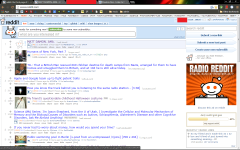
Screenshot 2014-02-06 12.48.44.png


2) Then, this dialogue box pops up telling me to call a number for "support"
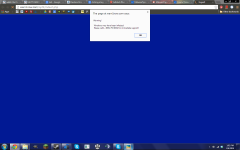
Screenshot 2014-02-06 13.02.53.png

3) Finally, I am redirected to this page after hopping through several url redirections.
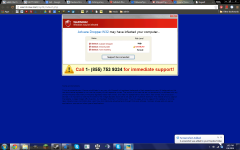
Screenshot 2014-02-06 13.02.55.png
 
Hi,


Please download zoek.zip or zoek.rar by smeenk (
Zoek_icon.png
) from here or here and save it to your Desktop.
Unpack the archive...
  • Close any open browsers
  • Temporarily disable your AntiVirus program. (If necessary)
    If you are unsure how to do this please read this or this Instruction.
  • Double click on zoek.exe to run the tool .
    Please wait while the tool does not start...
  • Copy the text present inside the code box below and paste it into the large window in the zoek tool:

    Code:
    createsrpoint; 
    StandardSearch; 
    emptyfolderscheck; 
    installer-list; 
    installedprogs; 
    uninstall-list;
  • Click on
    Run%20Script%20by%20zoek.png
    button.
    Please wait until a logreport will open (this can be after reboot)
  • Save notepad to your Desktop and attach here zoek-results.log
    Note: It will also create a log in the C:\ directory named "zoek-results.log"
 
Run Zoek again, but now with this script. Attach produced report

Code:
emptyfolderscheck;delete
emptyalltemp;
[HKEY_CURRENT_USER\Software\Microsoft\Windows\CurrentVersion\Run];r
"HKCU"=-;r
C:\Users\Owner\AppData\Roaming\spynet;fs
[HKEY_LOCAL_MACHINE\Software\Microsoft\Windows\CurrentVersion\Policies\Explorer\Run];r
"Policies"=-;r
[HKEY_CURRENT_USER\Software\Microsoft\Windows\CurrentVersion\Policies\Explorer\Run];r
"Policies"=-;r
C:\Windows\system32\spynet;fs
[HKEY_LOCAL_MACHINE\Software\Microsoft\Windows NT\CurrentVersion\Windows];r
"AppInit_DLLs"=-;r
c:\\progra~3\\intele~1;fs
Undetermined;ff
ejpbbhjlbipncjklfjjaedaieimbmdda;chr
jfmjfhklogoienhpfnppmbcbjfjnkonk;chr
kmkomcfplcpcogcghogacbnlipghamnj;chr
ejpbbhjlbipncjklfjjaedaieimbmdda;chr
autoclean;
emptyclsid;
 
Good, we need one more check:


Please download Farbar Recovery Scan Tool and save it to your desktop.

Note: You need to run the version compatibale with your system. If you are not sure which version applies to your system download both of them and try to run them.
Only one of them will run on your system, that will be the right version.


  • Double-click to run it. When the tool opens click Yes to disclaimer.
  • Press Scan button.
  • It will make a log (FRST.txt) in the same directory the tool is run. Please attach it to your reply.
  • The first time the tool is run, it makes also another log (Addition.txt). Please attach it to your reply.


Please download aswMBR and save it to your desktop.

Double click aswMBR.exe to start the tool.
  • Select Yes if prompted to download the Avast database.
  • Click Scan
  • Upon completion of the scan ( Scan finished successfully ) click Save log and save it to your desktop, and post that log in your next reply for review.
    Note: do NOT attempt any Fix yet.
 
Let's try one more check:


Download TDSSKiller and save it to your desktop

Execute TDSSKiller.exe by doubleclicking on it.
Confirm "End user Licence Agreement" and "KSN Statement" dialog box by clicking on Accept button.
  • Press Start Scan
  • If Suspicious object is detected, the default action will be Skip, click on Continue.
  • If Malicious objects are found, select Cure.

Once complete, a log will be produced at the root drive which is typically C:\ ,for example, C:\TDSSKiller.<version_date_time>log.txt


Please post the contents of that log in your next reply.
 
From Control Panel uninstall following:
- uTorrentBar Toolbar
- uTorrentControl_v2 Toolbar
- DAEMON Tools Toolbar


Then...


Download attached fixlist.txt on the same location as FRST (otherwise the fix won't work)

Open FRST, and click Fix. Attach me that report after it is finished.
 

Attachments

Good, then we're done here :)


• The following will implement some post-cleanup procedures:

=> Please download DelFix by Xplode to your Desktop.

Run the tool and check the following boxes below;
checkmark.png
Remove disinfection tools
checkmark.png
Create registry backup
checkmark.png
Purge System Restore

Click Run button and wait a few seconds for the programme completes his work.
At this point all the tools we used here should be gone. Tool will create an report for you (C:\DelFix.txt)

The tool will also record healthy state of registry and make a backup using ERUNT program in %windir%\ERUNT\DelFix
Tool deletes old system restore points and create a fresh system restore point after cleaning.
 
Open your own topic, do not attempt to use the fixes provided for other users, you can damage your system. Every fix is for itself and every machine is for itself.
 

Recently browsing

Members who viewed this thread in the last 5 minutes

Back
Top