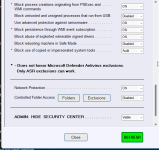
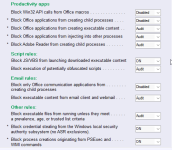
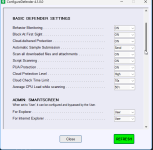
New Update Testing ConfigureDefenderPM (Policy Manager version)

does H C where ConfigureDefender blocks Windhawk MODS every WIndows update where it's Portmaster?

To see if H_C blocks the concrete application, you must inspect the H_C Log (Tools >> Blocked Events / Security Logs).
Depending on the settings, H_C can block the application "G:/Portable Apps/Start.exe".
Before inspecting the H_C Log, you can temporarily Switch OFF the H_C SRP restrictions to see if the issue disappears.

1782299554827.png
 
I removed H_C because I was having trouble accessing certain shortcuts, even though everything seemed fine in the settings...


I'm using ConfigureDefender and FirewallHardening separately...


Maybe WHHLight later...


I noticed that ConfigureDefender can be found separately (*.exe), but not FirewallHardening...


So I’m using an old WHHLight folder...


Is that OK?
Can I use these tools without using WHHLight?


explorer_UW6J8VkKzr.png


Thanks
 
I removed H_C because I was having trouble accessing certain shortcuts, even though everything seemed fine in the settings...

Shortcuts can be whitelisted in H_C (Whitelist By Path >> Add Path*Wildcards).

Can I use these tools without using WHHLight?

Your tools are outdated. You can get a newer version of the WHHLight package and use ConfigureDefender and FirewallHardening without using WHHLight.
You can also use ConfigureDefenderPM instead of ConfigureDefender.
 
Hi, I have ConfigureDefender 4.1.00 installed. Do I need to remove it to try ConfigureDefenderPM 4.1.1.1? Are they the same, and does one replace the other?

The new version replaces the older one, but not vice versa.
If you want to get rid of ver. 4.1.1.1, it is necessary to use the <RMOVE> red button.
 
Testing ConfigureDefenderPM (Policy Manager version)

The main goal of this version is to better protect Microsoft Defender from attacks that could abuse Defender exclusions.
It is assumed that MD Tamper Protection is enabled.


The new ConfigureDefenderPM looks similar to the previous versions, but its code has been significantly redesigned:

1. It can now work without PowerShell.
2. It uses Policy Manager settings instead of the standard/native Microsoft Defender settings.
3. Users must add Defender exclusions through ConfigureDefenderPM. The Exclusions option in Windows Security Center is blocked.
4. Two new features have been added:
  • Manage Microsoft Defender Exclusions
  • Lock and Protect Policies
These changes help protect important Defender settings and exclusions. For example, if an attacker tries to add Microsoft Defender exclusions using PowerShell MpPreference commands, those exclusions will be ignored by Microsoft Defender.

Please use the REMOVE red button to remove the Policy Manager settings and activate the standard/native Microsoft Defender settings.
Andy I'm not sure who to ask, being I am talking about 3 different pcs of software. I am going to run ConfigureDefender, with Malwarebytes WFC, and thinking possibly I should ad Cyberlock as I have a license. If I do so, can you give me the appropriate settings in all three, that would avoid conflicts, enhance security, and minimize PC impact? It would be greatly appreciated. If you prefer this be answered by someone else, maybe you could pass it along to them and if they answer here, that would be great. Thank You.
 
Andy I'm not sure who to ask, being I am talking about 3 different pcs of software. I am going to run ConfigureDefender, with Malwarebytes WFC, and thinking possibly I should ad Cyberlock as I have a license.

ConfigureDefender should not conflict with other software if you allow PowerShell in CyberLock while applying the ConfigureDefender settings.
Unfortunately, I do not use/test CyberLock and WFC, so I cannot help you to adjust the optimal settings. You may also consider using DefenderUI with CyberLock (the same developer) and ask about the config on the DefenderUI thread.
 
If I do so, can you give me the appropriate settings in all three, that would avoid conflicts, enhance security, and minimize PC impact?
You shouldn't have any problems in terms of conflicts with default settings in VoodooShield.

My VoodooShield settings:
  • Cyberlock mode: Always ON
  • Security posture: Aggressive
  • Basic settings -> Deny by Default - Uncheck to show prompt instead of balloon
  • Advanced settings -> all default
  • UI Tweaks -> Disable Automatically position the desktop shield gadget
  • SiriusGPT -> Disable "Show SiriusGPt icon", Disable "Create Firewall Rules for Not Safe items" and Disable SiriusGPT Real-time Scan
  • On right-click of taskbar icon -> select Hide Desktop Shield
I rely on VoodooShield's internal rules engine to do its job and do not use SiriusGPT. I make UI tweaks noted above to avoid annoyances and to configure alert type.

Choose "Allow" only If VS alerts re: powershell from ConfigureDefender. Otherwise should be no conflict.

I don't and haven't used WFC but again, should be no problem. Hope this helps.
 
Last edited:
Can I replace Defender hardening consol with ConfigureDefender and FirewallHardening,with an improvement?,a Ai calls the configure Defender(The gold standard) I have appguard usually on locked down?
 
You shouldn't have any problems in terms of conflicts with default settings in VoodooShield.

My VoodooShield settings:
  • Cyberlock mode: Always ON
  • Security posture: Aggressive
  • Basic settings -> Deny by Default - Uncheck to show prompt instead of balloon
  • Advanced settings -> all default
  • UI Tweaks -> Disable Automatically position the desktop shield gadget
  • SiriusGPT -> Disable "Show SiriusGPt icon", Disable "Create Firewall Rules for Not Safe items" and Disable SiriusGPT Real-time Scan
  • On right-click of taskbar icon -> select Hide Desktop Shield
I rely on VoodooShield's internal rules engine to do its job and do not use SiriusGPT. I make UI tweaks noted above to avoid annoyances and to configure alert type.

Choose "Allow" only If VS alerts re: powershell from ConfigureDefender. Otherwise should be no conflict.

I don't and haven't used WFC but again, should be no problem. Hope this helps.
Thank You Andy and Old School... Thankful.