What is the Defender hardening console, DefenderUI/DUI? The improvement will be firewall rules with FirewallHardening. You should try the Hard_Configurator suite: ConfigureDefender, FirewallHardening, and Hard_Configurator, all with recommended settings; you will not find as easy/set-and-forget default-deny/smart protection! Do remove AppGuard if you decide to try the Hard_Configurator suite.Can I replace Defender hardening consol with ConfigureDefender and FirewallHardening,with an improvement?,a Ai calls the configure Defender(The gold standard) I have appguard usually on locked down?


The MalwareTips app
Your community, one tap away.
Open MalwareTips from your Home Screen or desktop. Follow discussions, find answers and pick up where you left off.
- Home Screen access
- Optional push alerts
- Your community
You're ready to explore.Explore what's new
Installation instructions
iPhone & iPad
- Open MalwareTips in Safari and tap Share. You may need to open the Page Menu first.
- Choose Add to Home Screen. If it is not listed, use Edit Actions to add it.
- Keep Open as Web App enabled if shown, then tap Add.
Android
- Open MalwareTips in Chrome or another browser that supports app installation.
- Open the browser menu and look for Install app, Install and create shortcut, or Add to Home screen.
- Choose Install and confirm. Wording varies by browser.
Desktop
- Chrome: use the install icon in the address bar, or the menu under Cast, save and share.
- Edge: open the menu, then More tools, Apps and Install this site as an app.
- Safari on Mac: choose Share or File, then Add to Dock. Firefox on Windows: look for the web apps button in the address bar.
If you cannot find an install option, update your browser or use its bookmark option to keep MalwareTips close.
Keep up with your conversations
After installation, open the app and sign in. Enable push notifications in Preferences if you want alerts. On iPhone and iPad, push requires a Home Screen web app and iOS or iPadOS 16.4 or later.
Sign in to manage notificationsInstallation is optional. Your notification settings stay under your control.
You are using an out of date browser. It may not display this or other websites correctly.
You should upgrade or use an alternative browser.
You should upgrade or use an alternative browser.
New Update Testing ConfigureDefenderPM (Policy Manager version)
- Thread starter Andy Ful
- Start date
- Featured
Hard_Configurator Tools
52 Replies
7,834 Views

You won't see any improvement by switching since you already have two powerful programs in DHC and Appguard. Just make sure your browsers are secured with web filtering of some kind.Can I replace Defender hardening consol with ConfigureDefender and FirewallHardening,with an improvement?,a Ai calls the configure Defender(The gold standard) I have appguard usually on locked down?

Andy Ful
From Hard_Configurator Tools
Verified
Honorary Member
Top Poster
Developer
Well-known
Forum Veteran
Can I replace Defender hardening consol with ConfigureDefender and FirewallHardening,with an improvement?
DHC shares many features with ConfigureDefender.
Deep Firewall Control is a strong feature, but essentially different from FirewallHardening. Both protect against different attack vectors.
AppGuard Solo can restrict/contain some important LOLBins, but most of them can still make outbound connections.
You could add FirewallHardening to AppGuard and DHC setup, but I am afraid that such a setup would be unnecessarily complex for home usage.

Forgot to say thanks for creating this since, as you know, it solves MD's exclusion issue that I always hated.
BTW, I think this is the first time I have seen this ASR rule in action. It blocked a portable curl that I have, which comes with http3 support that the built-in curl lacks.
When I tried to use it, it was blocked as it should be.
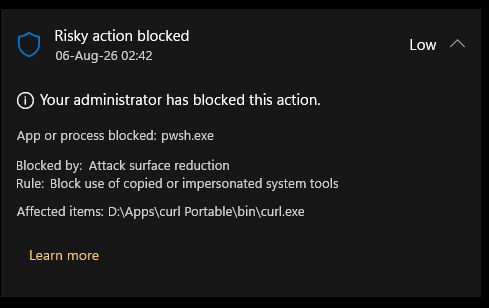
But when I tried to add it to the ASR exclusion, it wasn't letting me,
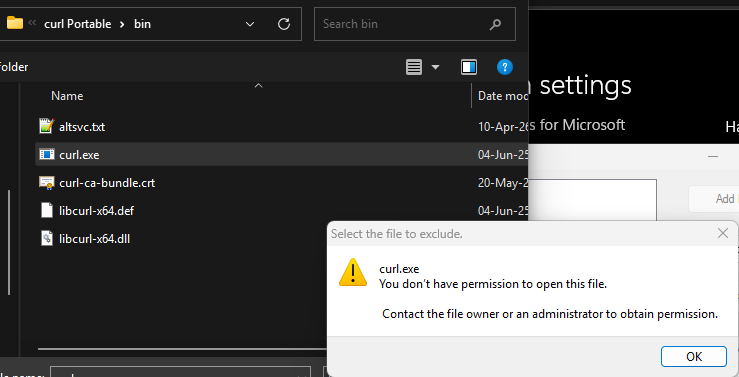
It worked after disabling MD. Then I could add the exclusion. I haven't had a ASR rule blocking something in a while so didn't remember that disabling the protection is needed.
BTW, I think this is the first time I have seen this ASR rule in action. It blocked a portable curl that I have, which comes with http3 support that the built-in curl lacks.
When I tried to use it, it was blocked as it should be.
But when I tried to add it to the ASR exclusion, it wasn't letting me,
It worked after disabling MD. Then I could add the exclusion. I haven't had a ASR rule blocking something in a while so didn't remember that disabling the protection is needed.

I had it in action twice.I think this is the first time I have seen this ASR rule in action
One time when trying to install a newer vesion of Realtek audio driver, downloaded from Hp website, than that installed by WU.
The second time during uinstalling of AVG.
I have it disabled all the time.
Andy Ful
From Hard_Configurator Tools
Verified
Honorary Member
Top Poster
Developer
Well-known
Forum Veteran
But when I tried to add it to the ASR exclusion, it wasn't letting me,
View attachment 299247
It worked after disabling MD. Then I could add the exclusion.
The ASR exclusions can be added in two ways:
- Temporarily setting the concrete ASR rule to Audit + adding an ASR exclusion.
- Temporarily disabling real-time protection + adding an ASR exclusion.
I had a block too while installing MuMu Player yesterday. The installation failed near the end because it blocked something which was needed to complete the installation. I have now also turned it off.I had it in action twice.
One time when trying to install a newer vesion of Realtek audio driver, downloaded from Hp website, than that installed by WU.
The second time during uinstalling of AVG.
I have it disabled all the time.
Since it blocking something while installing a driver, like in your case could cause a bigger issue.
Avast hardened mode paly more nicely with executable files without mark of the web compared to ASR rule of "Block executable files from running unless they meet a prevalence, age, or trusted list criterion".I had a block too while installing MuMu Player yesterday. The installation failed near the end because it blocked something which was needed to complete the installation. I have now also turned it off.
Since it blocking something while installing a driver, like in your case could cause a bigger issue.
Yeah, Avast hardened mode is really good. Andy also likes is very much. But I don't use the Block executable files from......ASR rules. I tend to not enable things that has the potential to cause trouble/annoyances. I have the ransomware one, the office and email related ones. Nothing else, I think. I'm not on my PC at the moment.Avast hardened mode paly more nicely with executable files without mark of the web compared to ASR rule of "Block executable files from running unless they meet a prevalence, age, or trusted list criterion".
I have to use it to make up for missing reputation check for executables without mark of the web, which may be deliberately applied by certain malware to bypass SmartScreen check.But I don't use the Block executable files from......ASR rules.
I see.I have to use it to make up for missing reputation check for executables without mark of the web, which may be deliberately applied by certain malware to bypass SmartScreen check.
I use Andy's Run by SmartScren tool which adds forcing MoTW button on right click.
Sometimes some big downloads are very slow in the browser and I use a download manager to download those things. That's where I mostly use Run By SmartScren just to be sure.
Yes, it is one of the smartest tools I have ever used.I use Andy's Run by SmartScren tool which adds forcing MoTW button on right click
MS should cooperate with developers such as Andy to improve their apps.
I use the ASR rule to monitor executable running by apps already installed, not for manually running installers for the first time.
Andy Ful
From Hard_Configurator Tools
Verified
Honorary Member
Top Poster
Developer
Well-known
Forum Veteran
ConfigureDefenderPM is currently incompatible with Microsoft Defender Administrator Policy HideExclusionsFromLocalAdmins.
This policy is rarely used, but it is a serious incompatibility, so I temporarily removed the installer until the fix is finished.
This policy is rarely used, but it is a serious incompatibility, so I temporarily removed the installer until the fix is finished.
Recently browsing
Members who viewed this thread in the last 5 minutes


