Open MalwareTips in Safari and tap Share. You may need to open the Page Menu first.
Choose Add to Home Screen. If it is not listed, use Edit Actions to add it.
Keep Open as Web App enabled if shown, then tap Add.
Android
Open MalwareTips in Chrome or another browser that supports app installation.
Open the browser menu and look for Install app, Install and create shortcut, or Add to Home screen.
Choose Install and confirm. Wording varies by browser.
Desktop
Chrome: use the install icon in the address bar, or the menu under Cast, save and share.
Edge: open the menu, then More tools, Apps and Install this site as an app.
Safari on Mac: choose Share or File, then Add to Dock. Firefox on Windows: look for the web apps button in the address bar.
If you cannot find an install option, update your browser or use its bookmark option to keep MalwareTips close.
Keep up with your conversations
After installation, open the app and sign in. Enable push notifications in Preferences if you want alerts. On iPhone and iPad, push requires a Home Screen web app and iOS or iPadOS 16.4 or later.
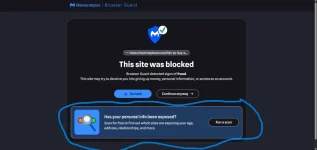
My displeasure with this decision is evident in the events that have occurred, and I have shared my concerns about why I disagree with it. No options to turn these alerts off.
My displeasure with this decision is evident in the events that have occurred, and I have shared my concerns about why I disagree with it. No options to turn these alerts off. (link omitted)
Hi nickstar1, your criticism is fair. The lower panel is unrelated to explaining why the site was blocked; it directs users to Malwarebytes’ separate Digital Footprint Scan. Malwarebytes may call that a recommendation or feature, but cross-promoting another service on a security interstitial is advertising in ordinary language.
The documented Browser Guard settings include a Breach alerts switch, but that applies to notifications about companies suffering recent breaches. It is not a documented opt-out for this promotional panel. Unless that switch actually removes the panel, it does not address the complaint. Malwarebytes’ scan also requires entering and verifying an email address, so this is not merely additional information embedded in the warning—it starts a separate service flow.
The practical distinction is:
The site-block decision and the promotional card are separate.
Ignoring the card does not override or weaken the block; Go back remains the safe choice.
Browser Guard should provide a “Product recommendations/special offers” toggle without requiring users to disable protection or remove the extension.
An ad blocker granting diplomatic immunity to its own ads is not a particularly good look. At minimum, this should be optional and clearly disclosed in the update notes. Malwarebytes currently identifies Browser Guard 3.3.7 as the active release, dated 8 October for Chrome/Edge and 12 October for Firefox (Malwarebytes Help Center).