Advanced Plus Security ticklemefeets' security config

  • Thread starter Thread starter ForgottenSeer 69673
  • Start date Start date
Last updated
Jan 6, 2019
Windows Edition
Home
Security updates
Allow security updates and latest features
User Access Control
Always notify
Real-time security
Appguard, Voodooshield, Shadow Defender, Windows Defender, Fort Knox Firewall, Windscribe, VMwarePlayer
Firewall security
Periodic malware scanners
NPE
Malware sample testing
I do not participate in malware testing
Browser(s) and extensions
Adguard, Grammerly, Translator for Edge
Maintenance tools
CCleaner, Autoruns, Process Explorer, Diskkeeper
File and Photo backup
Marcrium Reflect
System recovery
Marcrium full disk images on a USB stick
Risk factors
    • Logging into my bank account
    • Browsing to popular websites
    • Downloading software and files from reputable sites
    • Streaming audio/video content from shady sites
    • Downloading malware samples
    • Browsing to unknown / untrusted / shady sites
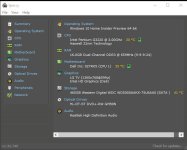
Computer specs
F

ForgottenSeer 69673

Thread author
This is my current setup
 

Attachments

  • ScreenHunter_137 Jan. 06 11.47.jpg
    ScreenHunter_137 Jan. 06 11.47.jpg
    57.3 KB · Views: 333
How large is the USB drive you are using to take images of your disk (must be a pretty large one I should think ?). Is the weekly image automatiacally scheduled and does the USB remain in your PC ? I'm asking because I am always looking out for ideas.
 
How large is the USB drive you are using to take images of your disk (must be a pretty large one I should think ?). Is the weekly image automatiacally scheduled and does the USB remain in your PC ? I'm asking because I am always looking out for ideas.

The USB stick is 256 gig
I run the full system image manually after each insider update.
I never leave the USB stick connected to my PC after creating an image.
 
  • Like
Reactions: harlan4096