


I used tw on two PCs, but on a PC with emisi installed, I noticed that there were cases where selecting an application to be excluded was not reflected in the rules. I guess it is probably not coexisting well with emisi's fw monitoring function.
You are using an out of date browser. It may not display this or other websites correctly.
You should upgrade or use an alternative browser.
You should upgrade or use an alternative browser.
- Status
- Not open for further replies.

Emisi? I can't find anything about it on the internet.
Any software that prevents TinyWall from adding its "Compat rules" to Windows Firewall will make it impossible to whitelist things in TinyWall.
Any software that prevents TinyWall from adding its "Compat rules" to Windows Firewall will make it impossible to whitelist things in TinyWall.

By Emsi he meant Emisoft Anti-Malware: Emsisoft | Anti-Malware: Lightweight Malware Protection for the HomeEmisi? I can't find anything about it on the internet.
Any software that prevents TinyWall from adding its "Compat rules" to Windows Firewall will make it impossible to whitelist things in TinyWall.
F
ForgottenSeer 85179
Thread author
I got this error if i try to allow a program from network log:Well, if there are problems and you report them, hopefully I can get rid of the problems
Informationen über das Aufrufen von JIT-Debuggen
anstelle dieses Dialogfelds finden Sie am Ende dieser Meldung.
************** Ausnahmetext **************
System.InvalidCastException: Das Objekt des Typs "System.Int32" kann nicht in Typ "TinyWall.Interface.ServerConfiguration" umgewandelt werden.
bei TinyWall.Interface.Controller.SetServerConfig(ServerConfiguration& serverConfig, Guid& changeset, ServerState& serverState)
bei PKSoft.TinyWallController.ApplyFirewallSettings(ServerConfiguration srvConfig, Boolean showUI)
bei PKSoft.TinyWallController.AddNewException(FirewallExceptionV3 fwex)
bei PKSoft.TinyWallController.AddExceptionList(List`1 list)
bei PKSoft.ConnectionsForm.mnuUnblock_Click(Object sender, EventArgs e)
bei System.Windows.Forms.ToolStripItem.RaiseEvent(Object key, EventArgs e)
bei System.Windows.Forms.ToolStripMenuItem.OnClick(EventArgs e)
bei System.Windows.Forms.ToolStripItem.HandleClick(EventArgs e)
bei System.Windows.Forms.ToolStripItem.HandleMouseUp(MouseEventArgs e)
bei System.Windows.Forms.ToolStrip.OnMouseUp(MouseEventArgs mea)
bei System.Windows.Forms.ToolStripDropDown.OnMouseUp(MouseEventArgs mea)
bei System.Windows.Forms.Control.WmMouseUp(Message& m, MouseButtons button, Int32 clicks)
bei System.Windows.Forms.Control.WndProc(Message& m)
bei System.Windows.Forms.ToolStrip.WndProc(Message& m)
bei System.Windows.Forms.ToolStripDropDown.WndProc(Message& m)
bei System.Windows.Forms.NativeWindow.Callback(IntPtr hWnd, Int32 msg, IntPtr wparam, IntPtr lparam)
************** Geladene Assemblys **************
mscorlib
Assembly-Version: 4.0.0.0.
Win32-Version: 4.8.4150.0 built by: NET48REL1LAST_C.
CodeBase: file:///C:/Windows/Microsoft.NET/Framework64/v4.0.30319/mscorlib.dll.
----------------------------------------
TinyWall
Assembly-Version: 2.99.15.0.
Win32-Version: 2.99.15.
CodeBase: file:///C:/Program%20Files/TinyWall/TinyWall.exe.
----------------------------------------
System.ServiceProcess
Assembly-Version: 4.0.0.0.
Win32-Version: 4.8.3752.0 built by: NET48REL1.
CodeBase: file:///C:/WINDOWS/Microsoft.Net/assembly/GAC_MSIL/System.ServiceProcess/v4.0_4.0.0.0__b03f5f7f11d50a3a/System.ServiceProcess.dll.
----------------------------------------
System
Assembly-Version: 4.0.0.0.
Win32-Version: 4.8.4001.0 built by: NET48REL1LAST_C.
CodeBase: file:///C:/WINDOWS/Microsoft.Net/assembly/GAC_MSIL/System/v4.0_4.0.0.0__b77a5c561934e089/System.dll.
----------------------------------------
TinyWall.Interface
Assembly-Version: 1.0.0.0.
Win32-Version: 1.0.0.0.
CodeBase: file:///C:/Program%20Files/TinyWall/TinyWall.Interface.DLL.
----------------------------------------
mscorlib.resources
Assembly-Version: 4.0.0.0.
Win32-Version: 4.8.3752.0 built by: NET48REL1.
CodeBase: file:///C:/WINDOWS/Microsoft.Net/assembly/GAC_MSIL/mscorlib.resources/v4.0_4.0.0.0_de_b77a5c561934e089/mscorlib.resources.dll.
----------------------------------------
System.Configuration
Assembly-Version: 4.0.0.0.
Win32-Version: 4.8.3752.0 built by: NET48REL1.
CodeBase: file:///C:/WINDOWS/Microsoft.Net/assembly/GAC_MSIL/System.Configuration/v4.0_4.0.0.0__b03f5f7f11d50a3a/System.Configuration.dll.
----------------------------------------
System.Core
Assembly-Version: 4.0.0.0.
Win32-Version: 4.8.4121.0 built by: NET48REL1LAST_C.
CodeBase: file:///C:/WINDOWS/Microsoft.Net/assembly/GAC_MSIL/System.Core/v4.0_4.0.0.0__b77a5c561934e089/System.Core.dll.
----------------------------------------
System.Xml
Assembly-Version: 4.0.0.0.
Win32-Version: 4.8.3752.0 built by: NET48REL1.
CodeBase: file:///C:/WINDOWS/Microsoft.Net/assembly/GAC_MSIL/System.Xml/v4.0_4.0.0.0__b77a5c561934e089/System.Xml.dll.
----------------------------------------
System.Windows.Forms
Assembly-Version: 4.0.0.0.
Win32-Version: 4.8.4150.0 built by: NET48REL1LAST_C.
CodeBase: file:///C:/WINDOWS/Microsoft.Net/assembly/GAC_MSIL/System.Windows.Forms/v4.0_4.0.0.0__b77a5c561934e089/System.Windows.Forms.dll.
----------------------------------------
System.Drawing
Assembly-Version: 4.0.0.0.
Win32-Version: 4.8.3752.0 built by: NET48REL1.
CodeBase: file:///C:/WINDOWS/Microsoft.Net/assembly/GAC_MSIL/System.Drawing/v4.0_4.0.0.0__b03f5f7f11d50a3a/System.Drawing.dll.
----------------------------------------
System.Runtime.Serialization
Assembly-Version: 4.0.0.0.
Win32-Version: 4.8.4150.0 built by: NET48REL1LAST_C.
CodeBase: file:///C:/WINDOWS/Microsoft.Net/assembly/GAC_MSIL/System.Runtime.Serialization/v4.0_4.0.0.0__b77a5c561934e089/System.Runtime.Serialization.dll.
----------------------------------------
SMDiagnostics
Assembly-Version: 4.0.0.0.
Win32-Version: 4.8.4150.0 built by: NET48REL1LAST_C.
CodeBase: file:///C:/WINDOWS/Microsoft.Net/assembly/GAC_MSIL/SMDiagnostics/v4.0_4.0.0.0__b77a5c561934e089/SMDiagnostics.dll.
----------------------------------------
System.ServiceModel.Internals
Assembly-Version: 4.0.0.0.
Win32-Version: 4.8.4150.0 built by: NET48REL1LAST_C.
CodeBase: file:///C:/WINDOWS/Microsoft.Net/assembly/GAC_MSIL/System.ServiceModel.Internals/v4.0_4.0.0.0__31bf3856ad364e35/System.ServiceModel.Internals.dll.
----------------------------------------
System.RunTime.Serialization.resources
Assembly-Version: 4.0.0.0.
Win32-Version: 4.8.3752.0 built by: NET48REL1.
CodeBase: file:///C:/WINDOWS/Microsoft.Net/assembly/GAC_MSIL/System.Runtime.Serialization.resources/v4.0_4.0.0.0_de_b77a5c561934e089/System.Runtime.Serialization.resources.dll.
----------------------------------------
TinyWall.resources
Assembly-Version: 2.99.15.0.
Win32-Version: 2.99.15.
CodeBase: file:///C:/Program%20Files/TinyWall/de/TinyWall.resources.DLL.
----------------------------------------
System.Management
Assembly-Version: 4.0.0.0.
Win32-Version: 4.8.3752.0 built by: NET48REL1.
CodeBase: file:///C:/WINDOWS/Microsoft.Net/assembly/GAC_MSIL/System.Management/v4.0_4.0.0.0__b03f5f7f11d50a3a/System.Management.dll.
----------------------------------------
System.Windows.Forms.resources
Assembly-Version: 4.0.0.0.
Win32-Version: 4.8.3752.0 built by: NET48REL1.
CodeBase: file:///C:/WINDOWS/Microsoft.Net/assembly/GAC_MSIL/System.Windows.Forms.resources/v4.0_4.0.0.0_de_b77a5c561934e089/System.Windows.Forms.resources.dll.
----------------------------------------
************** JIT-Debuggen **************
Um das JIT-Debuggen (Just-In-Time) zu aktivieren, muss in der
Konfigurationsdatei der Anwendung oder des Computers
(machine.config) der jitDebugging-Wert im Abschnitt system.windows.forms festgelegt werden.
Die Anwendung muss mit aktiviertem Debuggen kompiliert werden.
Zum Beispiel:
<configuration>
<system.windows.forms jitDebugging="true" />
</configuration>
Wenn das JIT-Debuggen aktiviert ist, werden alle nicht behandelten
Ausnahmen an den JIT-Debugger gesendet, der auf dem
Computer registriert ist, und nicht in diesem Dialogfeld behandelt.
Thx, fixed in next build. I got this fixed now in my code, but this must have been a one-off error, right? Or is it easily reproducible in your case?I got this error if i try to allow a program from network log:
I did a 5-min test. I installed Emisoft Anti-Malware on a Win8.1 VM, then I installed TinyWall. For now I couldn't see any compatibility problems. Firefox decided to update itself which Emsisoft overzealously blocked in the middle, and that resulted in Firefox running in some kind of ghost process from a non-existing file on the disk. That made it impossible to whitelist Firefox in TinyWall as there was no corresponding file on the drive. This was still the case even after closing and reopening Firefox (yeah, weird). After a reboot of the VM everything solved itself though, Firefox was again running from its usual path (C:\Program Files\Mozilla Firefox\firefox.exe) and it could again be whitelisted.I used tw on two PCs, but on a PC with emisi installed, I noticed that there were cases where selecting an application to be excluded was not reflected in the rules. I guess it is probably not coexisting well with emisi's fw monitoring function.
In other words, aside from some glitch which was seemed to be caused by Emsisoft interfering with the browser's self-update, it seems for now TinyWall and Emsisoft can be run in parallel.
F
ForgottenSeer 85179
Thread author
It was reproducible on every try to allow a program from network log. So easily reproducible.Thx, fixed in next build. I got this fixed now in my code, but this must have been a one-off error, right? Or is it easily reproducible in your case?
I can test new build after upload
I think your firewall was locked. Did you set a password in TinyWall? It is of course still a bug in TinyWall, I'm just making sure I have really found the cause.It was reproducible on every try to allow a program from network log. So easily reproducible.
I can test new build after upload
I am using Windows10 1909 environment. Most of the software applies the rules without any problems. However, only 'Microsoft Store' can not connect in the environment where tw is installed. I cannot connect even if you register the software by specifying it. The results were the same for automatic rule creation. To be precise, the rules are written but cannot be connected.I did a 5-min test. I installed Emisoft Anti-Malware on a Windows 8.1 VM, then I installed TinyWall. For now I couldn't see any compatibility problems. Firefox decided to update itself which Emsisoft overzealously blocked in the middle, and that resulted in Firefox running in some kind of ghost process from a non-existing file on the disk. That made it impossible to whitelist Firefox in TinyWall as there was no corresponding file on the drive. This was still the case even after closing and reopening Firefox (yeah, weird). After a reboot of the VM everything solved itself though, Firefox was again running from its usual path (C:\Program Files\Mozilla Firefox\firefox.exe) and it could again be whitelisted.
In other words, aside from some glitch which was seemed to be caused by Emsisoft interfering with the browser's self-update, it seems for now TinyWall and Emsisoft can be run in parallel.
This problem does not occur on the PC using Defender.
I don't have a Win10 VM right now, and Emsisoft is not installed on my work machine, but I can whitelist Windows Store there easily and it works. I tried the same thing in the Win8.1 VM too (where Emsisoft is installed), went to TinyWall->Whitelist by process->winstore, and the store worked and I could log in and install apps. there.
I'm not sure if will make a difference in your case, but just to be sure: Is the "Windows Store Update" special exception enabled?
I'm not sure if will make a difference in your case, but just to be sure: Is the "Windows Store Update" special exception enabled?
Special exceptions only enabled recommendations.I don't have a Windows 10 VM right now, and Emsisoft is not installed on my work machine, but I can whitelist Windows Store there easily and it works. I tried the same thing in the Windows 8.1 VM too (where Emsisoft is installed), went to TinyWall->Whitelist by process->winstore, and the store worked and I could log in and install apps. there.
I'm not sure if will make a difference in your case, but just to be sure: Is the "Windows Store Update" special exception enabled?
F
ForgottenSeer 85179
Thread author
Yes I enabled password. Can try withoutI think your firewall was locked. Did you set a password in TinyWall? It is of course still a bug in TinyWall, I'm just making sure I have really found the cause.
Edit: unlocking before works!
Last edited by a moderator:
What does the Connections windows say? Is there anything newly blocked when you try to use Windows Store on the Emsisoft PC?Special exceptions only enabled recommendations.
@ultim
I appreciate your concern. This is the pc ss running Emisisoft.
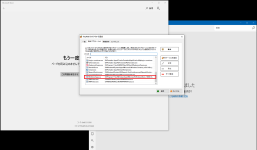
I uninstalled tw, reset the Windows Firewall restrictions, and then installed it again. I was able to connect to the Microsoft Store without any problem right after I set it to the automatic memory state, but it will be this state when I restart it.I couldn't connect the weather report as well, but this has been resolved.
The pc running WD has no problem. This is ss of that pc.
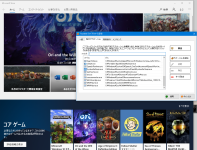
I appreciate your concern. This is the pc ss running Emisisoft.
I uninstalled tw, reset the Windows Firewall restrictions, and then installed it again. I was able to connect to the Microsoft Store without any problem right after I set it to the automatic memory state, but it will be this state when I restart it.I couldn't connect the weather report as well, but this has been resolved.
The pc running WD has no problem. This is ss of that pc.
@ultim
I appreciate your concern. This is the pc ss running Emisisoft.
View attachment 234859
I uninstalled tw, reset the Windows Firewall restrictions, and then installed it again. I was able to connect to the Microsoft Store without any problem right after I set it to the automatic memory state, but it will be this state when I restart it.I couldn't connect the weather report as well, but this has been resolved.
The pc running WD has no problem. This is ss of that pc.
View attachment 234860
Oh, ok, it seems you are not running the beta. Please install the beta (2.99.15) and whitelist the Store not as an executbale, but as a UWP-app. TinyWall 2.1 never officially supported UWP apps in the first place.
EDIT: I recognize this is an older version because the new version has a 3rd column in that list. See:
Last edited:
You might also need to whitelist Microsoft.Windows.CloudExperienceHost (UWP).
Hello Everybody,
As a token of thanks for everybody here helping me out, I would like to offer you a small utility I've written. You'll love it if you ever wished you could easily download music and video from various websites.
PM me if you'd like access. After a week only donators will have access.
As a token of thanks for everybody here helping me out, I would like to offer you a small utility I've written. You'll love it if you ever wished you could easily download music and video from various websites.
PM me if you'd like access. After a week only donators will have access.
I have installed and tried beta version 2.99.15.
The PC with the problem with the UWP application will display a message immediately after installation, such as 'Cannot start because required data cannot be found'. We reset the built-in fw settings just in case, but there was no improvement. When transitioning from stable to beta, how do you best handle uninstalling the stabilizer? Overwrite recommended?
The PC with the problem with the UWP application will display a message immediately after installation, such as 'Cannot start because required data cannot be found'. We reset the built-in fw settings just in case, but there was no improvement. When transitioning from stable to beta, how do you best handle uninstalling the stabilizer? Overwrite recommended?
What displayed this message? TinyWall's installer? Or TinyWall itself? Or something completely else? The only similar message in TinyWall is "Database is missing or corrupt.", but that seems to be a different message (or maybe the same but original meaning lost in translation?).The PC with the problem with the UWP application will display a message immediately after installation, such as 'Cannot start because required data cannot be found'.
You can/should just install the beta while 2.1 is installed. It will automatically upgrade the version AND migrate your firewall settings. It is unnecessary to uninstall the older version first.When transitioning from stable to beta, how do you best handle uninstalling the stabilizer? Overwrite recommended?
Downgrading is a different story: To downgrade, you need to uninstall the newer version first and then install the old version.
It is very important in general, that you only use the installer and uninstaller to install, remove and upgrade. Never try to upgrade or remove the files manually without using the (un)installer. This is of course true for all other security software too that have non-trivial integration with the system, but I need to point out TinyWall is no exception. You haven't done any manual file deletions or upgrades have you?
- Status
- Not open for further replies.
You may also like...
-
 Serious Discussion Block Common Attacks: A Beginner's Guide to Windows Firewall
- Started by Divergent
- Replies: 18
-
 New Update Defender Hardening Console (part of Hawk Eye Analysis Platform)
- Started by Trident
- Replies: 62
-
Serious Discussion Simple Steps to Secure Your Windows 11 PC
- Started by Divergent
- Replies: 0
-
