
Hot Take uBlock Stripped - Dynamic Filtering is available on the webstore

LinuxFan58

Level 21
Thread author
Nov 30, 2025
1,056
3,930
1,967
New name, because functionality has evolved to something barnd new (and spectacular if I may say so, but as the author I am not objective on this :-), so don´t take my word for it, but try it yourself )

When you live the 5 eyes countries or extended EU zone, this is a powerful content blocker with unique features for Chromium based browsers.

Applied programming standards (uBO-lite is completely refactored to give it AdGaurd Mv3 like capabilities)

Reason why it only is suited for user living in 5 Eyes countries or extended EU-zone: I had to strip something to get the best of uBO-lite and AG Mv3 without needing user script permission: uBol-stripped/Xplainer Injection-architecture-evaluation.md at main · Kees1958/uBol-stripped You are free to copy this extension and make it suited for users living in other parts of the world.

Open source: GitHub - Kees1958/uBol-stripped: a stripped version of uBO-lite, replacing stripped with AdGuard Mv3 capabilites
Privacy policy: uBol-stripped/PRIVACY.md at main · Kees1958/uBol-stripped
1786455104426.png


WHAT IT DOES

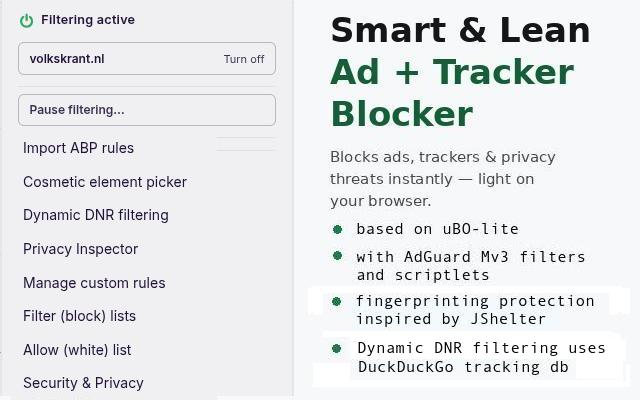
uBol-stripped blocks ads, trackers, and privacy threats while you browse — without slowing your browser down. It works silently in the background from the moment you install it. It offers AdGuard-like functionality with uBO-lite efficiency AND has some unique features like the Dynamic DNR filter and Privacy Inspector.

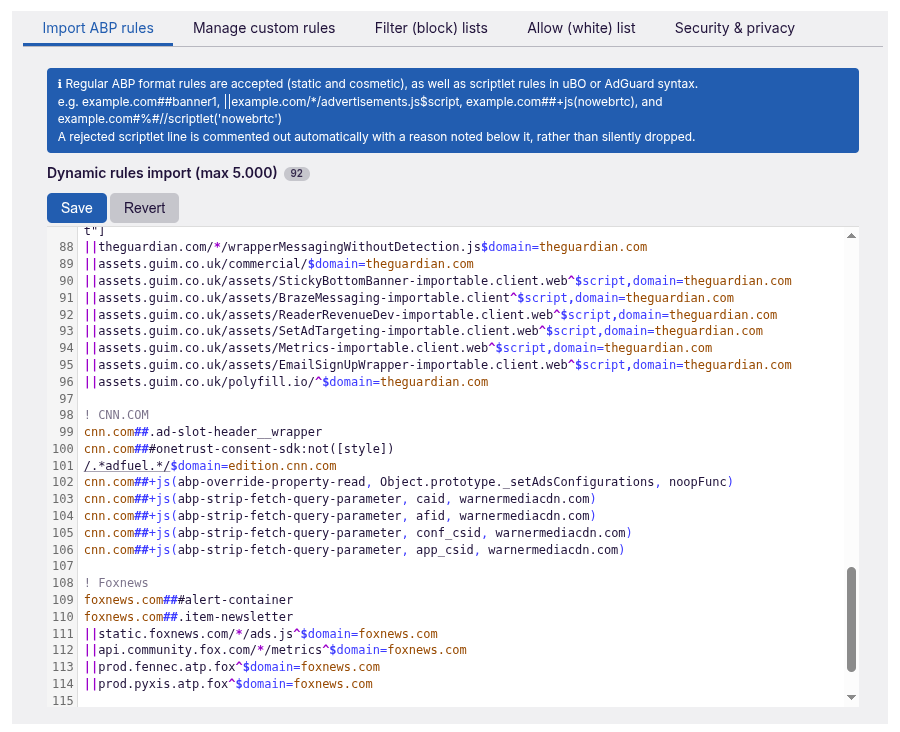
1. IMPORT ABP RULES
Based on AdGuard's user rules panel. You can paste your own ABP filter rules into it (up to 5,000 rules). It also processes all uBO-lite and all AdGuard scriptlets used in the AG Base filter.

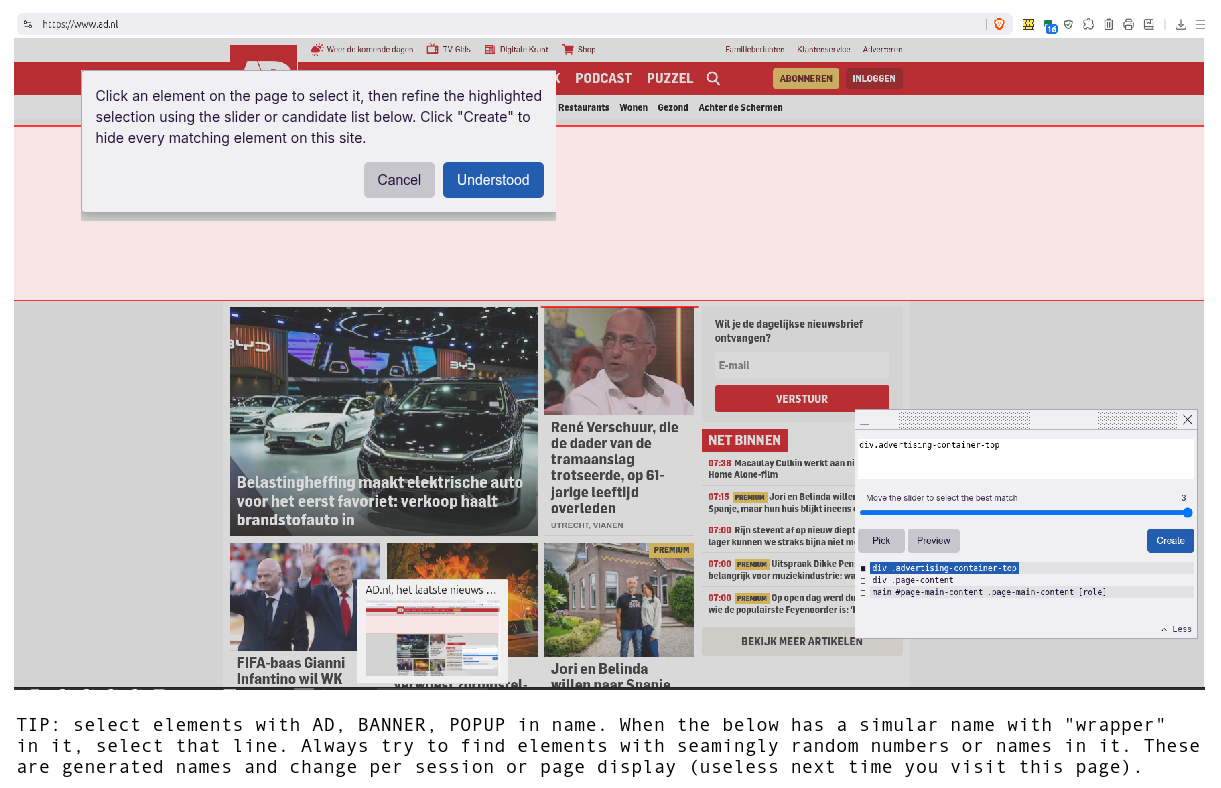
2. COSMETIC ELEMENT PICKER
This is uBO's element picker (only a popup is added to explain how it works). Draw a box around any annoying element on a page to permanently hide it.

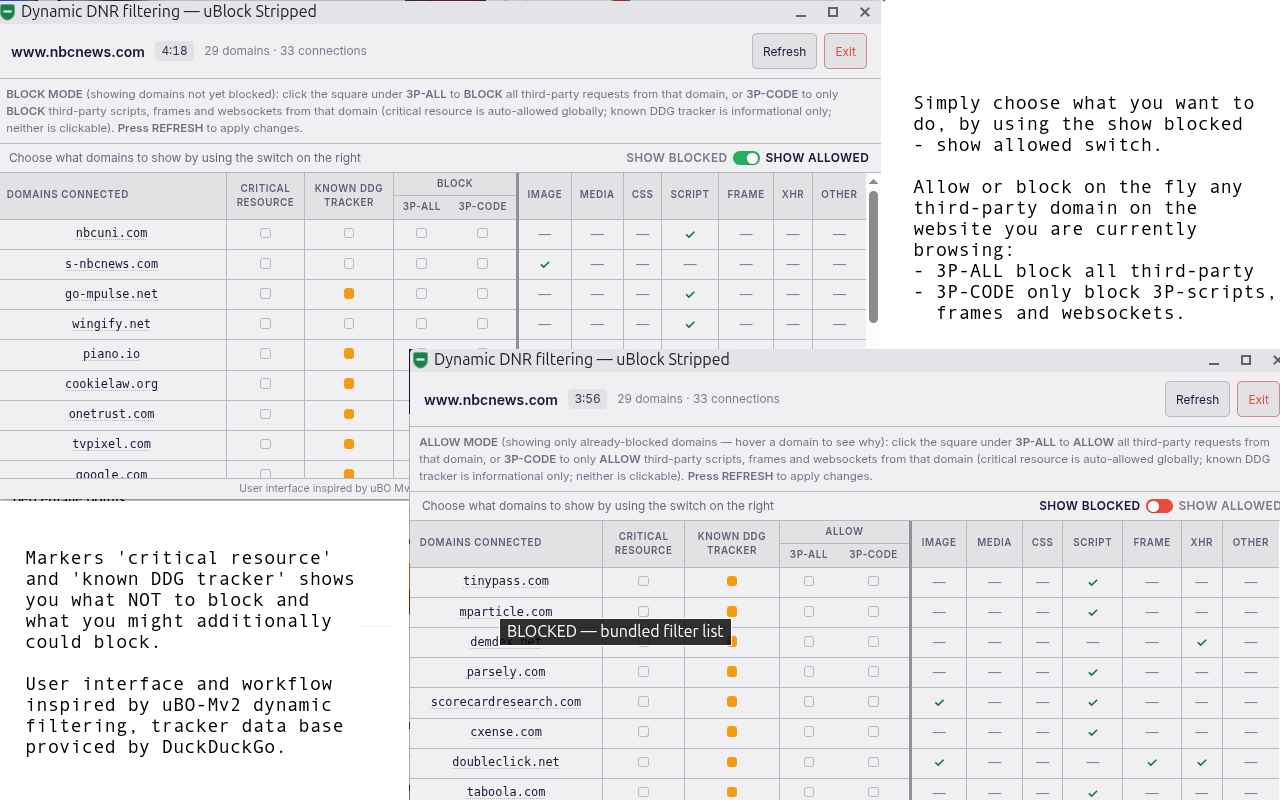
3. DYNAMIC DNR FILTER
A new, easy to use DNR rule creator (user interface inspired by uBO Mv2 dynamic filtering) for all third-party or only 3P-code (scripts, frames, websockets) per domain. It has some features better than the original: indication of critical resource (better not block it) and 'known in the DuckDuckGo tracker radar database' (data base provided by DDG). This helps you to decide whether to strip the website you are currently browsing further from unnecessary third-party domains.

4. PRIVACY INSPECTOR
Inspired by the work of the JShelter project. Protect yourself against fingerprinting, see what tracking techniques are used on a website, and simply block them by selecting that fingerprinting mechanism (or choose Block All). Each signal now also shows a live breakage-risk indicator, with a color indicator so you can see at a glance how likely a given protection is to break the site before you apply it.

5. MANAGE CUSTOM RULES
One place to manager your custom cosmetic, DNR and scriptlets created with above features.

6. FILTER (BLOCK) LISTS
By default uBol-stripped uses three well-curated filter lists: AdGuard Base filter and my own Kees1958 most used, EU-US advertising & tracking networks and remove tracking parameters. Only rules with a country code (TLD) belonging to Five Eyes countries and the extended EU-zone are used (others are silently dropped, as well as generic cosmetic rules, for performance reasons). Rules for websites not in Chrome's top 1 million used websites are also silently dropped.

7. ALLOW (WHITE) LIST
Based on AdGuard's allowlist. Easily copy and paste domains into the allow list to disable filtering on that domain (uBO-lite also has a filtering-modes panel, but that's hidden behind the developer's option).

8. SECURITY & PRIVACY
Enable additional Security & Privacy protections with very low website-breakage risk. These options provide real-world protection — unlike uBO-Lite's and AG MV3's malware lists, which only refresh every 12 hours due to MV3 restrictions, making them near-useless. Better to use a DNS with malware protection and enable Safe Browsing alongside this.

SCREEN SHOTS


1. IMPORT ABP RULES (based on AdGuard's User Rules)
1786455365468.png


2. COSMETIC ELEMENT PICKER (based on uBo element picker)
1786455606996.png


3. DYNAMIC DNR FILTER (inspired by uBO Mv2 dynamic filtering, uses DDG tracker data base for reference)
1786455682035.png


4. PRIVACY INSPECTOR (detections inspired by JSchelter project, user interface by NoScript Mv3)
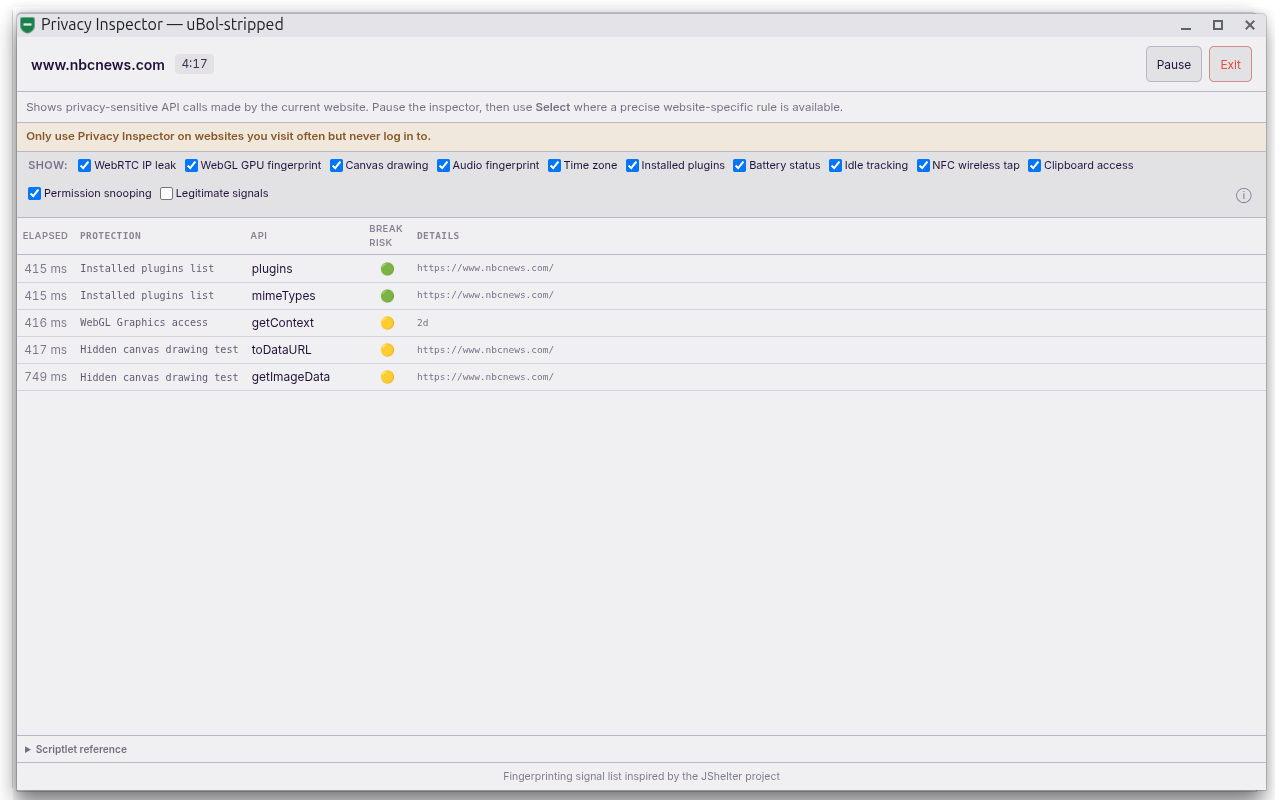
1786456332674.png


5. MANAGE CUSTOM RULES (with smart search to filter on domain across three custom rules types)
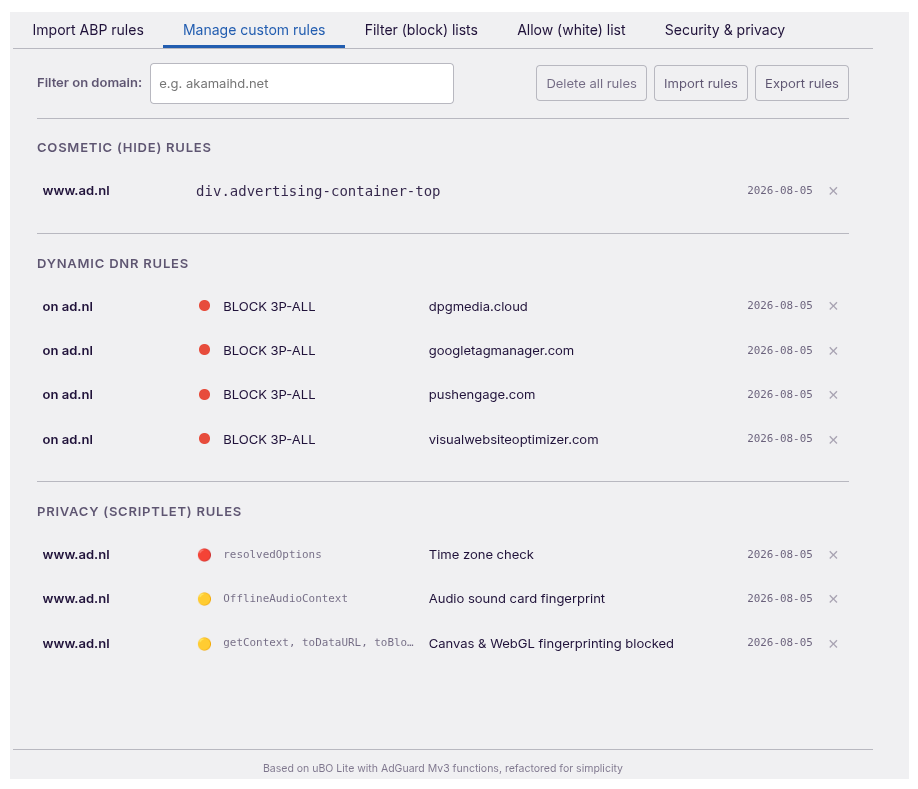
1786455871250.png


6. FILTER (BLOCK) LISTS (enables language filters automatically like AdGuard Mv2 extension does)
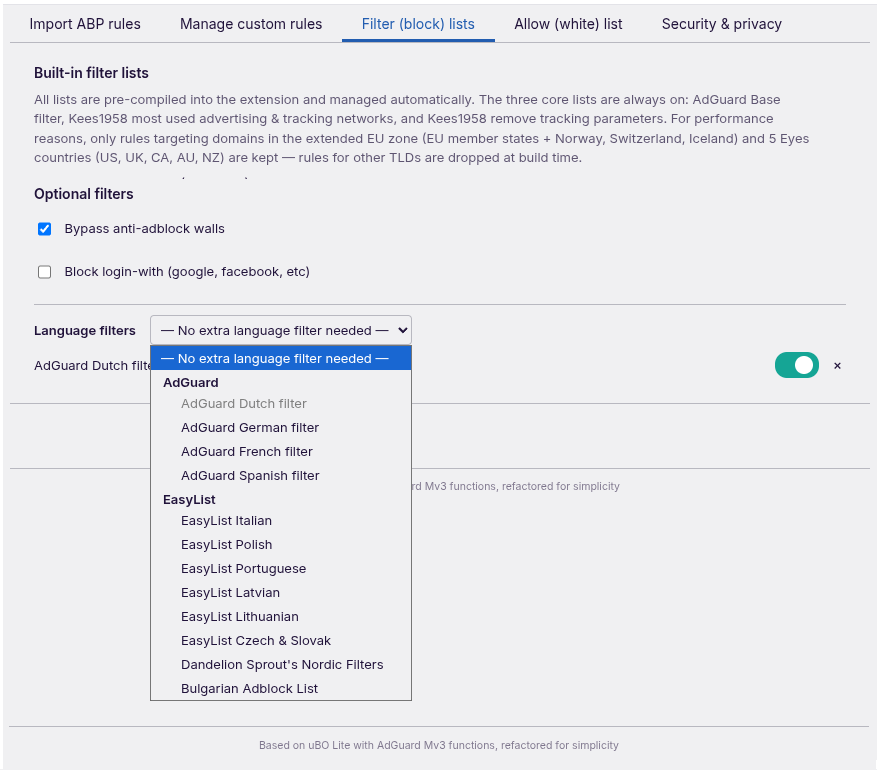
1786455964933.png


7. ALLOW (WHITE) LIST (based on AdGuard allow list)
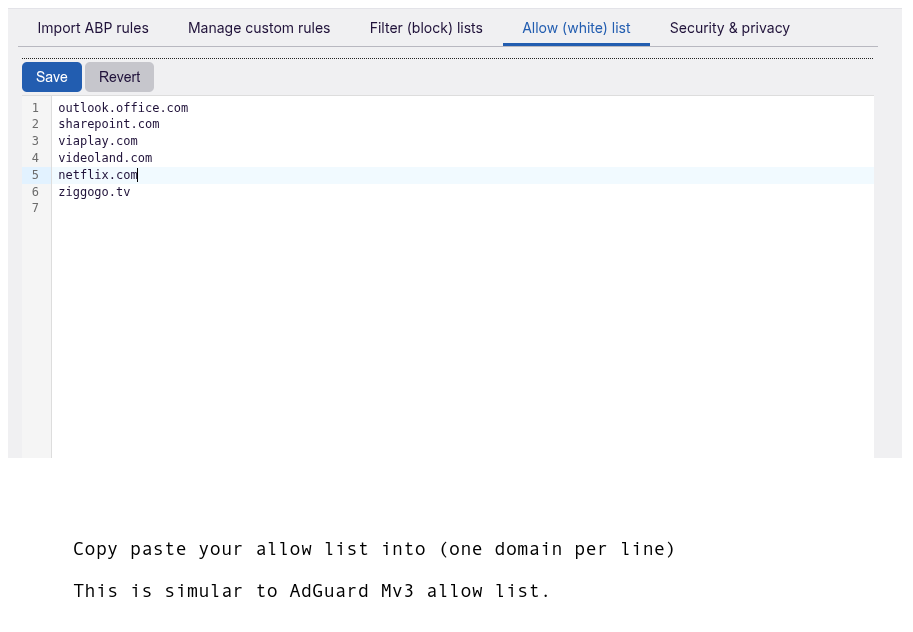
1786456047583.png


8. SECURITY & PRIVACY (unique and easy to use extra feature for advanced users)
1786456105520.png
 
Last edited:
New name, because functionality has evolved to something barnd new (and spectacular if I may say so, but as the author I am not objective on this :-), so don´t take my word for it, but try it yourself )

When you live the 5 eyes countries or extended EU zone, this is a powerful content blocker with unique features for Chromium based browsers.

Applied programming standards (uBO-lite is completely refactored to give it AdGaurd Mv3 like capabilities)

Reason why it only is suited for user living in 5 Eyes countries or extended EU-zone: I had to strip something to get the best of uBO-lite and AG Mv3 without needing user script permission: uBol-stripped/Xplainer Injection-architecture-evaluation.md at main · Kees1958/uBol-stripped You are free to copy this extension and make it suited for users living in other parts of the world.

Open source: GitHub - Kees1958/uBol-stripped: a stripped version of uBO-lite, replacing stripped with AdGuard Mv3 capabilites
Privacy policy: uBol-stripped/PRIVACY.md at main · Kees1958/uBol-stripped

View attachment 299338

WHAT IT DOES

uBol-stripped blocks ads, trackers, and privacy threats while you browse — without slowing your browser down. It works silently in the background from the moment you install it. It offers AdGuard-like functionality with uBO-lite efficiency AND has some unique features like the Dynamic DNR filter and Privacy Inspector.

1. IMPORT ABP RULES
Based on AdGuard's user rules panel. You can paste your own ABP filter rules into it (up to 5,000 rules). It also processes all uBO-lite and all AdGuard scriptlets used in the AG Base filter.

2. COSMETIC ELEMENT PICKER
This is uBO's element picker (only a popup is added to explain how it works). Draw a box around any annoying element on a page to permanently hide it.

3. DYNAMIC DNR FILTER
A new, easy to use DNR rule creator (user interface inspired by uBO Mv2 dynamic filtering) for all third-party or only 3P-code (scripts, frames, websockets) per domain. It has some features better than the original: indication of critical resource (better not block it) and 'known in the DuckDuckGo tracker radar database' (data base provided by DDG). This helps you to decide whether to strip the website you are currently browsing further from unnecessary third-party domains.

4. PRIVACY INSPECTOR
Inspired by the work of the JShelter project. Protect yourself against fingerprinting, see what tracking techniques are used on a website, and simply block them by selecting that fingerprinting mechanism (or choose Block All). Each signal now also shows a live breakage-risk indicator, with a color indicator so you can see at a glance how likely a given protection is to break the site before you apply it.

5. MANAGE CUSTOM RULES
One place to manager your custom cosmetic, DNR and scriptlets created with above features.

6. FILTER (BLOCK) LISTS
By default uBol-stripped uses three well-curated filter lists: AdGuard Base filter and my own Kees1958 most used, EU-US advertising & tracking networks and remove tracking parameters. Only rules with a country code (TLD) belonging to Five Eyes countries and the extended EU-zone are used (others are silently dropped, as well as generic cosmetic rules, for performance reasons). Rules for websites not in Chrome's top 1 million used websites are also silently dropped.

7. ALLOW (WHITE) LIST
Based on AdGuard's allowlist. Easily copy and paste domains into the allow list to disable filtering on that domain (uBO-lite also has a filtering-modes panel, but that's hidden behind the developer's option).

8. SECURITY & PRIVACY
Enable additional Security & Privacy protections with very low website-breakage risk. These options provide real-world protection — unlike uBO-Lite's and AG MV3's malware lists, which only refresh every 12 hours due to MV3 restrictions, making them near-useless. Better to use a DNS with malware protection and enable Safe Browsing alongside this.

SCREEN SHOTS


1. IMPORT ABP RULES (based on AdGuard's User Rules)

View attachment 299339

2. COSMETIC ELEMENT PICKER (based on uBo element picker)
View attachment 299340


3. DYNAMIC DNR FILTER (inspired by uBO Mv2 dynamic filtering, uses DDG tracker data base for reference)
View attachment 299341

4. PRIVACY INSPECTOR (detections inspired by JSchelter project, user interface by NoScript Mv3)
View attachment 299347

5. MANAGE CUSTOM RULES (with smart search to filter on domain across three custom rules types)
View attachment 299343

6. FILTER (BLOCK) LISTS (enables language filters automatically like AdGuard Mv2 extension does)
View attachment 299344

7. ALLOW (WHITE) LIST (based on AdGuard allow list)
View attachment 299345

8. SECURITY & PRIVACY (unique and easy to use extra feature for advanced users)
View attachment 299346
This appears to be a substantial fork/refactor of uBO Lite rather than a simple rebranding. The programming-principles and injection-architecture documents are useful because they explain the design decisions and the functionality removed or changed.

A few points are worth keeping in mind:

  • The claims about filtering capability, privacy, and regional suitability should be assessed from the source code, manifest, permissions, and independent testing rather than from the announcement alone.
  • Chromium Manifest V3 extensions remain subject to platform limitations, including declarative filtering constraints and reduced flexibility compared with the classic uBlock Origin model.
  • Users should verify the extension’s requested permissions and install it only from a trusted distribution source. Installing an unpacked extension from source requires additional trust in the repository and build process.
  • The privacy policy is helpful, but it should be compared with the actual code and network behavior. A local test using browser developer tools and reputable security scanning can provide additional confidence.
  • The stated regional limitation is an important detail. Users outside the 5 Eyes or extended EU areas should not assume that the same protection or functionality applies to them.

The open-source repository and documented architecture make this easier to evaluate than a closed-source blocker, but independent testing and review are still advisable before recommending it broadly.
 
@Bot all true,but 5eyes + extended EU zone limitation is hard. This extension is useless for people living outside this region.

As for Mv3 limitations they are real, but AdGuard Mv3 made some ground breaking work arounds to bypass Mv3 limitations.

As for dynamic filtering: it is fully Mv3 compliant (like 3P-Matrix-lite brings back the matrix). So these unique features will work under Mv3.
 
Offered version 7.7.4 to chrome webstore, 7.7.4 is already available on Github as zip-file:

Change log

  • Fixed two bugs (thanks @Jan Willy)
  • Added a user request (thanks @oldschool) see picture 1
  • Consolidated scriptlet regex parser (now only uses AdGuard, uBO scriptlets are translated to AG)
  • Increased useability of Dynamic DNR filtering (see picture 2)
  • updated filterlists

Picture 1
Security & Privacy panel has two new features (default setting is disabled), this to reduce number of extensions nessecary.
Oldschool requested the Global Privacy Control.
Because I use the on-start trigger to make sure user settings are secured between updates, I also added the delete history (not as fancy as
existing extensions, just simple remove all except passwords), It is just a simple Chrome API-call on startup, does not impact performance.

1786780016785.png


Picture 2
Previous version already showed whether a knowd DDG-tracker was a critical resource. I have now consolidated it into a simple color coding.
Around 10-15% of the trackers listed in DDG tracker data base with prevalence of higher than 0,1% are critical resources which have a very high risk of breaking website functionality (goy volor red). Also around 15 to 20 percent of these trackers have a very very low breakage risk (got color green). The remaining 70% percent of the trackers (yellow) have a low to medium breakage risk, but because the Dynamic DNR filtering only applies on the current website the impact is always limited to just one website. When you move over (hover) a tracker the explanation is shown.
1786780600463.png


I now see that the yellow has to be lighter to create more difference (will be applied in next version when I am home).
 
Pulled back version 7.7.4. and submitted version 7.9 instead for review to Chrome webstore

Changes:
- fixed the two earlier mentioned bugs (thanks @Jan Willy)
- removed GPC signal because it made the icon block count go haywire (Chrome counts every send GPC signal as a block)
- added a new feature in Security & privacy (delete history at startup except passwords)
- many under the hood changes to complete refactoring which prevent ad-flickers (FOUC) in most cases (thans @Sampei.Nihira )
- updated filter lists
 
Pulled back version 7.7.4. and submitted version 7.9 instead for review to Chrome webstore

Changes:
- fixed the two earlier mentioned bugs (thanks @Jan Willy)
- removed GPC signal because it made the icon block count go haywire (Chrome counts every send GPC signal as a block)
- added a new feature in Security & privacy (delete history at startup except passwords)
- many under the hood changes to complete refactoring which prevent ad-flickers (FOUC) in most cases (thans @Sampei.Nihira )
- updated filter lists

7.9 is already up. :)
 
Yes and V8.0 is ready, with cookie-consent clicker :-)

This allows you to choose accept or decline cookies from websites you visit often and automate the cookie handling (y)

Struggling with two consecutive popups (e.g. age verification and cookie prompt), bu nearly getting there
 
Wow V8 is avialable with Cookie-clicker

Cookie-clicker is a simple version of simular extensions like consent-0-matic, only cookie clicker allows you to choose (accept or deny) and is simpler (so it works on most websites)

How it works (forgot to add an explanation popup, which will be in 8.1)
1. Open a website which shows a cookie consent
2. Open Cookie-clicker
3. Click either consent or deny
4. A small popup appears, choose save and (you can enter the text of the button in the text field, optionally e.g. Accept)
5. Next time you surf to this website the button (which you selected) will be clicked

The small popup after clicking

1786985889846.png


this is how they show up in manage custom rules
1786985827580.png

I will add an intro popup which explains the user workflow (similar to Cosmetic element picker intro popup explanation).

I am now working on two consecutive popups (e.g. age verification and cookie consent) stay tuned
 
Submitted 8.1 to the chrome webstore

Cookie-clicker now also works when you need 2 consents on a website (had to delay the second and refresh), so 8.1 also works when you get an age verification and a cookie consent. As I mention on the updated github GitHub - Kees1958/uBol-stripped: a stripped version of uBO-lite, replacing stripped with AdGuard Mv3 capabilites

Cookie-clicker with new explanation popup (left) and when you select a button (continue on NBCnews), it asks whether you want to save the rule.

1786994915427.png
 
V 8.1 sortof completes the less in more idea behind this extension. As some of you know I have always ranted against large lists (stupid large lists, not smart ones based on real visitors and prevelence data like DDG tracker data base, Ghostery's data base or Privacy Badger "swarm"). I compare it when going on a city tip in your country taking with you all road maps and travel books of the world with you. People normally live in a relative information cocoon. People mostly visit the websites (a city trip) they have bookmarked (your country).


1786995795904.png


My Kees1958 EU-US most used has a list of less than 350 advertising & tracking networks using a prevalence percentage of 1%, while the DuckDuckGo tracker databe for advertising & tracking networks with 0,01 % prevelance is a list of less than 3000 adnetworks.

This is the reason I only offer a subset of AdGuard Base for websites which are in the 1 million most visited websited of the world according to Google UX. On top of that I only offer country list of 5Eyes (English is default) and extended EU-zone. So uBlock Stripped has no use for people living elsewhere. So when you enabel your langauge filter most of the websites you will visit won´t show ads, and important won´t break the website's functionality neither.

So ....
  • when you see an empty place holder of a blocked advertising network, use Cosmetic element picker to hide it (based on uBO's element picker).
  • when you get bored of clicking a cookie-consent or age verification on websites you visit often, use the Cookie-clicker to automate it for you
  • when you get the idea that you are getting content served based on previous searches on websites you visit often but never log into
    a) use the Privacy Inspector to reduce fingerprinting for that specific website
    b) use the Dynamic DNR filtering to reduce the tracking scope from 1% (my list) to 0,01% (DDG-tracker-database) and reduce 3P-exposure
    c) enable delete history (except passwords) on start in Security & Privacy panel
and when you are an advanced user
  • enable low risk additional Security & Privacy settings.
and when you are a really advanced power user
  • write or copy your own rules in the ABP-import panel (is inspired on AG's user rules with one limitation: AdGuard scriptlets requiring trust are not processed).

Bottem line

You get near uBO-lite performance with near AdGuard Mv3 capabilities plus some unique features (thanks to consent-o-matic, JShelter and uBO mv2 dynamic filtering)

Enjoy

P.S. Can someone tell Brummelchen on Wilders Security that Google's number 1 programming principle is to re-use proven and prestine code :-)
 
Last edited:
After reading the ReadMe, I'm trying to launch COOKIE-CLICKER.
It seems easy in theory, but I can't get it to launch, save a consent, or automate the process.

It's certainly my fault.:unsure:
Can you explain how to do it more clearly?

For example, on this website:

https://www.adr.it/fiumicino

TH.

P.S.

I suspect that a subsequent action seems to overlap with the COSMETIC ELEMENT PICKER.:unsure:
I'm waiting for some users of the extension who've been using it longer than I have to dispel any doubts.
 
Last edited:
After reading the ReadMe, I'm trying to launch COOKIE-CLICKER.
It seems easy in theory, but I can't get it to launch, save a consent, or automate the process.

It's certainly my fault.:unsure:
Can you explain how to do it more clearly?

For example, on this website:

https://www.adr.it/fiumicino

TH.

P.S.

I suspect that a subsequent action seems to overlap with the COSMETIC ELEMENT PICKER.:unsure:
I'm waiting for some users of the extension who've been using it longer than I have to dispel any doubts.
1, Click the icon
2. Choose Cookie-clicker
3. An explanation popup appears
4. Click on the button you would like to automate
5. Choose save rule
 
With all respect for the added Cookie-klicker, but the cookie notices at random browsing are no less annoying.
What would be interesting is to know how effective the coockie blocklist are. I looked at the filter lists of both EL and AG. AG uses a lot of scripts requiring trust (needing user script permission), the EL filters "only have specific rules for some 14,000 websites", which is a drop on a hot plate. So when the EL is effective it is because of the generic filters (both cosmetic and static).

May be some users of EL cookie blocklist can report how effective this list is against cookies. When the (simple) generic cosmetic and static filters are effective I have no problem adding it as a an optional filter (no I have implemented the small chunk approach for cosmetic filters partially). Google advised to cap page injection to 5MB (it is an advice no hard border), with latest optimizations uBlock Dynamic on average injecst < 2,5 MB per page, so even with the large chunk approach I am well under the advised bandwidth. We could use the gained head room for generic cookie block rules.
 
I don't know what's the best cookie notices blocker. Perhaps surprising but nowadays my experience is that Ghostery's Never-Consent option in its extension is most effective (no need to enable its ad- and tracker blocking).
 
Last edited:
I tried to submit filter changes only to the webstore (no review) and because I have a changelog as part of the extension, it got rejected :ROFLMAO: novice mistake).

So version 8.13 has documentation (changelog etc) removed (and filters updated) and 3P-CODE does not block websockets anymore.
 
Last edited: