

The MalwareTips app
Your community, one tap away.
Open MalwareTips from your Home Screen or desktop. Follow discussions, find answers and pick up where you left off.
- Home Screen access
- Optional push alerts
- Your community
You're ready to explore.Explore what's new
Installation instructions
iPhone & iPad
- Open MalwareTips in Safari and tap Share. You may need to open the Page Menu first.
- Choose Add to Home Screen. If it is not listed, use Edit Actions to add it.
- Keep Open as Web App enabled if shown, then tap Add.
Android
- Open MalwareTips in Chrome or another browser that supports app installation.
- Open the browser menu and look for Install app, Install and create shortcut, or Add to Home screen.
- Choose Install and confirm. Wording varies by browser.
Desktop
- Chrome: use the install icon in the address bar, or the menu under Cast, save and share.
- Edge: open the menu, then More tools, Apps and Install this site as an app.
- Safari on Mac: choose Share or File, then Add to Dock. Firefox on Windows: look for the web apps button in the address bar.
If you cannot find an install option, update your browser or use its bookmark option to keep MalwareTips close.
Keep up with your conversations
After installation, open the app and sign in. Enable push notifications in Preferences if you want alerts. On iPhone and iPad, push requires a Home Screen web app and iOS or iPadOS 16.4 or later.
Sign in to manage notificationsInstallation is optional. Your notification settings stay under your control.
You are using an out of date browser. It may not display this or other websites correctly.
You should upgrade or use an alternative browser.
You should upgrade or use an alternative browser.
Hot Take uBlock Stripped - Dynamic Filtering is available on the webstore
-
 Thread starter
LinuxFan58
- Start date
- 408 Replies
- 38,125 Views
Thread details

Yes nearly finished, only a block page for sneaky/insecure 3P-links and then up to Edge and Firefox store. But the perfection is only for advanced users from 5eyes and EU+zone, see number of users  in the comparison below
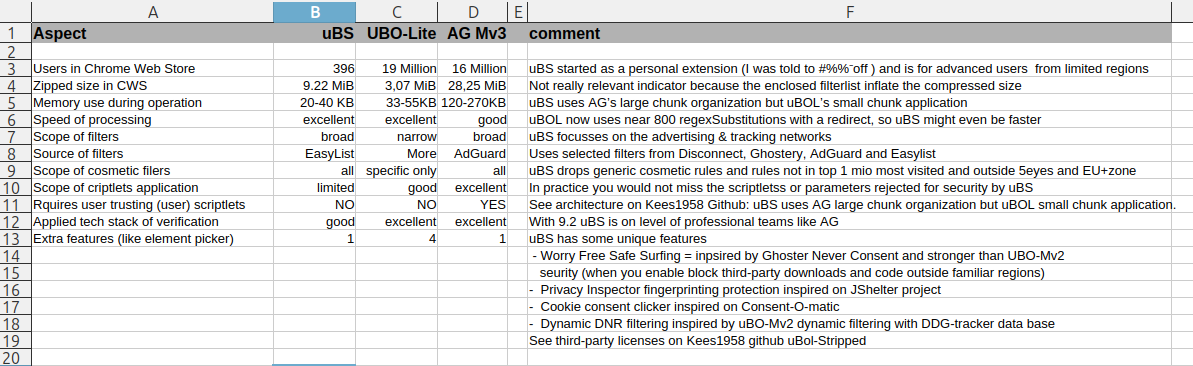
in the comparison below
Last edited:


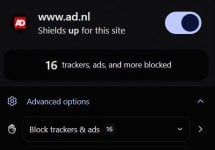
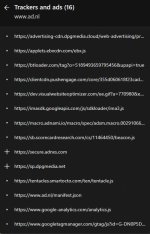
Perhaps in the way Brave Shields does? But then with an unblock option?The only thing I want to add, is a decent block page when Security & Privacy protections intercept a fishy 3P-link.
Last edited:
@Morro
I needed to change something in the loading of rules at browser start to ensure Google does not cache. This created a slight delay when you add a website to the allow list.
Both allowlist and ABP import deliberately don't refresh automatically, because a refresh applies new rules. A refresh with fresh rules could disturb a flow of events on a tab which the user has opened. This is why you have to exit a website and refresh manually.
This is an old 'prevent website breakage practice'. But similar to my resistance to allowing Worry-free always (also because it could break website login), most websites have modernized cloud service calls, so in practice this risk was neglectable and I added the "Enable worry-free at start". I will investigate this other (old) better be safe than sorry practice and add an auto-refresh when domains are added to whitelist and ABP-import.
I wil also investigate whether I can add some checks on trackers from socialmedia (automatically excluding the block on the website itself.
@Jan Willy
No like AdGuard blockpage when you use $document option with continue and remember option.
When disable uBS for a website it automatically puts it on the whitelist. I will explain that better in the icon popup.
I needed to change something in the loading of rules at browser start to ensure Google does not cache. This created a slight delay when you add a website to the allow list.
Both allowlist and ABP import deliberately don't refresh automatically, because a refresh applies new rules. A refresh with fresh rules could disturb a flow of events on a tab which the user has opened. This is why you have to exit a website and refresh manually.
This is an old 'prevent website breakage practice'. But similar to my resistance to allowing Worry-free always (also because it could break website login), most websites have modernized cloud service calls, so in practice this risk was neglectable and I added the "Enable worry-free at start". I will investigate this other (old) better be safe than sorry practice and add an auto-refresh when domains are added to whitelist and ABP-import.
I wil also investigate whether I can add some checks on trackers from socialmedia (automatically excluding the block on the website itself.
@Jan Willy
No like AdGuard blockpage when you use $document option with continue and remember option.
When disable uBS for a website it automatically puts it on the whitelist. I will explain that better in the icon popup.
Last edited:


@Morro
I dropped the disconnect and ghostery social media filters (Ghostery blocked redditstatic.com), but it seems that Disconnect now blocks
simply add this line in ABP-import
@@redditstatic.com$domain=reddit.com
Done, and thank you for all the hard work.

Or disable Disconnect filterlist.Done
Or disable Disconnect filterlist.
Yes, both will result in the same.
Version 9.2.2 has landed in Chrome webstore
Changelog
1. Typo corrected (thanks @Jan Willy)
2. Domains which contain a part of the top 20 social media platforms, are dropped in Disconnect and Ghostery categories (thanks @Morro)
3. Updated filter lists
Changelog
1. Typo corrected (thanks @Jan Willy)
2. Domains which contain a part of the top 20 social media platforms, are dropped in Disconnect and Ghostery categories (thanks @Morro)
3. Updated filter lists

I just add Ublock Stripped to my chromium in fedora linux. thanks for your persistence, and all the testers, I came late to this party cuz I only use chromium very rarely and when I do have to use it, I don't want an extension to break anything. Much appreciate y'alls' hard work with this.
@simmerskool
When you are wiling to apply for a free VT license, have a look at Download Sentinel. It checks download URL at VirusTotal (for privacy reasons not the download itself) for script, executables and archives. I am using Linux Mint, so Linux file types are included.
When URL is not known at VT it performs heuristics (e.g file type changed during chrome triggers on-download and file-name-write, inconsistant file and mime type and some more sketchy URL checks).
To find these obfuscation tricks applied by malware it does not block downloads, but warns after file is written to disk (with safety risk rating). It does this by design and offers links to VT (when known on VT or hybrid analysis, when unknown on VT).
It fires on Chrome triggers, so uses no CPU or Memory in normal operations. @Shadowra has announced a test which will be published soon. He told me he found two minor issues, which I will try to resolve asap.
In the extension menu you can check that Download Sentinel does not need access. With ctrl+ shift you can see that it is inactive during normal browsing.
I had not expected uBS to get more than a dozen security aware users (has 400+ now), but had expected Download Sentinel to gain some user base (only has 42 now) e.g people using browsers without Chrome services (like Ungoogled Chromium) or people using Linux who don't have an AV warning them for risky downloads.
When you are wiling to apply for a free VT license, have a look at Download Sentinel. It checks download URL at VirusTotal (for privacy reasons not the download itself) for script, executables and archives. I am using Linux Mint, so Linux file types are included.
When URL is not known at VT it performs heuristics (e.g file type changed during chrome triggers on-download and file-name-write, inconsistant file and mime type and some more sketchy URL checks).
To find these obfuscation tricks applied by malware it does not block downloads, but warns after file is written to disk (with safety risk rating). It does this by design and offers links to VT (when known on VT or hybrid analysis, when unknown on VT).
It fires on Chrome triggers, so uses no CPU or Memory in normal operations. @Shadowra has announced a test which will be published soon. He told me he found two minor issues, which I will try to resolve asap.
In the extension menu you can check that Download Sentinel does not need access. With ctrl+ shift you can see that it is inactive during normal browsing.
I had not expected uBS to get more than a dozen security aware users (has 400+ now), but had expected Download Sentinel to gain some user base (only has 42 now) e.g people using browsers without Chrome services (like Ungoogled Chromium) or people using Linux who don't have an AV warning them for risky downloads.
Last edited:
Version 9.26 is available on Chrome Webstore.
Changelog
1. Removed two Ghostery categories in Worry-free mode (after social category incident I analysed both Disconnect and Ghostery categories for possible website breakage risk)
2. Added a badfilters-quick-fixes list from my own repo to have a correction mechanism ready like uBO has (is empty now)
3. Fixed 2 medium and 2 low security improvements. My former neighbour had offered to do a security audit when code matured, so I used his offer gratefully for uBS (3P-Matrix-lite and Download Sentinel already have been auditted).
4. Added extra checks and safetynets to programming practices. I already had a few implemented.
@Sampei.Nihira that is why you get invalid or to long parameter errors in ABP-import when write your own rules. I considered an overrule option for experienced power users like you, but since no-one else complained about these limitations (and you posted that you probably stay as long as possible on uBO-Mv2 as possible), dropped that idea.
Changelog
1. Removed two Ghostery categories in Worry-free mode (after social category incident I analysed both Disconnect and Ghostery categories for possible website breakage risk)
2. Added a badfilters-quick-fixes list from my own repo to have a correction mechanism ready like uBO has (is empty now)
3. Fixed 2 medium and 2 low security improvements. My former neighbour had offered to do a security audit when code matured, so I used his offer gratefully for uBS (3P-Matrix-lite and Download Sentinel already have been auditted).
4. Added extra checks and safetynets to programming practices. I already had a few implemented.
@Sampei.Nihira that is why you get invalid or to long parameter errors in ABP-import when write your own rules. I considered an overrule option for experienced power users like you, but since no-one else complained about these limitations (and you posted that you probably stay as long as possible on uBO-Mv2 as possible), dropped that idea.

@LinuxFan58
I have at least 20 rules that your extension doesn't accept.
Obviously, if I had to choose between the AG Browser Extension and uBlock Stripped - Dynamic Filtering, I'd prefer to use your extension, but with 20 rules that aren't accepted right now, I can't,or don't want to.
In my opinion, you should take this “issue” into consideration, as it might also affect other users who’d like to add rules from filter lists such as “Bypass Paywalls Clean filters” or “Anti-paywall filters.”
If you try running a test and adding many rules from the lists mentioned above, they’ll be rejected.
If you can’t find the right rules, give me a shout… though right now I’m training a “future agent,” so I’m pretty busy with practical and theoretical lessons, especially in the mornings.
Best regards.
I have at least 20 rules that your extension doesn't accept.
Obviously, if I had to choose between the AG Browser Extension and uBlock Stripped - Dynamic Filtering, I'd prefer to use your extension, but with 20 rules that aren't accepted right now, I can't,or don't want to.
In my opinion, you should take this “issue” into consideration, as it might also affect other users who’d like to add rules from filter lists such as “Bypass Paywalls Clean filters” or “Anti-paywall filters.”
If you try running a test and adding many rules from the lists mentioned above, they’ll be rejected.
If you can’t find the right rules, give me a shout… though right now I’m training a “future agent,”
so I’m pretty busy with practical and theoretical lessons, especially in the mornings.Best regards.
I just found out that Ghostery ads & tracking networks blocks imgur. To be more precise, I could enter my login info, but when I clicked on sign-in, it froze, so to speak, on the login screen. I would not continue with the login. So I first unchecked the Disconnect list, but I could still not log in. After re-enabling Disconnect, I disabled Ghostery ads & tracking networks... and after that I could log in as normal.

I'd like to add them.In my opinion, you should take this “issue” into consideration, as it might also affect other users who’d like to add rules from filter lists such as “Bypass Paywalls Clean filters” or “Anti-paywall filters.”
Btw, what's the link to "Anti-paywall filters"?
Last edited:
I'd like to add them.
Btw, what's the link to "Anti-paywall filters"?
miscfilters/antipaywall.txt at master · liamengland1/miscfilters
https://gitflic.ru/project/magnolia...-filters/blob/raw?file=bpc-paywall-filter.txt
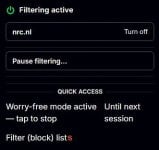
I removed Ghostery gave to much problems, so this is how new Filter (block) lists looks like in version I pushed to CWSI just found out that Ghostery ads & tracking networks blocks imgur. To be more precise, I could enter my login info, but when I clicked on sign-in, it froze, so to speak, on the login screen. I would not continue with the login. So I first unchecked the Disconnect list, but I could still not log in. After re-enabling Disconnect, I disabled Ghostery ads & tracking networks... and after that I could log in as normal.
Sorry, for that guys
Changes:
1. Removed Ghostery Filters
2. Moved Disconnect to Worry-free
Recently browsing
Members who viewed this thread in the last 5 minutes