Hot Take uBlock Stripped - Dynamic Filtering is available on the webstore

Thread details
Pushed version 9.6.9 to the Chrome Webstore

Changelog:
- users can now add the @@domainname.tld$saferegions in their allow list to exclude a domain from safe-regions protections
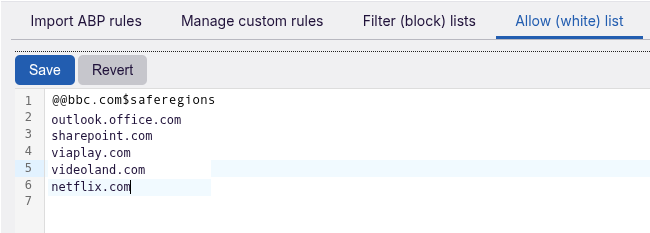
1789845584230.png


Why did I need 7 iterations for such a simple change?
- unsuccessful tried to add the safe scripts limitation on websites to prevent a website fetching (XmlHttpRequest) 3P-code and executing it as first party
in layman terms wanted to add a filter which allowed 3P-XmlHttpRequest but preventing websites to use the fetched data as first-party code.
 

Attachments
  • 1789845520182.png
    1789845520182.png
    31.7 KB · Views: 82
Last edited:
Version 9.7.0 with an extra set security protections ("advanced").

They are listed as medium risk and disabled by default in Filter (block) lists, but I have not (yet) encountered website breakage.

1789972230289.png


With all these extra security protections it is IMO impossible to get infected from something outside the "safe-regions"

As often posted using the safe regions still gives you full access to 80-90% percent of the websites of the world, while the extra security settings completely disarms malware outside the safe-regions, which reduces the attack surface by 80-90% (considering the malware distribution in the world), even when you accidentally surf to a website (first-party) outside the safe-regions.
 
Last edited:
Pushed version 9.7.1

What is changed

1. Limited clear browsing history at start (triggered by a comment made by @oldschool)
2. Changed text of "Block first-party downloads outside safe regions" to "Block script-triggered and forced downloads on websites outside the safe-regions." reason: user triggered link based downloads never enter a Chrome Sandbox because (simply) there is no sandbox for this type of actions. In simple words when the user triggers the download and the website does not touch it with javascript (e.g. redirects or changes stuff) the download is allowed.

1790140112638.png
 
Pushed version 9.7.4

What is changed
1. Icon ON green changed to mint-green and OFF has black bar to show states better (also in dark mode)
2. Added Hagezi's filter to the defaults (adds only 8 Mv3 DNR rules to the rule count when out-of-scope domains are dropped).

1790230857973.png


3. Reason Hagezi's list is DNS (host file like) blocklist and very conservative (set and forget with no home admin around needed to unblock) and for browsing news websites very effective

People using a DNS with Adblocking can disable it, people using a worry-free DNS like Quad9 or Cloudflare (with malware protection 1.1.1.2) will enjoy the added effectiveness

I played a few days with NextDNS used different privacy filters but was surprised to see how effective it was
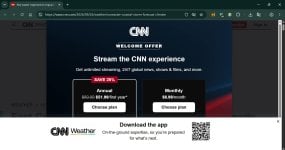
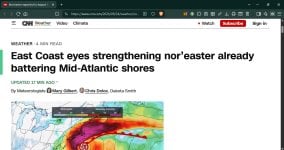
- browsed 5 Dutch websites 4 of them belonging to media groups operating in NL, BE, EI, UK, DE, DK.
- US (NY Times, CNN, NBC, Fox)
- UK (BBC, the Guardian)
- online magazines like Wired, the Verge,etc


1790230931153.png
 
Last edited:
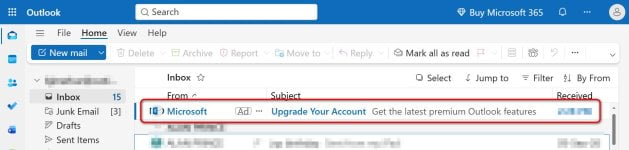
Chrome + uBO Lite Complete (all filter lists - except miscellaneous) 2026.920.1710
Brave + Brave Shields - Aggressive
Brave Outlook.jpg
--
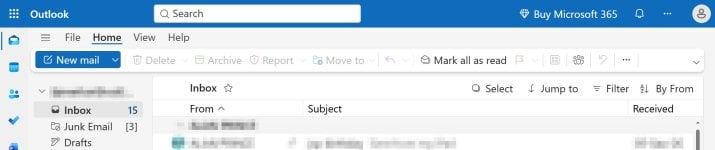
Chrome + uBlock Stripped (all boxes tic'd) 9.7.4
Chrome Outlook.jpg
 
Last edited:
Please use the Cosmetic element picker or Dynamic DNR to strip first-party stuff, that is also by design. When you don't want to use power tools (or worry-free safe surfing), then your better off with a filter list adblocker.
Chrome is not my daily rider. I usually run uBO Lite on Chrome. uBlock Stripped worry-free is enabled.
 
Last edited:
Stripped blocked that Microsoft add, did it not? The others failed to, but Stripped did? (I gotta stop saying stripped.) Stripped.
No, you don´t want your adblocker to mess around with your e-malls. Dealing with SPAM is a task of your e-mail application. Obviously a Microsoft AD in a Microsoft Application on a Microsoft website is not considered SPAM by Microsoft. This is also the reason I don't like to use webmail, but rather use an e-mail application. There is a reason Google warns for extensions with user script permissions. This example is one IMO.
 
As posted luckily not

No, you don´t want your adblocker to mess around with your e-malls. Dealing with SPAM is a task of your e-mail application. Obviously a Microsoft AD in a Microsoft Application on a Microsoft website is not considered SPAM by Microsoft. This is also the reason I don't like to use webmail, but rather use an e-mail application. There is a reason Google warns for extensions with user script permissions. This example is one IMO.
 
Last edited:

Recently browsing

Members who viewed this thread in the last 5 minutes

Back
Top