

The MalwareTips app
Your community, one tap away.
Open MalwareTips from your Home Screen or desktop. Follow discussions, find answers and pick up where you left off.
- Home Screen access
- Optional push alerts
- Your community
You're ready to explore.Explore what's new
Installation instructions
iPhone & iPad
- Open MalwareTips in Safari and tap Share. You may need to open the Page Menu first.
- Choose Add to Home Screen. If it is not listed, use Edit Actions to add it.
- Keep Open as Web App enabled if shown, then tap Add.
Android
- Open MalwareTips in Chrome or another browser that supports app installation.
- Open the browser menu and look for Install app, Install and create shortcut, or Add to Home screen.
- Choose Install and confirm. Wording varies by browser.
Desktop
- Chrome: use the install icon in the address bar, or the menu under Cast, save and share.
- Edge: open the menu, then More tools, Apps and Install this site as an app.
- Safari on Mac: choose Share or File, then Add to Dock. Firefox on Windows: look for the web apps button in the address bar.
If you cannot find an install option, update your browser or use its bookmark option to keep MalwareTips close.
Keep up with your conversations
After installation, open the app and sign in. Enable push notifications in Preferences if you want alerts. On iPhone and iPad, push requires a Home Screen web app and iOS or iPadOS 16.4 or later.
Sign in to manage notificationsInstallation is optional. Your notification settings stay under your control.
You are using an out of date browser. It may not display this or other websites correctly.
You should upgrade or use an alternative browser.
You should upgrade or use an alternative browser.
Setup Idea Ubuntu Hardening
- Thread starter Victor M
- Start date
PC Setup Ideas
67 Replies
22,756 Views
Thread details
- Last updated
- Aug 23, 2024
- Main use of this computer
- For home and private use
- Operating system
- Linux
- On-device encryption
- Other full-disk drive encryption software
- Device sign-in security
- Account password
- Security updates
- Allow security updates
- Update channels
- Allow stable updates only
- User Account Control (UAC)
- Not applicable - not running Windows
- Smart App Control
- Not applicable / not available on this device
- Network firewall
- Enabled
- Real-time protection
- clamav (linux free AV)
- Device firewall
- Built-in Firewall for Mac/Linux
- Custom security settings
- this is what the article is about
- Periodic malware scanners
- clamav
- Malware sample testing
- I do not participate in malware testing
- Environment for malware testing
- n/a
- Browsers and extensions
- firefox
- Secure DNS
- quad9
- Desktop VPN
- proton vpn free
- Password and passkey manager
- firefox built-in password manager
- File and photo backups
- deja-dup (built-in backup app)
- System recovery
- clonzilla
- Usage and exposure
- Visiting familiar websites
- Computer specs
- ASUS Vivobook 2021 model
- Recommended for
- All types of users
- All types of users

Also don't run as root. Make separate account and give least privilege. My bad if you already mentioned that.

No I didn't. Thanks for bringing that up.if you already mentioned that.
One thing to note, when you create a second account, it doesn't have rights to issue sudo commands until it is granted via visudo or adding her to the admin group. And that's a good thing, as the attacker cannot gain root privileges when he attacks anything that is run by that account.
Last edited:

Switch to Ubuntu Pro, free for 5 home devices.

 ubuntu.com
Ubuntu Pro | Ubuntu
Ubuntu Pro: security patching for 25,000+ packages, kernel Livepatch, FIPS, CIS hardening, and enterprise support.
ubuntu.com

What is the source that says Ubuntu Livepatch provides live patches prior to updates becoming available?Ubuntu hardening. Not a script. Just follow along and paste in the commands.
[...]
### Enable Ubuntu One LivePatch, which provides live patches prior to updates becoming available
sudo pro attach
To my knowledge, Ubuntu Pro offers Expanded Security Maintenance (ESM), and Live kernel updates, the Livepatch service. Livepatch patches critical and high-severity kernel vulnerabilities while the system runs, eliminating the need for unplanned reboots.
I don't have any source that says Livepatch provides live patches prior to updates becoming available.
https://ubuntu.com/pro
https://ubuntu.com/security/livepatch
Also, to my knowledge, the command to attach your Ubuntu LTS machine to an Ubuntu Pro subscription is not: sudo pro attach, but it is:
sudo pro attach [YOUR_TOKEN]
in which [YOUR_TOKEN] must be replaced with the token that is in your Ubuntu Pro dashboard.
https://ubuntu.com/pro/tutorial
That is only my guess. I should have checked before posting. My bad. I guess the benefit of LivePatch is that you maintain up-time and can patch before your regular scheduled patching. Thanks for the explanation.I don't have any source that says Livepatch provides live patches prior to updates becoming available
Doing it without the token, it displays the token to you in the terminal. And it gives you a link. You navigate to the link using your browser, copy the token displayed, and paste it into the field in that web form. Then it replies that you have subscribed. I've always done it that way.sudo pro attach [YOUR_TOKEN]
Last edited:
Ah, I understand. No problem at all.That is only my guess. I should have checked before posting. My bad. Thanks for the explanation.
Hey, that's handy. I didn't know that. Thanks for the information.Doing it without the token, it displays the token to you in the terminal. And it gives you a link. You navigate to the link using your browser, copy the token displayed token from terminal, and paste it into the field in that web form. I've always done it that way.

Nice setup, I hope more Linux topics will be added to the forum.


I'm rusty with my Linux skills (to the extent I had any), running Zorin (a fork of Ubuntu IIRC) I installed Brave browser from Zorin's software package but it doesn't automagically add Brave to firejail profile. Is there a link that explains how to use firejail, set config / profiles etc...There is a typo in the line:
sudo nano /etc/firefox-common.profile
It should be:
sudo nano /etc/firejail/firefox-common.profile
### Remove snap packages and replace it with flatpak.
short reason why -- I'm clueless...### Remove snap packages and replace it with flatpak.
Actually, you run Firejail and indirectly call Brave. As in "firejail brave" . You can try it at the terminal.but it doesn't automagically add Brave to firejail profile
All the icons are at /usr/share/applications/ in desktop files. And there would be something like 'brave.desktop' These .desktop files are text files. So you open it with nano. Then you find the line(s) inside which says "Exec=brave". And change them to "Exec=firejail brave".
A firejail profile is the compartmentalization settings for a particular program. Brave has a profile already made. All the firejail profiles are in /etc/firejail/ .
Last edited:
well, I think that's how it is supposed to work BUT I did run firejail brave in terminal and it did not happen. Unfortunately I did not keep a copy of the exact error message and I'm not running Linux today. Will update next time I run Zorin.Actually, you run Firejail and indirectly call Brave. As in "firejail brave" . You can try it at the terminal.
All the icons are at /usr/share/applications/ in desktop files. And there would be something like 'brave.desktop' These .desktop files are text files. So you open it with nano. Then you find the line(s) inside which says "Exec=brave". And change them to "Exec=firejail brave".
A firejail profile is the compartmentalization settings for a particular program. Brave has a profile already made. All the firejail profiles are in /etc/firejail/ .
There are too many reasons, but in short, Flatpak is faster in startup time, have more packages, open source, doesn't get updates automatically, comes with sandboxing enabled by default, respect user themes, in general Flatpak is better for home users, while Snap is better for servers.short reason why -- I'm clueless...

Hi @simmerskool ,
I haven't used Firejail in a long time, nor have I ever used it to sandbox Brave, but the built-in sandboxing of Brave running on Linux is quite strong. Try entering in the address bar: brave://sandbox and see what it outputs. the attached shows the sandboxing types, the strongest of which is the seccomp-BPF. If you can't get Brave firejailed successfully, you still have a strong sandbox running it on Linux.
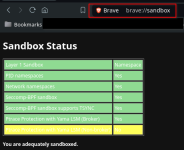
I haven't used Firejail in a long time, nor have I ever used it to sandbox Brave, but the built-in sandboxing of Brave running on Linux is quite strong. Try entering in the address bar: brave://sandbox and see what it outputs. the attached shows the sandboxing types, the strongest of which is the seccomp-BPF. If you can't get Brave firejailed successfully, you still have a strong sandbox running it on Linux.
Recently browsing
Members who viewed this thread in the last 5 minutes
You may also like...
-

-
-
 Advanced Plus Security Victor M Fedora 44 KDE Configuration
 -
 Advanced Plus Security TuxTalk - Ubuntu 26.04.1 LTS
 -