

The MalwareTips app
Your community, one tap away.
Open MalwareTips from your Home Screen or desktop. Follow discussions, find answers and pick up where you left off.
- Home Screen access
- Optional push alerts
- Your community
You're ready to explore.Explore what's new
Installation instructions
iPhone & iPad
- Open MalwareTips in Safari and tap Share. You may need to open the Page Menu first.
- Choose Add to Home Screen. If it is not listed, use Edit Actions to add it.
- Keep Open as Web App enabled if shown, then tap Add.
Android
- Open MalwareTips in Chrome or another browser that supports app installation.
- Open the browser menu and look for Install app, Install and create shortcut, or Add to Home screen.
- Choose Install and confirm. Wording varies by browser.
Desktop
- Chrome: use the install icon in the address bar, or the menu under Cast, save and share.
- Edge: open the menu, then More tools, Apps and Install this site as an app.
- Safari on Mac: choose Share or File, then Add to Dock. Firefox on Windows: look for the web apps button in the address bar.
If you cannot find an install option, update your browser or use its bookmark option to keep MalwareTips close.
Keep up with your conversations
After installation, open the app and sign in. Enable push notifications in Preferences if you want alerts. On iPhone and iPad, push requires a Home Screen web app and iOS or iPadOS 16.4 or later.
Sign in to manage notificationsInstallation is optional. Your notification settings stay under your control.
You are using an out of date browser. It may not display this or other websites correctly.
You should upgrade or use an alternative browser.
You should upgrade or use an alternative browser.
New Update Ungoogled Chromium
- H Thread starter HarborFront
- Start date
- 419 Replies
- 156,122 Views

Yes, saw that earlier today, but same error
 :
:/home/nico/ungoogled-chromium/chrome-wrapper %U
/home/nico/ungoogled-chromium/chrome: /lib/x86_64-linux-gnu/libm.so.6: version `GLIBC_2.35' not found (required by /home/nico/ungoogled-chromium/chrome)
/home/nico/ungoogled-chromium/chrome: /lib/x86_64-linux-gnu/libc.so.6: version `GLIBC_2.32' not found (required by /home/nico/ungoogled-chromium/chrome)
/home/nico/ungoogled-chromium/chrome: /lib/x86_64-linux-gnu/libc.so.6: version `GLIBC_2.33' not found (required by /home/nico/ungoogled-chromium/chrome)
/home/nico/ungoogled-chromium/chrome: /lib/x86_64-linux-gnu/libc.so.6: version `GLIBC_2.34' not found (required by /home/nico/ungoogled-chromium/chrome)
Yes, saw that earlier today, but same error
/home/nico/ungoogled-chromium/chrome-wrapper %U
/home/nico/ungoogled-chromium/chrome: /lib/x86_64-linux-gnu/libm.so.6: version `GLIBC_2.35' not found (required by /home/nico/ungoogled-chromium/chrome)
/home/nico/ungoogled-chromium/chrome: /lib/x86_64-linux-gnu/libc.so.6: version `GLIBC_2.32' not found (required by /home/nico/ungoogled-chromium/chrome)
/home/nico/ungoogled-chromium/chrome: /lib/x86_64-linux-gnu/libc.so.6: version `GLIBC_2.33' not found (required by /home/nico/ungoogled-chromium/chrome)
/home/nico/ungoogled-chromium/chrome: /lib/x86_64-linux-gnu/libc.so.6: version `GLIBC_2.34' not found (required by /home/nico/ungoogled-chromium/chrome)
If you cannot get the answer below, with your presence there, then it still cannot be resolved. Later version may solve it.
AppImage won't run anymore on Ubuntu 20.04 · Issue #4 · clickot/ungoogled-chromium-build
I'm not sure this is the right place to report this issue. I'm running the AppImage found here, previous versions of which have been running great on Ubuntu 20.04. But the version in that link won'...
 github.com
Lets hope so.Later version may solve it.
In the meantime I'm waiting for a new release from @marmaduke (from here).
I'm still using his
114.0.5735.133version.
JustInTime
Level 2
Is this build based on GitHub - ungoogled-software/ungoogled-chromium: Google Chromium, sans integration with GoogleLets hope so.
In the meantime I'm waiting for a new release from @marmaduke (from here).
I'm still using his114.0.5735.133version.
Yes, but with some differences between the Eloston and Marmaduke versions of UG. This was discussed long time back.
Can read below
Request: Please can you credit Marmaduke, the main developer of your Chromium release? · Issue #9 · portapps/ungoogled-chromium-portable
Hello @crazy-max: I salute your effort to make a portable version of Chromium. 👍 https://github.com/portapps/ungoogled-chromium-portable Please, can you credit the source of your Chromium releases ...
github.com
GitHub - mtslzr/homebrew-marmaduke-chromium: Homebrew Tap for Marmaduke Chromium builds
Homebrew Tap for Marmaduke Chromium builds. Contribute to mtslzr/homebrew-marmaduke-chromium development by creating an account on GitHub.
github.com
In short the Marmaduke version is not as 'ungoogled' as compared to Eloston version.
Last edited:

@HarborFront are you able to save selected cookies with "Sites that can always use cookies" setting? That setting isn't working here in latest version.
That setting isn't working here in latest version.@HarborFront are you able to save selected cookies with "Sites that can always use cookies" setting?
I'm using Cookie AutoDelete for cookies control so not sure
@HarborFront are you able to save selected cookies with "Sites that can always use cookies" setting?
FI, I disabled Cookie AutoDelete and I'm able to save MWT cookie using v116.0.5845.82-1 without the need to sign in.
I figured out what was happening on my end. Thanks anyway.FI, I disabled Cookie AutoDelete and I'm able to save MWT cookie using v116.0.5845.82-1 without the need to sign in.
I guess @Marmaduke's Linux builds are now deprecated:

Guess I'll now have to use these.
This means I have to upgrade my system to Linux Mint 21, because versions above 114 need a newer glibc version...
Still don't understand why Chromium's official dev. build (118.0.5968.0 atm) runs fine on Mint 21.
Guess I'll now have to use these.
This means I have to upgrade my system to Linux Mint 21, because versions above 114 need a newer glibc version...
Flatpak version is not an option here (disk space).Note that this build produces results that are currently not working with ubuntu 20.04. The reason is, that the chromium code since 114.xx needs a newer glibc version than ubuntu 20.04 (and debian bullseye) and does not compile anymore with older glibc versions. Therefore I had to switch to debian:bookworm as builder image. The build results do work e.g. on ubuntu 22.04 and higher and debian bookworm.
Those how do not want to upgrade their ubuntu 20.04 might use the flatpak version of ungoogled-chromium. Flatpaks to not rely on the glibc on the underlying system.
Still don't understand why Chromium's official dev. build (118.0.5968.0 atm) runs fine on Mint 21.
Finally @Marmaduke released a new version for GNU/Linux (116.0.5845.140).
And it's working (no glibc errors).
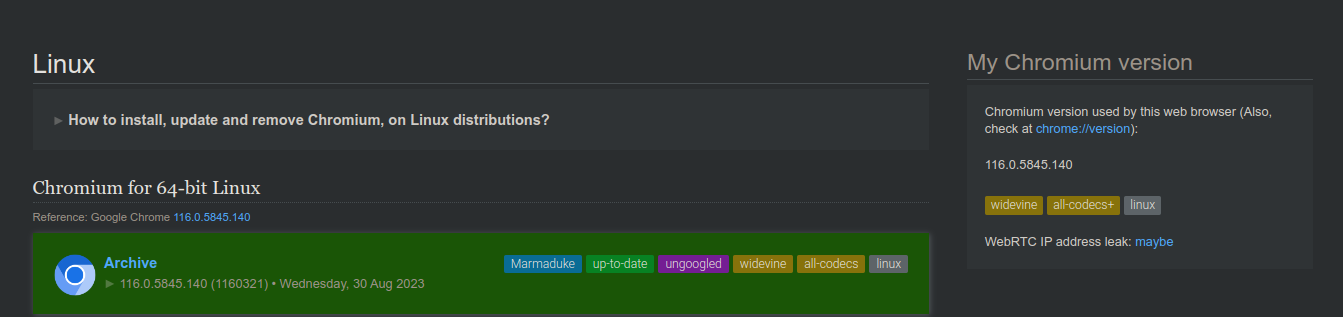
Release v116.5845.140-M116.0.5845.140-r1160321-portable-ungoogled-Lin64 · macchrome/linchrome
Note:
And it's working (no glibc errors).
Release v116.5845.140-M116.0.5845.140-r1160321-portable-ungoogled-Lin64 · macchrome/linchrome
Note:
(doesn't matter much for me, since I play videos through MPV)
- No Hardware Acceleration Video Decode (vaapi is broken)
Recently browsing
Members who viewed this thread in the last 5 minutes
You may also like...
- H
-
F
Serious Discussion Chrome vs. Chromium: Differences in Benchmarks
- Chrome & Chromium
- ForgottenSeer 116559
- · 23
-

-
 Software Review Download Sentinel Reviews
 -
 New Update Sandboxie-Plus v1.18.0 / 5.73.0 Latest